4 admin | firmware – Comtech EF Data CDM-800 User Manual
Page 74
CDM-800 Gateway Router
Revision 1
Ethernet-based Remote Product Management
MN-CDM800
5–14
5.4.4.2.4
Admin | Firmware
Chapter 4. UPDATING FIRMWARE
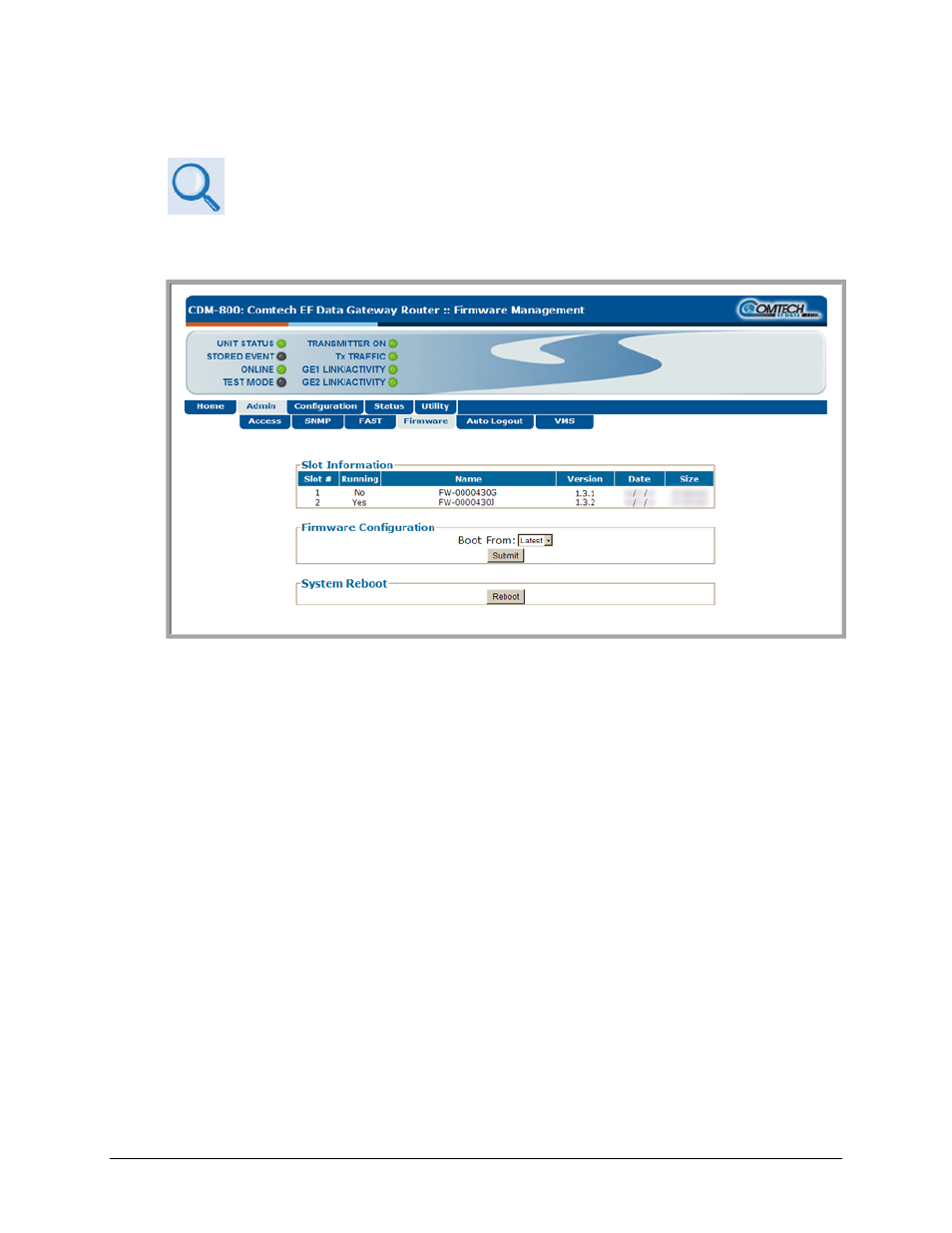
Use this page to select which image (boot Slot #) is to be designated as the active running
firmware image – i.e., the version loaded for operation upon power‐up or soft reboot.
Figure 5‐6. Admin | Firmware page
Slot Information
This read‐only status section displays operating status for the firmware versions loaded into Slot
#1 and Slot #2.
Firmware Configuration
Use the Boot From: drop‐down menu to select Latest, Slot 1, or Slot 2. The default selection is
Latest, in which the unit will automatically select the image that contains the most current
firmware.
Click [Submit] when done. Note that the Slot Information section, which in Figure 5‐6 displays
Slot #1 as the designated active running firmware image, will not update until after the unit is
rebooted.
System Reboot
Click [Reboot] to reboot the CDM‐800. Once the unit reboots, the user must log in once again to
resume use of the Web Server Interface. See the ‘Utility | Reboot’ page (Sect. 5.4.4.5.2) for full
details about the reboot process.