Ss2gd8i, Iagram, Front panel – Amer Networks SS2GD8I User Manual
Page 9
3
•
SNMP access can be disabled and prevent from unauthorized SNMP access
•
Ingress, non-unicast and egress bandwidth rating management with a resolution of 1Mbps
•
The trap event and alarm message can be sent via e-mail and mobile phone SMS
•
Diagnostics to let administrators know the hardware status
•
External loopback test to check if the link is ok
•
TFTP for firmware upgrade, system log upload and config file import/export
•
Remote boot the device through user interface and SNMP
•
Network time synchronization and daylight saving time
•
120 event log records in the main memory and displayed on the local console
1.5 SS2GD8I
Diagram
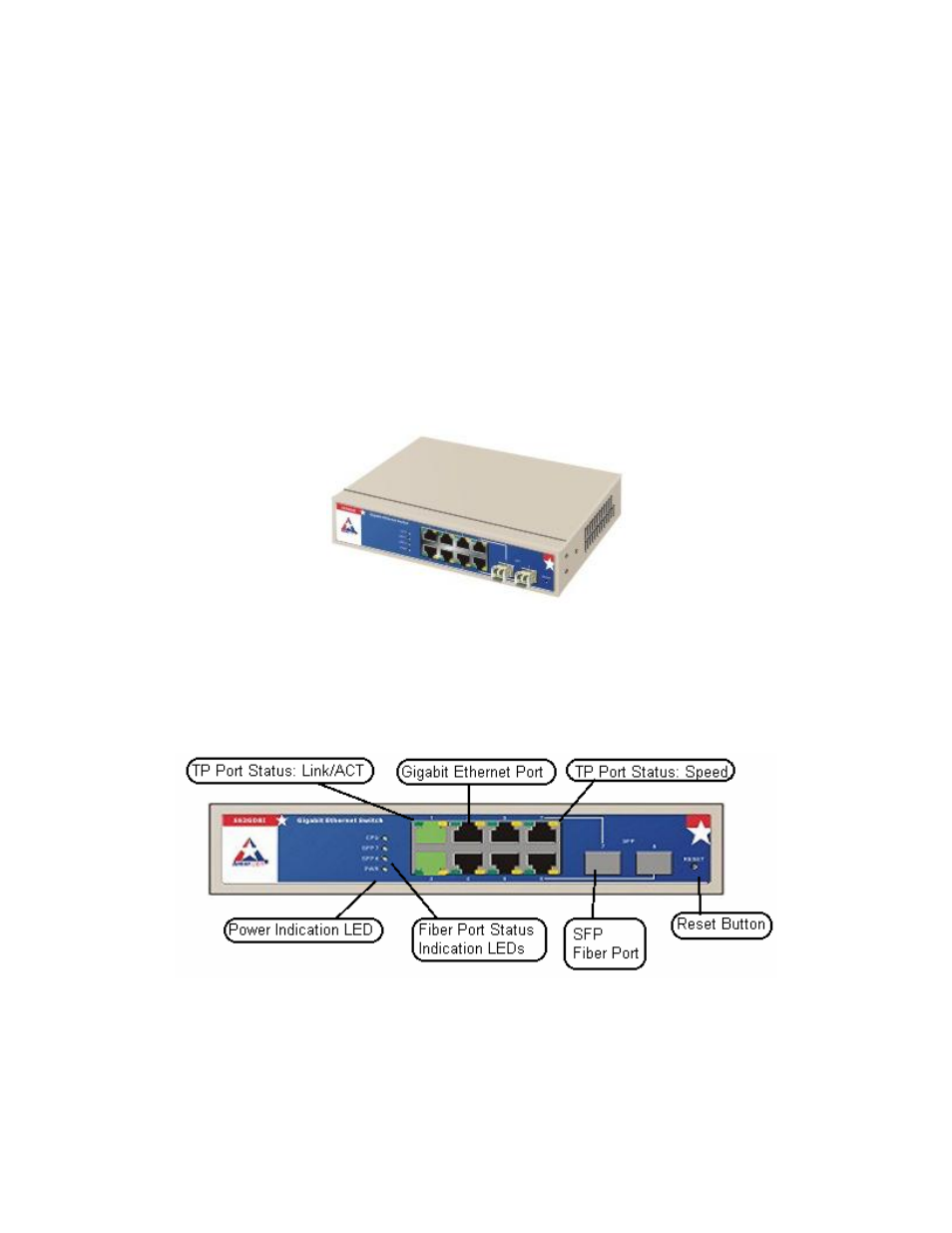
Figure 1-1: SS2GD8I
1.5.1 Front
Panel
There are 8 Gigabit Ethernet ports and 2 SFP fiber ports for optional removable transceivers on the front
of the switch. The LEDs located on the panel consists of a Power LED which indicates the power status
and LEDs for each port on the switch.
Figure 1-2: Front Panel
LED Indicators
POWER: Lights up green when switch is receiving power.
CPU: Lights up green when switch is on, flashes when CPU is working.