Network requirements, Configuration consideration, Configuration procedure – H3C Technologies H3C SecPath F1000-E User Manual
Page 106
94
Network requirements
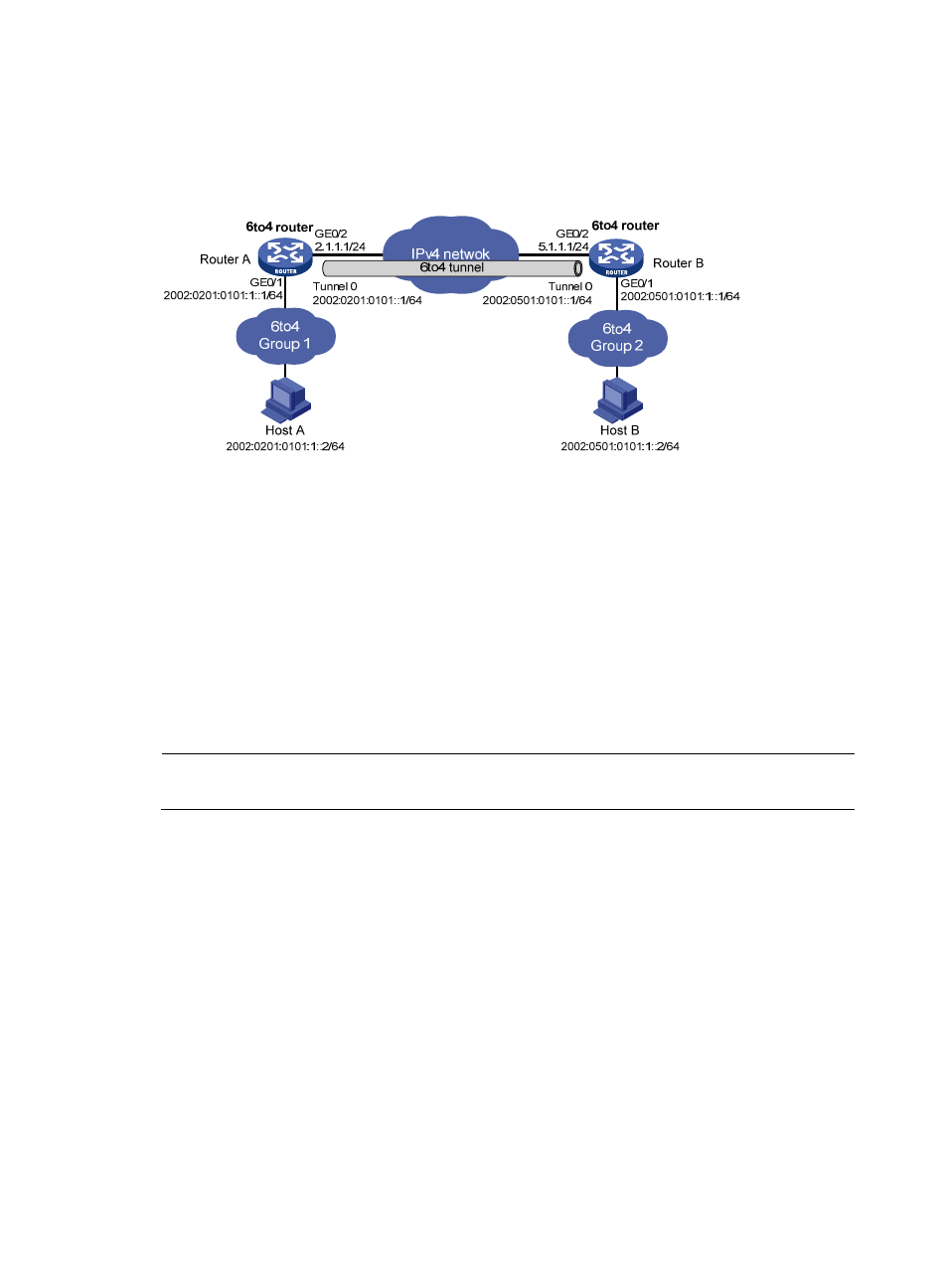
As shown in
, two 6to4 networks are connected to an IPv4 network through two 6to4 routers
(Router A and Router B). Configure a 6to4 tunnel to make Host A and Host B reachable to each other.
Figure 73 Network diagram
Configuration consideration
To enable communication between 6to4 networks, configure 6to4 addresses for 6to4 routers and hosts
in the 6to4 networks.
•
The IPv4 address of GigabitEthernet 0/2 on Router A is 2.1.1.1/24, and the corresponding 6to4
prefix is 2002:0201:0101::/48 after it is translated to an IPv6 address. Assign interface Tunnel 0 to
subnet 2002:0201:0101::/64 and GigabitEthernet 0/1 to subnet 2002:0201:0101:1::/64.
•
The IPv4 address of GigabitEthernet 0/2 on Router B is 5.1.1.1/24, and the corresponding 6to4
prefix is 2002:0501:0101::/48 after it is translated to an IPv6 address. Assign interface Tunnel 0 to
subnet 2002:0501:0101::/64 and GigabitEthernet 0/1 to subnet 2002:0501:0101:1::/64.
Configuration procedure
NOTE:
Before configuring a 6to4 tunnel, make sure that Router A and Router B are reachable to each other.
•
Configure Router A:
# Enable IPv6.
<RouterA> system-view
[RouterA] ipv6
# Configure an IPv4 address for GigabitEthernet 0/2.
[RouterA] interface GigabitEthernet 0/2
[RouterA-GigabitEthernet0/2] ip address 2.1.1.1 24
[RouterA-GigabitEthernet0/2] quit
# Configure an IPv6 address for GigabitEthernet 0/1.
[RouterA] interface GigabitEthernet 0/1
[RouterA-GigabitEthernet0/1] ipv6 address 2002:0201:0101:1::1/64
[RouterA-GigabitEthernet0/1] quit
# Configure the 6to4 tunnel.
[RouterA] interface tunnel 0
[RouterA-Tunnel0] ipv6 address 2002:201:101::1/64
- H3C SecPath F5000-A5 Firewall H3C SecPath F1000-A-EI H3C SecPath F1000-E-SI H3C SecPath F1000-S-AI H3C SecPath F5000-S Firewall H3C SecPath F5000-C Firewall H3C SecPath F100-C-SI H3C SecPath F1000-C-SI H3C SecPath F100-A-SI H3C SecBlade FW Cards H3C SecBlade FW Enhanced Cards H3C SecPath U200-A U200-M U200-S H3C SecPath U200-CA U200-CM U200-CS