Option led display, 4 option components – Yaskawa Modbus TCP/IP SI-EM3D/V User Manual
Page 14
u
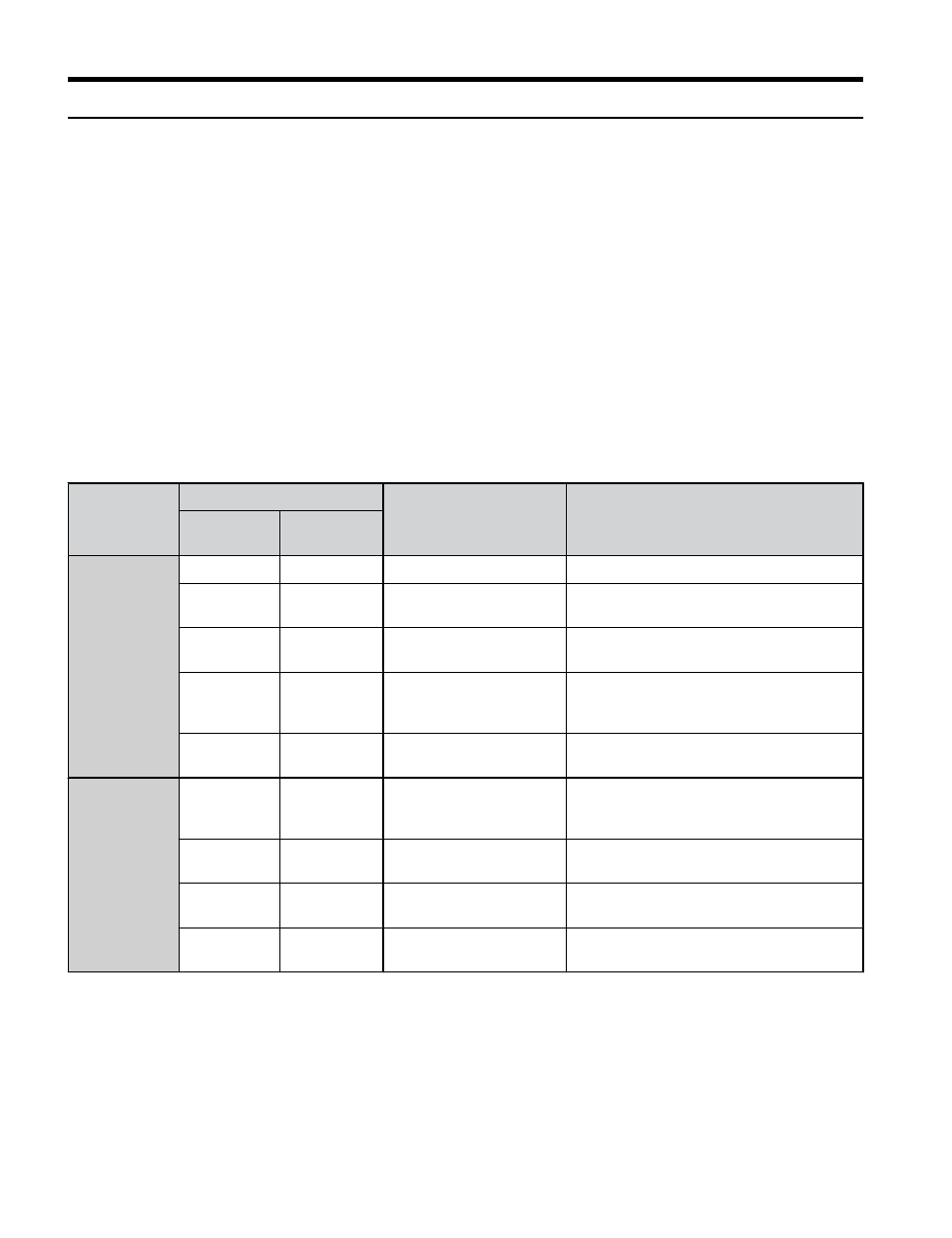
Option LED Display
The option has four LEDs.
Bi-color Status LEDs:
• Module status (MS) red/green
• Network status (NS) red/green
Ethernet LEDs:
• Network speed - 10/100 (MS) green
• Link status and network activity - LINK/ACT (NS) red/green
The operational states of the option LEDs after completion of the power-up diagnostic LED
sequence are described in
. Wait at least 2 seconds for the power-up diagnostic process
to complete before verifying LED states.
Table 3 Option LED States
Name
Display
Operating Status
Remarks
Color
Status
MS
–
OFF
Power supply OFF
Power is not being supplied to the drive.
Green
ON
Normal operation
The option is operating normally and
initialization is complete.
Green
Flashing
Standby/Initializing
The option is in process of configuring or
waiting for configuration information.
Red
Flashing
Non-fatal error occurred
The option has detected a recoverable
minor fault such as incomplete
configuration.
Red
ON
Fatal error occurred
The option has detected an unrecoverable
major fault.
NS
–
OFF
Power supply OFF or no
network connection
established.
–
Green
ON
Online communications
established
The option is online and has established
connections.
Green
Flashing
Control communications
established
The option is online with a control
connection.
Red
ON
Major fault
The option detected a duplicate IP address
or the control connection timed out.
4 Option Components
14
YASKAWA TOEP YAICOM 17A V1000 Option Dual-Port Modbus TCP/IP SI-EM3D/V Installation Manual