Exposure bracketing – LEICA M11 Monochrom Rangefinder Camera User Manual
Page 119
PHOTOGRAPHY ▸ SHOOTING MODES
119
EXPOSURE BRACKETING
Many attractive objects are rich in contrast, which means they have
very bright and very dark areas. The image effect can be dramatical-
ly different, depending on which of these areas you choose to align
your exposure with. The automatic bracketing function in aperture
priority mode allows you to produce several alternatives with grad-
uated exposure values and varying shutter speeds. You can then
select the image you like best or use relevant photo editing software
to calculate an image with a particularly broad contrast spectrum
(HDR).
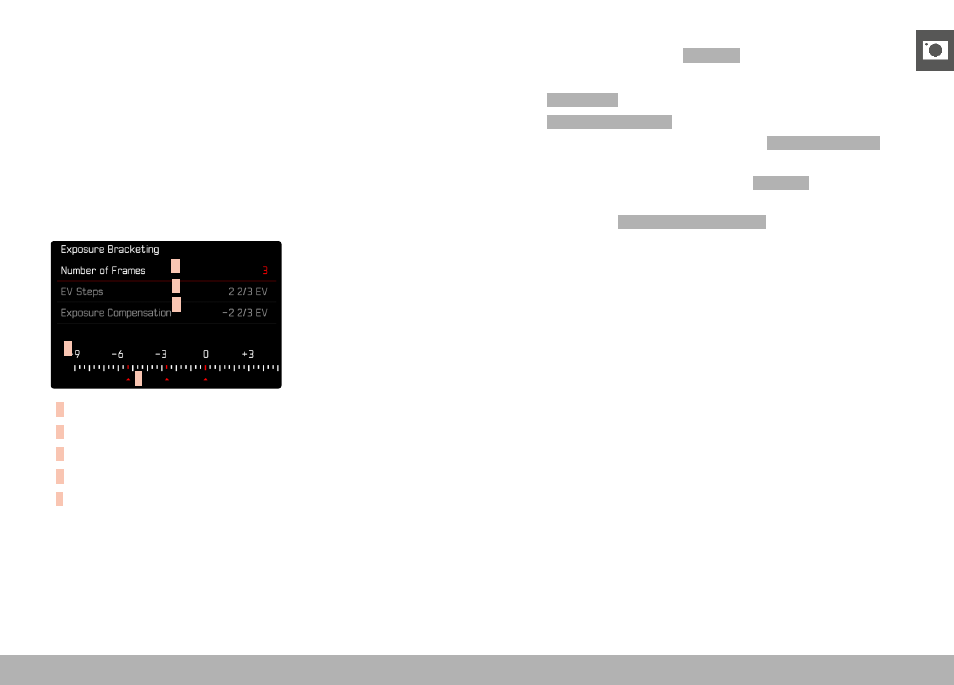
A
B
C
D
E
A
Number of frames
B
Exposure difference between shots
C
Exposure compensation
D
Light value scale
E
Exposure values of the images marked in red
(The scale will be offset by the relevant value if exposure com-
pensation is set concurrently.)
You can select the desired number of frames (3 or 5). The exposure
difference, which can be set via
EV Steps
, can be up to 3 EV.
▸
Select
Drive Mode
in the main menu
▸
Select
Exposure Bracketing
▸
Select the desired number of frames under
Number of Frames
in
the submenu
▸
Select the desired exposure offset under
EV steps
in the sub-
menu
▸
Select the desired
Exposure Compensation
value in the submenu
• The marked exposure values change positions according to the
settings selected. In the case of exposure compensation, the
scale also shifts.
• The selected exposure compensation value will be applied to
the entire series of shots.
▸
Shutter release