Mute button, Power on/off button, Display button – APC Power-Saving Back-UPS Pro 1500 International Version (230V) User Manual
Page 4: Display interface, Input voltage, Output voltage, Front panel buttons and display interface
Back-UPS Pro 1200 & 1500 230 V Installation and Operation
4
Front Panel Buttons and Display Interface
Use the three buttons on the front panel of the Back-UPS and the display interface to configure the Back-UPS.
Front panel
Mute button
Power On/Off button
Display button
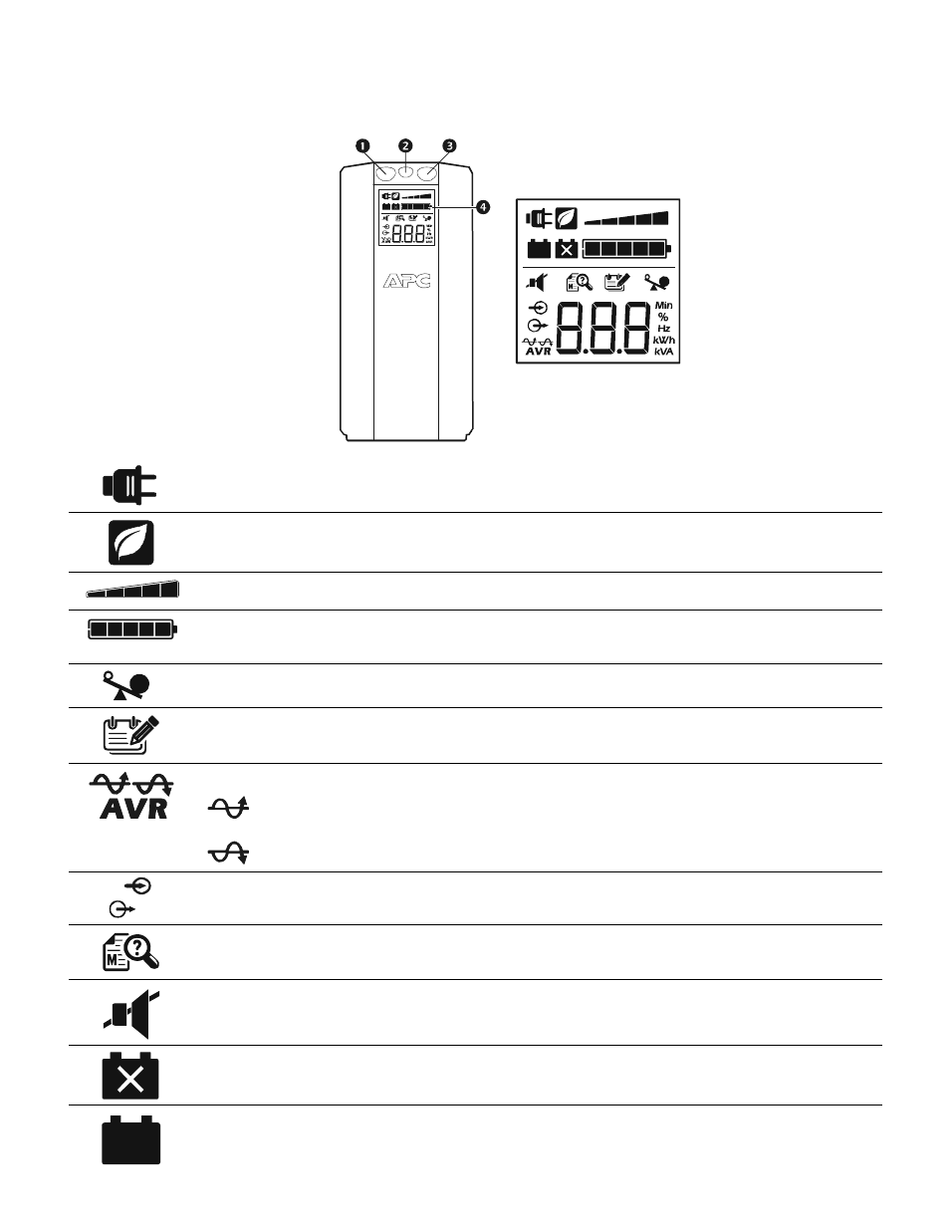
Display interface
On Line—
The Back-UPS is supplying conditioned utility power to connected equipment
Power-Saving—
Master and Controlled outlets are enabled, saving power when the master device goes into
sleep or standby mode
Load Capacity—
The load is indicated by the number of sections illuminated, one to five. Each bar represents
20% of the load.
Battery Charge—
The battery charge level is indicated by the number of sections illuminated. When all five
blocks are illuminated, the Back-UPS is at full charge. When one block is filled, the Back-UPS is near the end of
its battery capacity, the indicator will flash and the Back-UPS will beep continuously.
Overload—
The power demand from the load has exceeded the capacity of the Back-UPS.
Event—
The event counter shows the number of events that occurred that caused the Back-UPS to switch to
on-battery operation.
Automatic Voltage Regulation
—The Back-UPS can compensate for high or low input voltage.
When illuminated, the Back-UPS is compensating for low input voltage.
When illuminated, the Back-UPS is compensating for high input voltage.
Input voltage.
Output voltage.
System Faults—
The system has a fault. The fault number will illuminate on the display interface. See “System
Faults” on page 5.
Mute—
If the line through the speaker icon is illuminated, the audible alarm has been turned off.
Replace Battery—
The battery is not connected or is nearing the end of its useful life. Replace the battery.
On Battery—
The Back-UPS is supplying battery backup power to the connected equipment, it will beep four
times every 30 seconds.
b
u04
4a
bu
002
a