Configuration basics – ARRIS WTM552 User Guide User Manual
Page 27
Touchstone® WTM552 Telephony Modem User’s Guide
27
Getting
Battery
Wireless
Ethernet
Configuration Basics
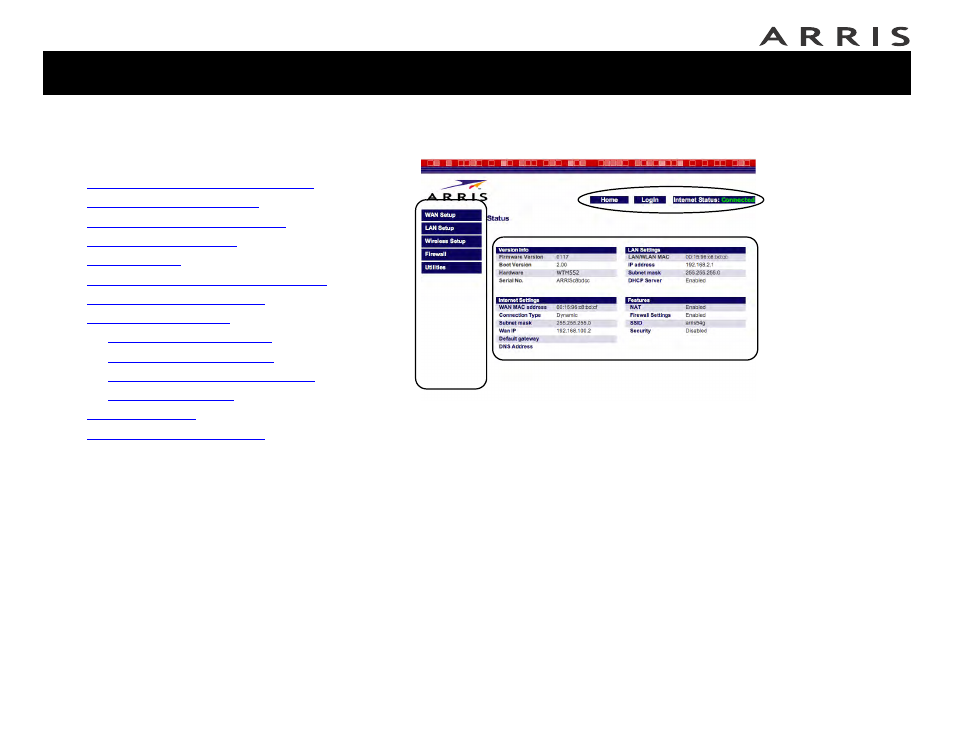
The WTM552 uses a web-based interface to configure wireless settings. The follow-
ing screen shows the various components of the interface.
1 Access bar: Shows the WTM552 connection status and provides the follow-
ing links:
— Home — returns to the Status page (shown above) from any screen.
— Help — displays help for the current screen.
— Login/Logout — allows access to screens other than the Status screen.
2 Navigation menu: Select any of the items in this list to display an associ-
ated submenu. Selecting submenu items displays the associated screen. If
you are not logged in, the WTM552 displays the login screen before allowing
you to proceed.
3 Display area: Enter or view configuration information in this area. A ? link
may be available to explain the purpose of the screen or individual items on
the screen.
➀
➁
➂
Jump directly to one of the following topics:
•
Configuration Basics
•
Accessing the Configuration Interface
•
•
Setting Up Your WAN Connection
•
•
•
Configuring the LAN Channel and Name
•
•
—
—
—
Configuring MAC Address Filtering
—
•
•