5 configuration | routing | routes – Comtech EF Data CDD-880 User Manual
Page 86
CDD-880 Multi Receiver Router
Revision 1
Ethernet-based Remote Product Management
MN-CDD880
5–26
• Index (read‐only) – This is the automatically assigned internal table index number.
• IP – Entry IP Address, format XXX.XXX.XXX.XXX.
• MAC – Entry MAC Address, format YY:YY:YY:YY:YY.
• Type (read‐only) – The entry Type is identifiable as Static or Dynamic and cannot be edited.
Make the desired IP and MAC Address edits. Click [Submit Changes] to save.
5.4.4.3.5
Configuration | Routing | Routes
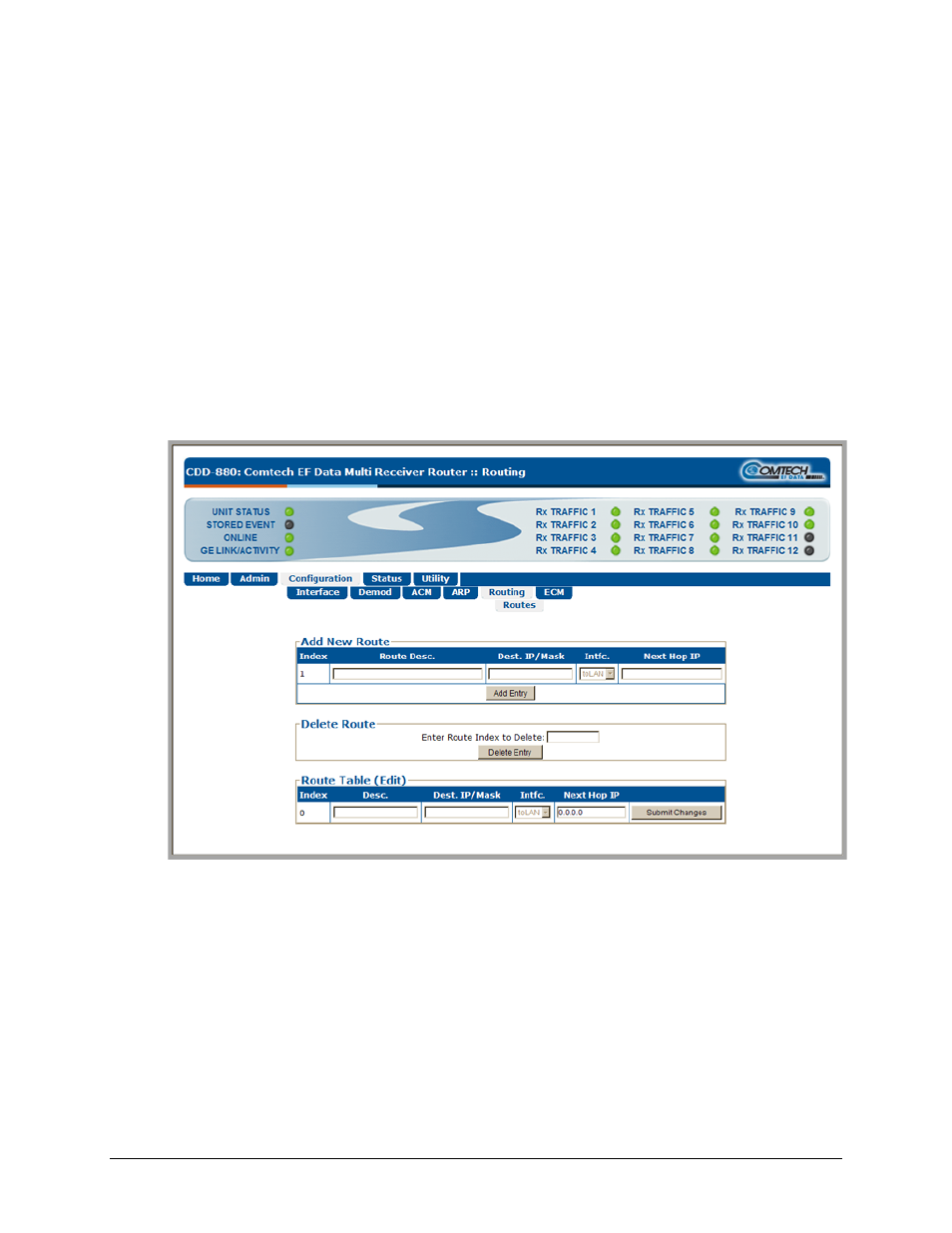
Use this page to enter static routes for IP traffic over the satellite or to another device on the
LAN.
Figure 5‐14. Configuration | Routing | Routes page
Add New Route
Use this section to directly add a Route Table entry. From left to right:
• Index (read‐only) – This is the automatically assigned internal table index number.
• Description –This label helps to maintain the network. The name entered in this text box
must be unique and cannot contain any whitespace.
• Dest. IP/Mask – Enter a Destination IP Address/Mask in the form XXX.XXX.XXX.XXX/YY.