Rs-232 communication, Figure 15: rs-232 communication layout, 5 rs-232 communication – Daktronics AF-3400-12-RGB User Manual
Page 26
•
Refer to the software manual for other possible conditions.
4.5 RS-232
Communication
If the communication system is RS-232, look for:
• no indoor connectors.
• one enclosure at the display.
This communication type is designed to work over short distances and typically connects to
an indoor display.
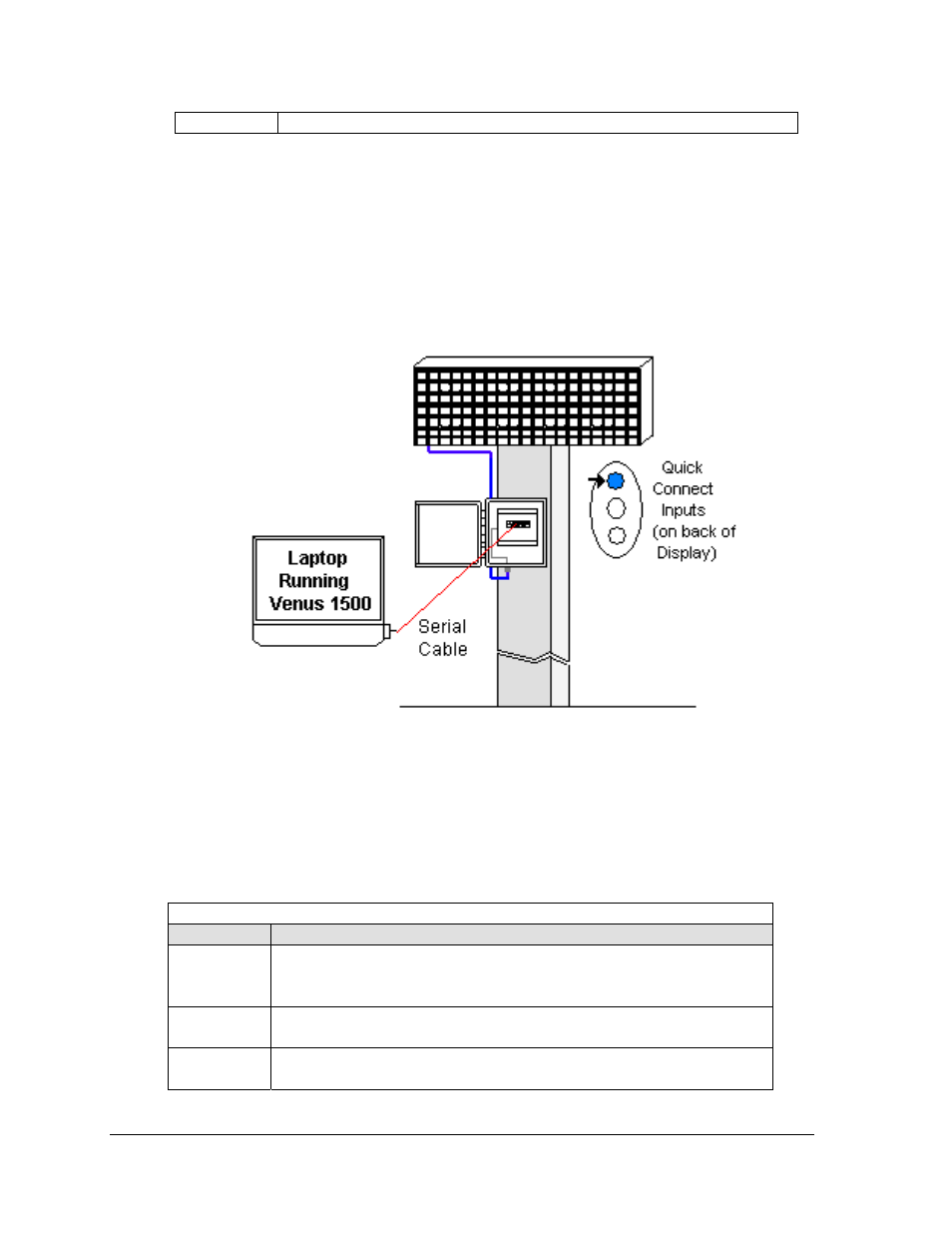
Figure 15: RS-232 Communication Layout
Connections
• Computer to display enclosure − six-foot serial cable with 9-pin plug into laptop
computer or USB connector and a 25-pin jack into enclosure.
• Enclosure to display − quick-connect cable (maximum 25 feet) from back of enclosure to
top jack on back of display.
Troubleshooting
Component Check
Cable
Connections
•
The serial cable is connected from the laptop to the enclosure.
•
The cable is connected from the enclosure to the top jack on the back of
the display.
Display
Power
•
The display is either running a message or showing a single pixel flashing
in the bottom right corner of the display when power is on.
Software
•
The software and the display are set for the same network address.
•
Refer to software manual for other possible conditions.
Signal Overview
20