Description, Setting the format – MBM Corporation 352S User Manual
Page 15
Operator's Manual
multipli 35
Friction Feeder F35
18
Mathias Bäuerle GmbH
Description
1
2
3
4
1
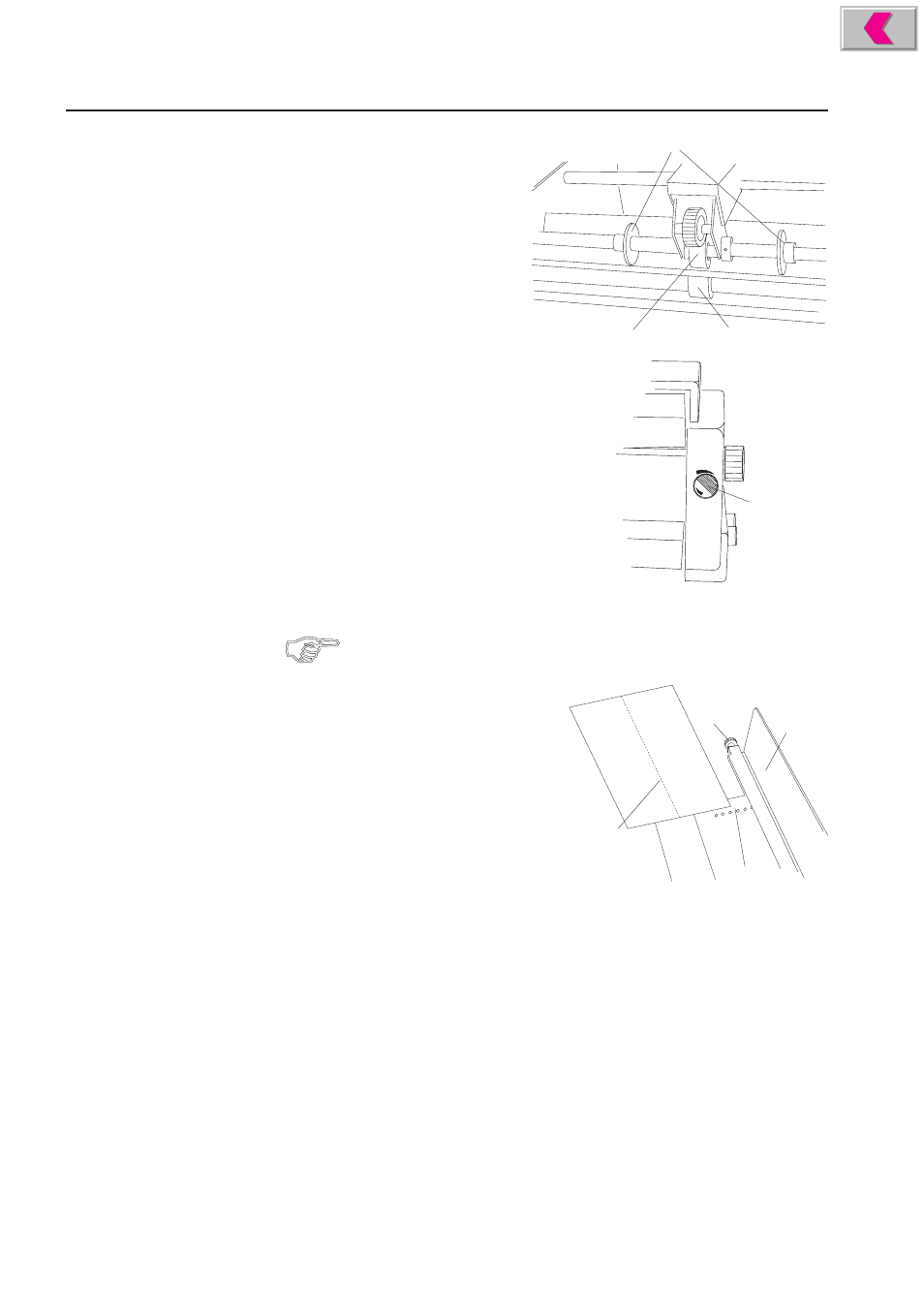
Feed roller
2
Pressure roller
3
Hold-down disks
4
Paper thickness setting disk
Setting the Format
When setting the format, care should be taken that the sheets are fed
approximately from the center.
•
Loosen the knurled nut (5) at the two
feed guides by turning it counter-
clockwise.
•
Set both feed guides roughly to the
desired format.
•
Manually fold a sample sheet length-
wise down the middle (7).
•
Place the sample sheet (7) on the feed
table in such a way that the fold is
located roughly near the center of the feed roller.
•
Place the left feed guide (6) against the sheet, using the locating holes (8) as
a guide.
•
Tighten the knurled nut (5) of the left feed guide.
•
Slide the right feed guide against the edge of the sheet without actually touching
it, leaving a gap of approx. 0.5 mm.
•
Tighten the knurled nut of the right feed guide.
•
Displace the hold-down disks (3) in such a way that they serve as guides about
2 - 3 cm from the edge of the sheet.
5
6
7
8