Recording durations when using microsd cards, Connecting with a computer – Teac DR-10X User Manual
Page 13
TASCAM DR-10X
13
Recording durations when using
microSD cards
The table below shows maximum recording times
on microSD/microSDHC cards of different capacities.
microSD/
microSDHC
card capacity
(hours:minutes)
24-bit/48kHz mono WAV
recording setting
DUAL REC
MODE off
DUAL REC
MODE on
1GB
2:04
1:02
2GB
4:08
2:04
4 GB
8:16
4:08
8GB
16:32
8:16
•
The recording times shown above are estimates.
They might differ depending on the microSD/
microSDHC card in use.
•
The recording times shown above are not
continuous recording times, but rather they
are the total possible recording times for the
microSD/microSDHC card.
Connecting with a computer
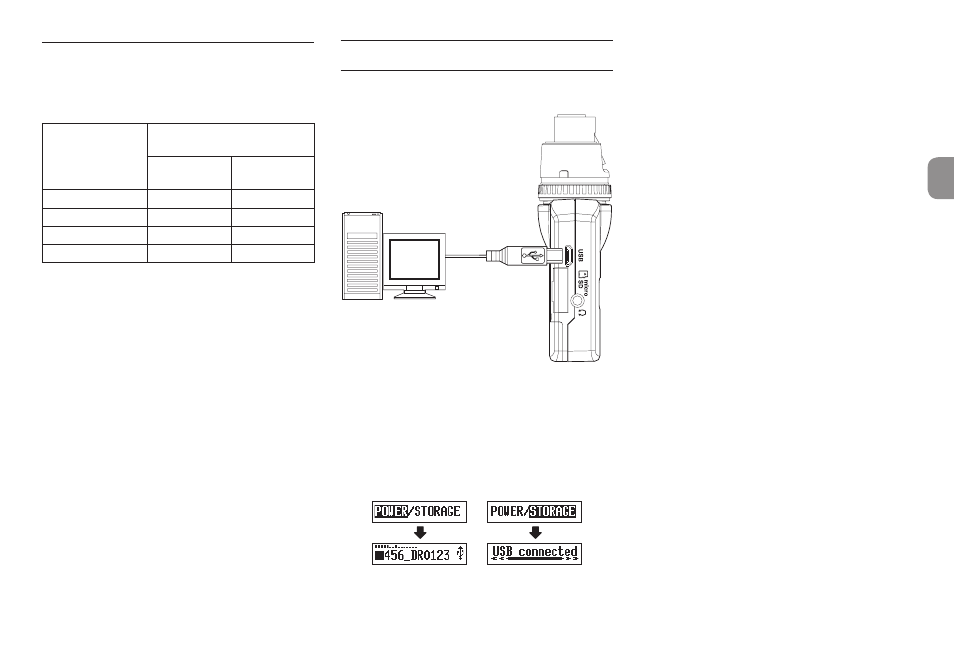
Connect the unit to a computer using the included
USB cable as shown in the illustration.
Computer
microB
USB cable
Whether the power is on or off, when connected, the
POWER/STORAGE
screen appears to allow selection
of bus power supply or USB connection with the
computer.
Use the . [j] and / [k] buttons to select
(highlight) the
POWER
or
STORAGE
item at the
bottom of the display, and press the 7’9 [ENTER]
button.
•
If
POWER
is selected, power will be supplied from
the USB port and the Home Screen will open.
•
If
STORAGE
is selected,
USB connected
will
appear on the display after the unit connects to
the computer without any problems.
The unit will be shown on the computer as a USB
device named “DR-10”.
Double-click the “DR-10” drive to open it and
show a list of the recording files, so you can
retrieve the desired files.