Teac GigaStudio 4 User Manual
Page 75
GigaStudio 4 Reference Manual
75
Keyboard Color-Coding
•
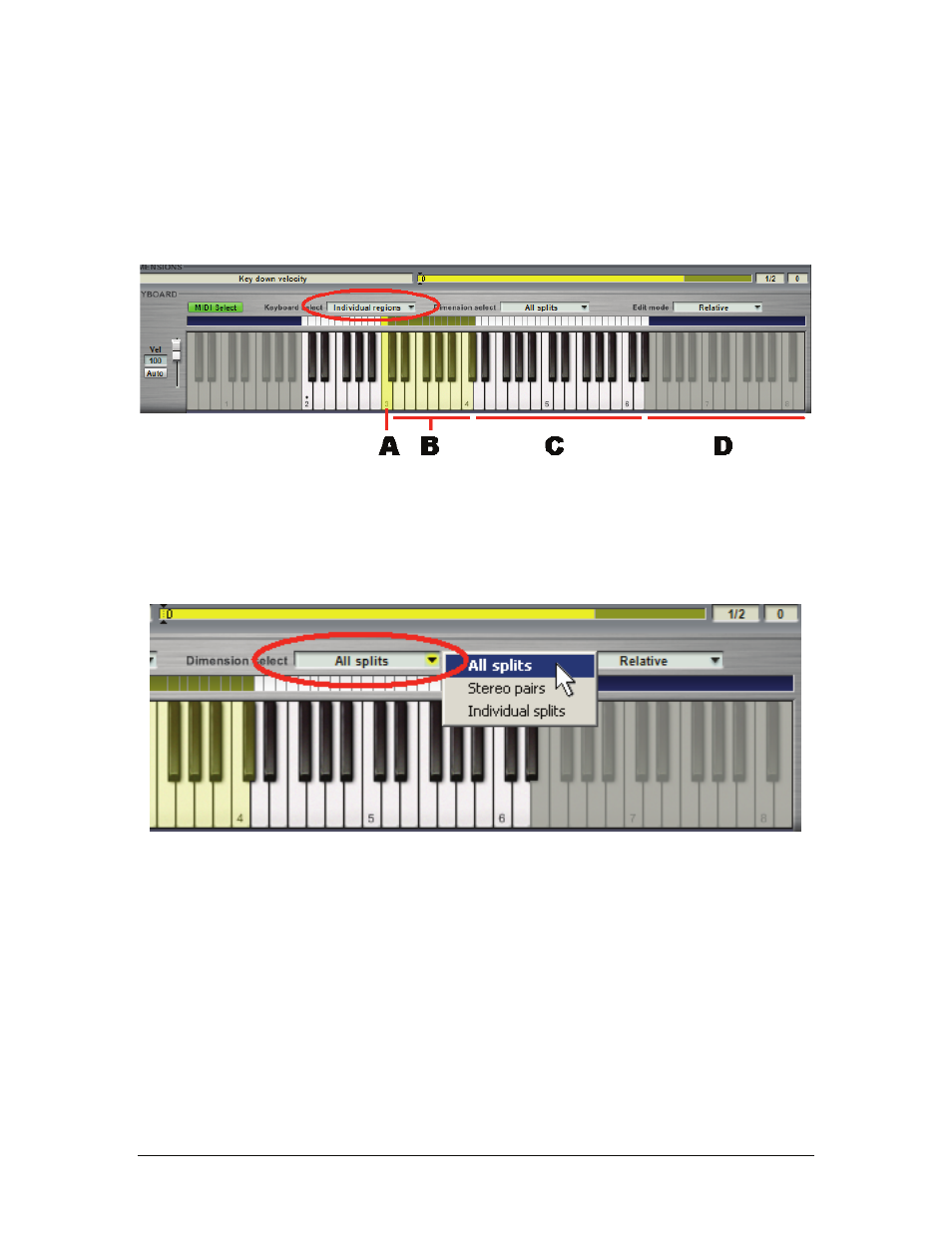
(A) Bright yellow keys indicate the region with the focus, i.e., the region whose parameters are being
displayed in the articulation section above the keyboard.
•
(B) Dim yellow keys indicate selected regions other than the focus to which edits nonetheless will be
applied.
•
(C)White keys are active parts of an instrument’s range, but not part of a selection.
•
(D) Gray keys are unassigned.
Dimension Select Drop-Down Menu
Each note region of an instruments is divided into a number of dimension splits, such as L/R for stereo files,
multiple velocities, Round Robin, etc. Edits applied to an instrument’s dimension splits can either apply to all
region splits simultaneously or on an individual, split-by-split basis. To make a choice, click the Dimension
select option and choose among All splits, Stereo pairs, or Individual splits.
All splits:
Selects all dimension splits associated with specified regions
Stereo pairs:
Groups L/R stereo dimension splits while allowing other individual dimension selections
Individual splits:
Allows for individual selection of all dimensions, including L/R stereo dimensions