3 mounting a lens – Grass Valley LDK 500 User Manual
Page 16
Installation | Mounting a lens
2-3
2.3
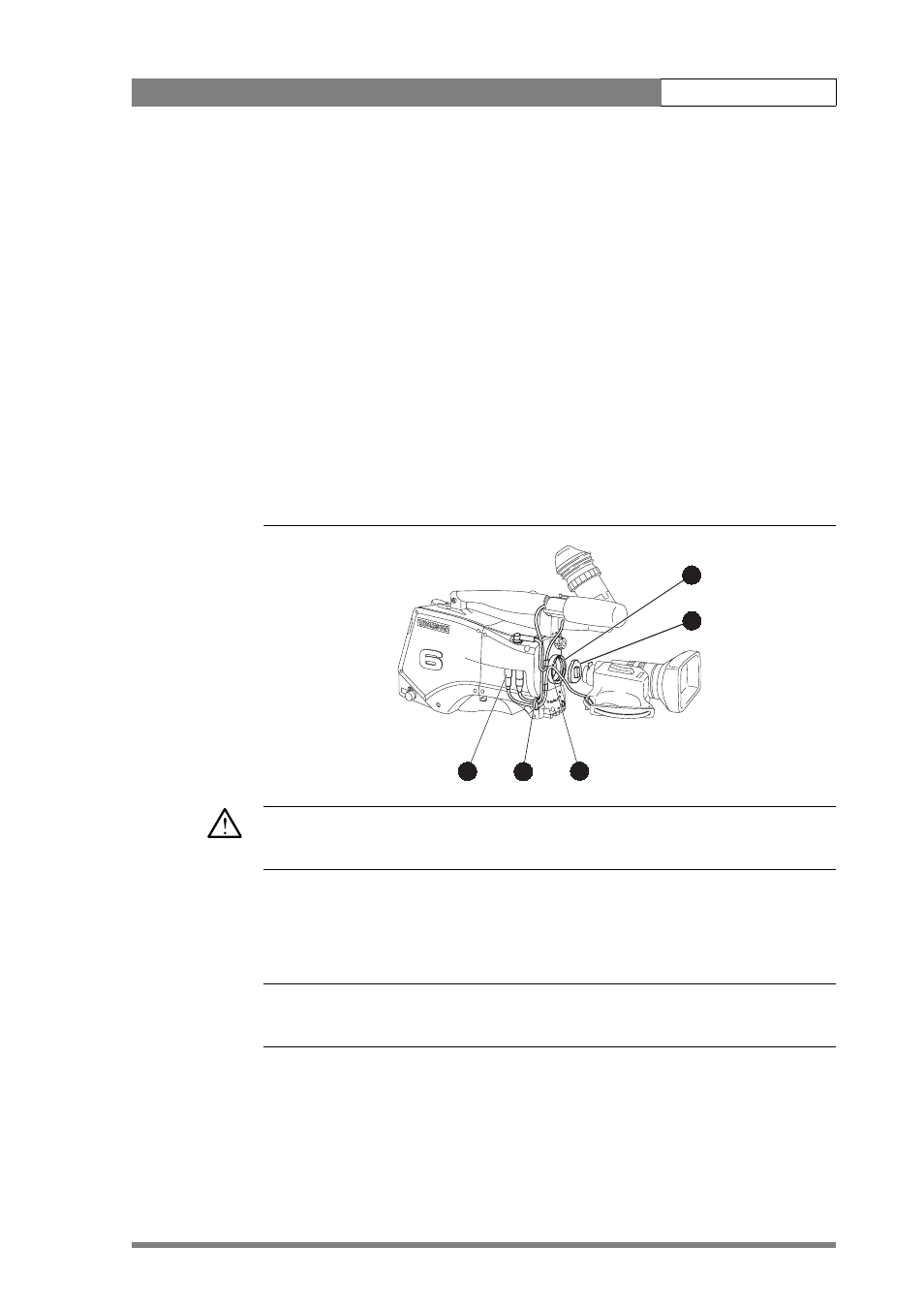
Mounting a lens
To attach a lens to the camera head proceed as follows:
1.
Ensure that the lens locking ring (1) is in the unlocked position - turned
counterclockwise.
2.
Remove the dust protection cap (2).
3.
Slot the lens into the lens mount (3).
4.
Turn the lens locking ring (1) clockwise to lock the lens in place.
5.
Connect the lens cable to the lens connector (4) at the right side of the
camera.
6.
Place the lens cable into the bottom clip at the front of the camera and clip (5)
located at the side. (Pull and twist clip to open it.)
Figure 2-2. Lens mounting
Caution
Do not attach a lens weighing more than 5 kg to the camera without a support.
When a new lens is fitted to the camera it may be necessary to carry out some
adjustments to optimize its use, for example, back focus or shading. For more
information about these adjustments refer to the lens manufacturer’s documentation
☞
Note
Always mount the dust protection cap when the lens is not connected to the camera.
bts1009
4
5
3
2
1