Rugged Cams Vertex & Vertex RTH User Manual
Page 31
30
①
In Playback mode, the user can play back video contents using the functions below.
②
After the data is played to the end, the data of the next time zone will be automatically
searched and played (this function is possible only in Multi-channel Playback mode;
both backward playback and forward playback are possible).
③
Using the Up/Down button, the user can adjust the playback speed between (ⅹ1/29)
and (ⅹ29) and fast forward or rewind at a speed between (x30) and (x300).
※
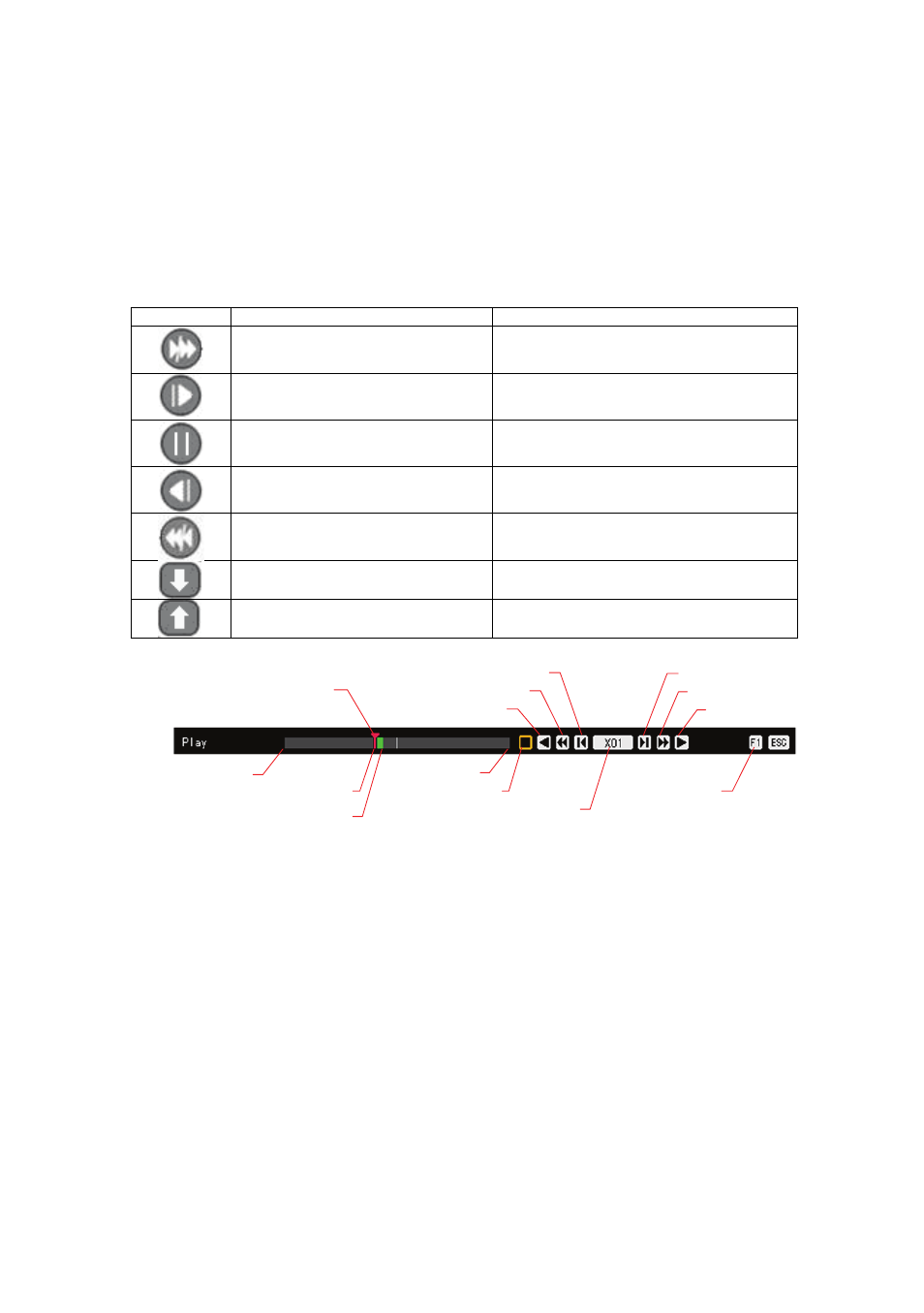
Description of the Search Buttons
Button Name
Features
Forward playback/Fast
forward
Playback forward (ⅹ1)/
Fast forward (ⅹ30)
Forward Frame by Frame
Frame-by-frame playback
Pause
Pause
Reverse frame by frame
Reverse playback frame by frame
Reverse playback/Fast
reverse
Playback in reverse (ⅹ1)/
Rewind (ⅹ30)
Speed Down
Decreases the playback speed
Speed Up
Increases the playback speed
0 min
currently displayed video’s position
Go to video of desired minute
by moving the red-arrow
Recorded video exists up to this minute
Play speed control
Step backward
Fast backward
Backward play
Pause
60 min
Step forward
Fast forward
Forward play
Hide menu bar
[Figure 4-9. Playback Status and Control Window]
4-8-7 Playback on a divided screen
①
In Playback mode, the user can split the screen as in the monitoring mode.
4-8-8 Audio Playback
①
In Playback mode, select {Playback Menu} {Audio}.
②
Select an audio channel for playback using the arrow keys and the Select button.
4-8-9 Event Playback
This feature finds and plays specific events only in the recorded data.