Native Instruments MASCHINE MK3 Groove Production Studio (Black) User Manual
Page 142
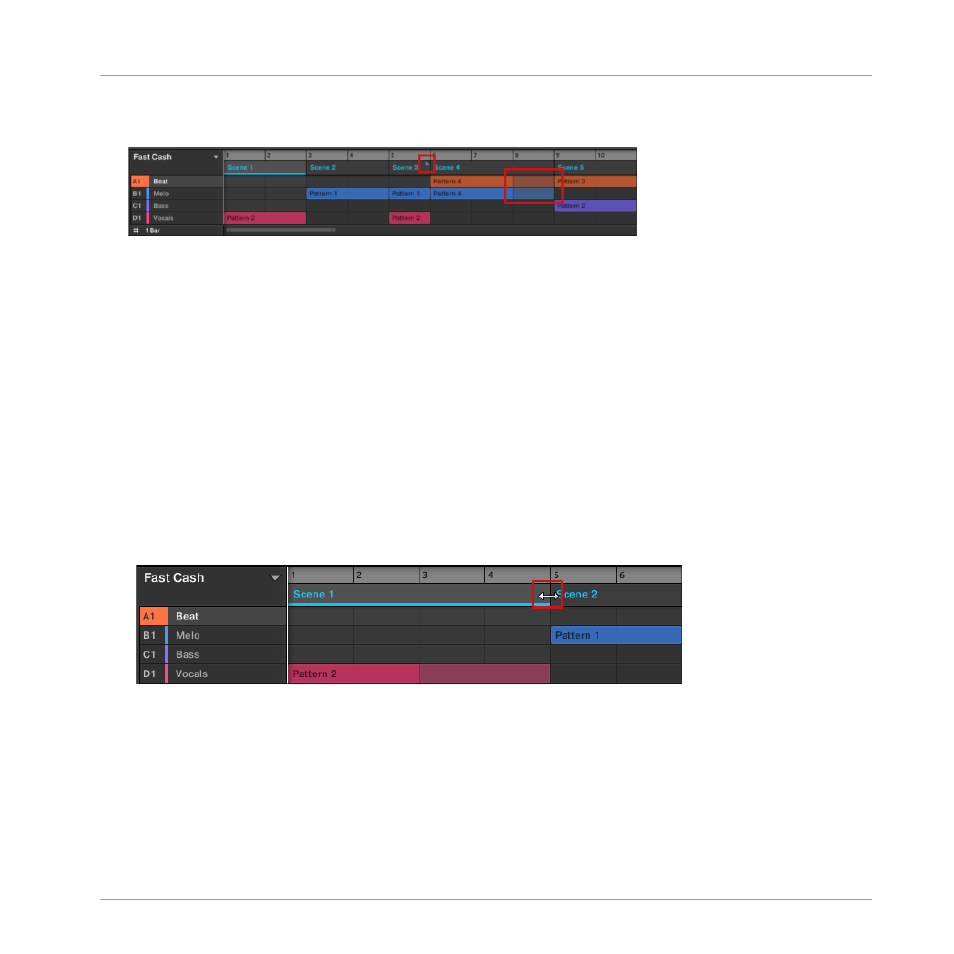
ranger, and a Truncated Pattern marker will appear on the right-hand side of the Section to
indicate that a section of the Pattern is hidden:
▪
If a Section has been manually shortened, only the visible part of the Pattern within the set
length will be audible.
▪
Scenes always start at the beginning of the Section.
10.2.1.1 Adjusting the Length of a Section Using the Software
Variable Section length allows you to lengthen or shorten a Scene without altering the refer-
enced Patterns. This is particularly useful as it avoids the need to create a new version of a
Scene when you only want to extend or truncate a Scene to make it fit an arrangement.
When the right end marker of a Section is extended beyond the length of a Scene, the refer-
enced Patterns are repeated. When the right end marker of a Section is dragged so it is shorter
than the referenced Scene, only the part visible part of the Patterns are audible.
To lengthen a Section:
►
Click and drag the end marker of the Section to the right.
→
The Scene will be repeated if the adjustment is longer than the referenced Pattern.
To shorten a Section:
Creating an Arrangement
Managing Sections
MASCHINE - Getting Started - 142