Front panel control & lcd – Key Digital 4x4 UHD 4K Multiview Presentation Matrix Switcher User Manual
Page 17
521 East 3
rd
Street Mt. Vernon, NY 10553 • www.keydigital.com
Rev 1.2
– Apr, 2022
17
Front Panel Control & LCD
•
Switching / Multi-view select:
HDMI Video & Audio
1. Video button (section A)
2. Output button (section B)
3. Input button (full screen) or MultiView button (section C)
•
Matrix Switching:
External Audio only
1. Audio button (section A)
2. Output button (section B)
3. Input button (section C)
•
Choose multi-view layout for all multi-view zones
1. 4K MultiView Mode button (section D)
•
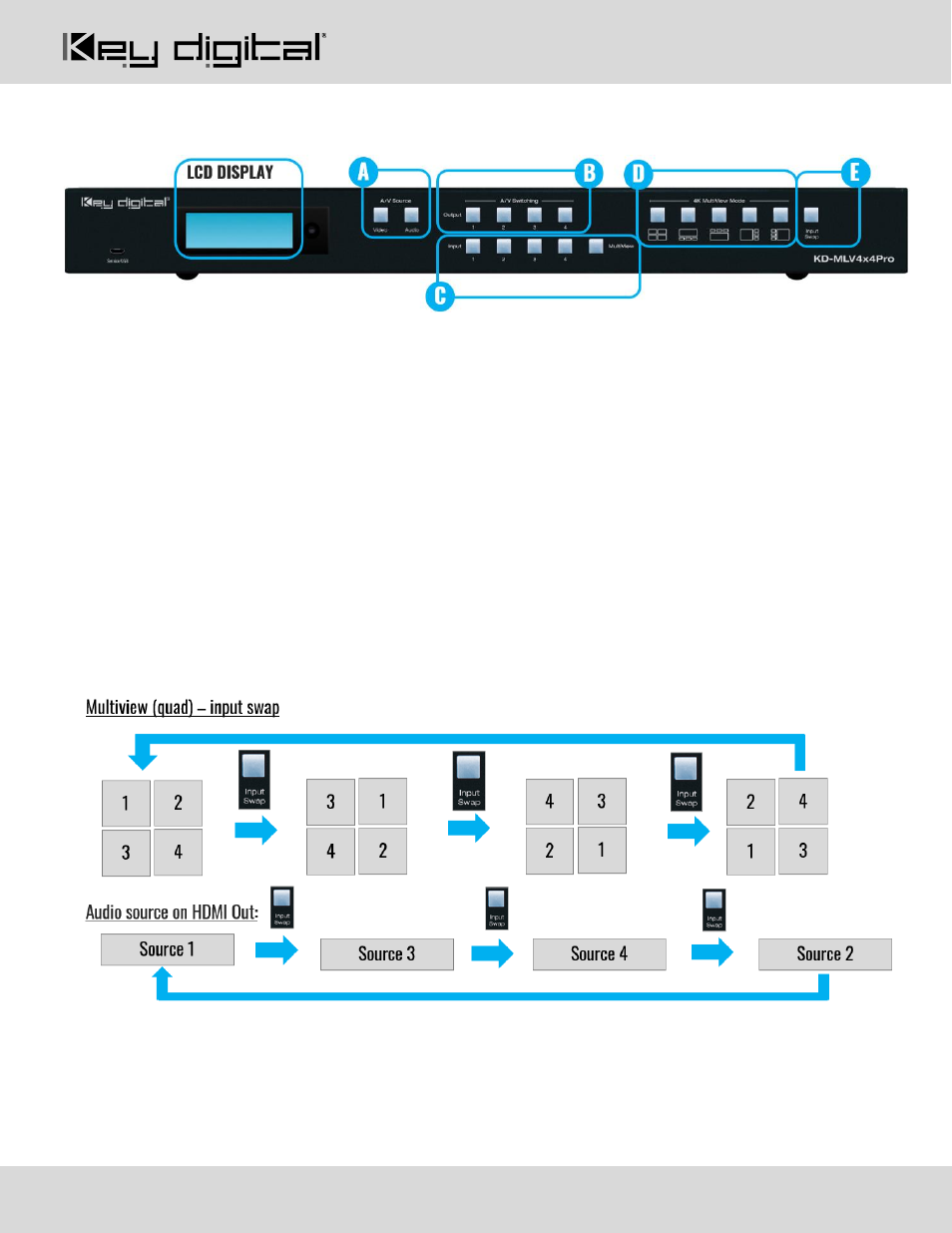
The Input Swap button
(section E) rotates souce positioning when in a multi-view layout.
o
When in quad layout, the HDMI audio will be of the source in the top-left position
o
When in multi-view layout, the HDMI audio will be of the source in the large/primary position
o
External audio does not automatically follow the HDMI audio. It must be switched independently.
o
Sources rotate clockwise as pictured: