Ir remote control – Key Digital 4x4 UHD 4K Multiview Presentation Matrix Switcher User Manual
Page 19
521 East 3
rd
Street Mt. Vernon, NY 10553 • www.keydigital.com
Rev 1.2
– Apr, 2022
19
Factory Default Reset via Front Buttons:
Simultaneously press & hold the Video and Input Swap buttons for
10 seconds to reset KD-MLV4x4Pro to its factory settings:
•
All outputs select source 1
•
EDID setting 5 is applied at all HDMI inputs
•
IP Address, input & output naming, and all other applied settings are defaulted
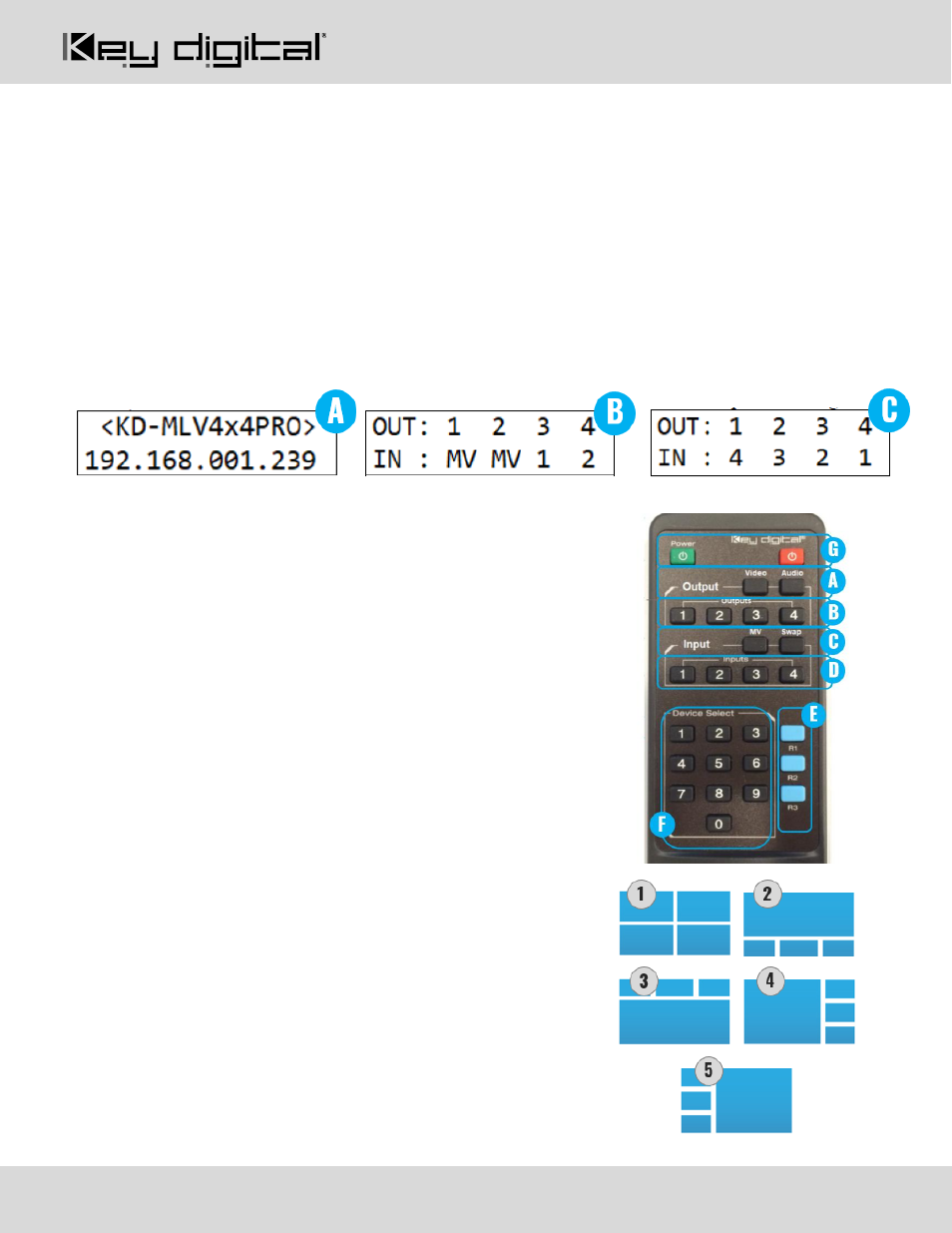
LCD Display
A.
During bootup, the model number and unit’s IP address are shown
B. During Switching / Multi-
View select for video, the selected source number or “MV” is shown for each
output
C. During Switching for audio, the selected source number is shown for each output
IR Remote Control
•
Switching HDMI AV + External Audio
together
1. R1 button (section E)
2. Output button (section B)
3. Input button (section D)
•
Select multi-view layout
for all multi-view zones
1. R1 button (section E)
2. Layout 1-9, using Device Select buttons (section F)
▪
1-5 = same as layouts 1-5 on front panel and
pictured below
▪
6-9 = custom layouts
•
Audio Selection in Multi-View mode
1. Audio button (section A)
2. MV button (section C)
3. Input button (section D)
•
Switching / Multi-view select:
HDMI AV only
1. Video button (section A)
2. Output button (section B)
3. Input button (section D) or MV (section C)
•
Switching:
External Audio only
1. Audio button (section A)
2. Output button (section B)
3. Input button (section D)