Chapter 2: system setup, System power on power key functions, System power on – NEXCOM VMC 3000/ 3001 User Manual
Page 45: Power key functions
Copyright © 2012 NEXCOM International Co., Ltd. All rights reserved
29
VMC 3000/4000 Series User Manual
Chapter 2: System Setup
Chapter 2: System Setup
System Power On
Power Source Setup
The typical power consumption requirement for VMC 3000/3001 series is
26W, for VMC3500/3501 series is 32W. Please select the right adapter or
car battery to power on the VMC products.
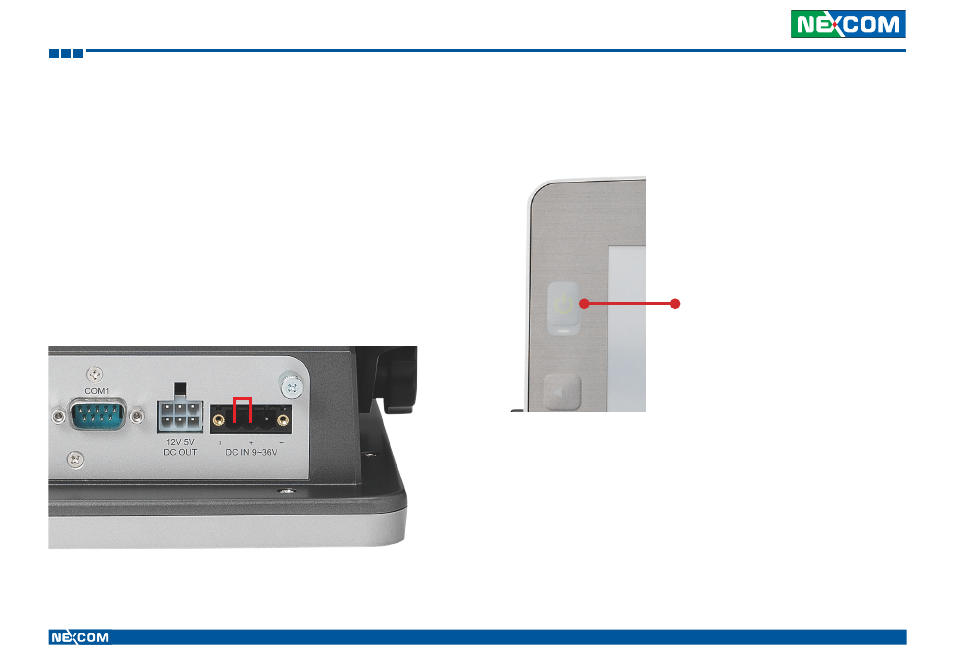
If the VMC does not have ignition signal, please use a cable to short the
Vin and ignition pin.
Power Key Functions
The power key can power on/off the system as well as turn on/off the
display.
Power Key
•
When the ignition is from “low” to “high”, VMC will turn on automatically.
•
When the ignition is “high”, press and hold the power button for 5
seconds to turn on/off VMC.
•
When the ignition is from “high” to “low”, VMC will turn off automatically.
•
When the ignition is “low”, pressing the power button will not turn on
VMC.
•
When you short the Vin and ignition pin, press and hold the power
button for 5 seconds to turn on/off VMC.
•
When you press it for 1 second, the display will turn on/off.
Note: The typical power consumption stated above is measured without the use of any
extended modules such as Mini PCI-E and CFast card modules, or 5V/12V DC output
power.