Subaru 2009 Impreza Navigation System User Manual
Page 233
Vehicle Information 233
Displaying Vehicle Information and Programming Vehicle System Functions
3
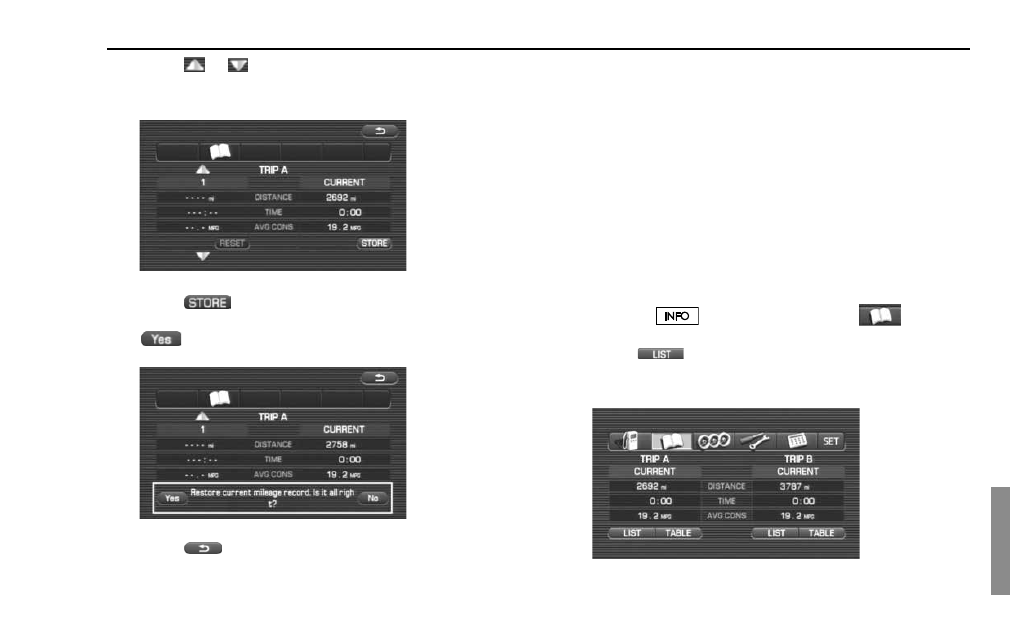
Select
or
to specify the number of the history
frame (data storage location) where the driving record
data are to be retained.
4
Select
(store).
5
(yes) will appear, requesting you to confirm your
selection. Select it.
6
Select
.
This completes the procedure.
NOTE
•
A maximum of three different driving record data sets can be retained for
each of the trip meters (TRIP A and TRIP B).
•
Driving record data can be retained while viewing the retained driving record
data list (See Page
235
).
•
If the data storage location (history frame) specified in Step 3 is already occu-
pied by data, this data will be replaced with new data once you have con-
firmed Step 5.
•
When driving record data have been successfully retained in a history frame,
the history frame's heading will change from a number to the date of data
retention.
■
Erasing driving record data
Use the following procedure to erase retained driving record data.
1
Press the
button and then select
.
2
Select
(list) below the trip meter designation
(TRIP A or TRIP B) about which you wish to erase the driv-
ing record data.