Subaru 2009 Impreza Navigation System User Manual
Page 53
Navigation 53
Route Options
3
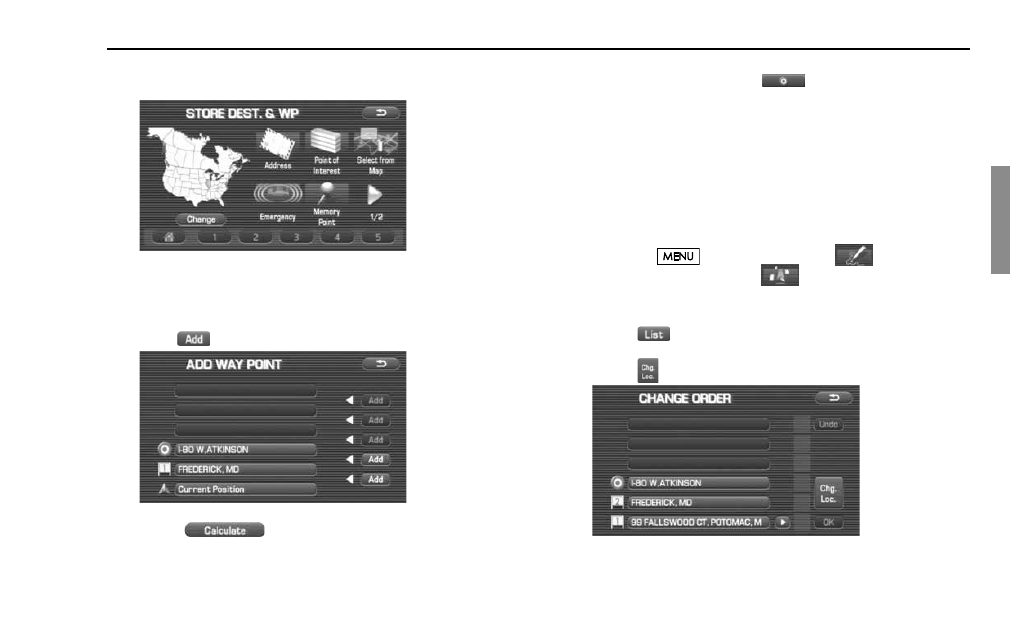
Set a waypoint using any method available from the
screen.
4
Specify the order in which all the set waypoints are to be
visited.
Choose the location of the waypoint to be added, and then
select
(add).
5
Select
(calculate).
NOTE
•
When a new destination is set using
(destination), it will replace the
current destination and the route calculation will be carried out again.
•
Step 4 must be performed for the second and any subsequent waypoints.
•
Repeat Steps 1 to 4 for each waypoint to be set.
■
Modifying destination or waypoint positions
Use this procedure to modify the destination or waypoint positions. The
screen will display the calculated route and the positions of the destina-
tion or waypoints that you will be able to modify.
1
Press the
button, then select
(route
options), and then select
(destination and way-
points).
2
Select
(list).
3
Select
(change location).