PLANET FNSW-2400PS User Manual
Page 35
User’s Manual of FNSW-2400PS
• Rename Button
Allow to change the Name
• Delete Button
Allow to delete the group which has been created
• Update Button
Allow to update the group when change/modify the port members
• Load Default Button
Back to VLAN member default, all of groups will be clear
Table 4-13
Descriptions of the VLAN Member Setting (Port Based) Screen Objects
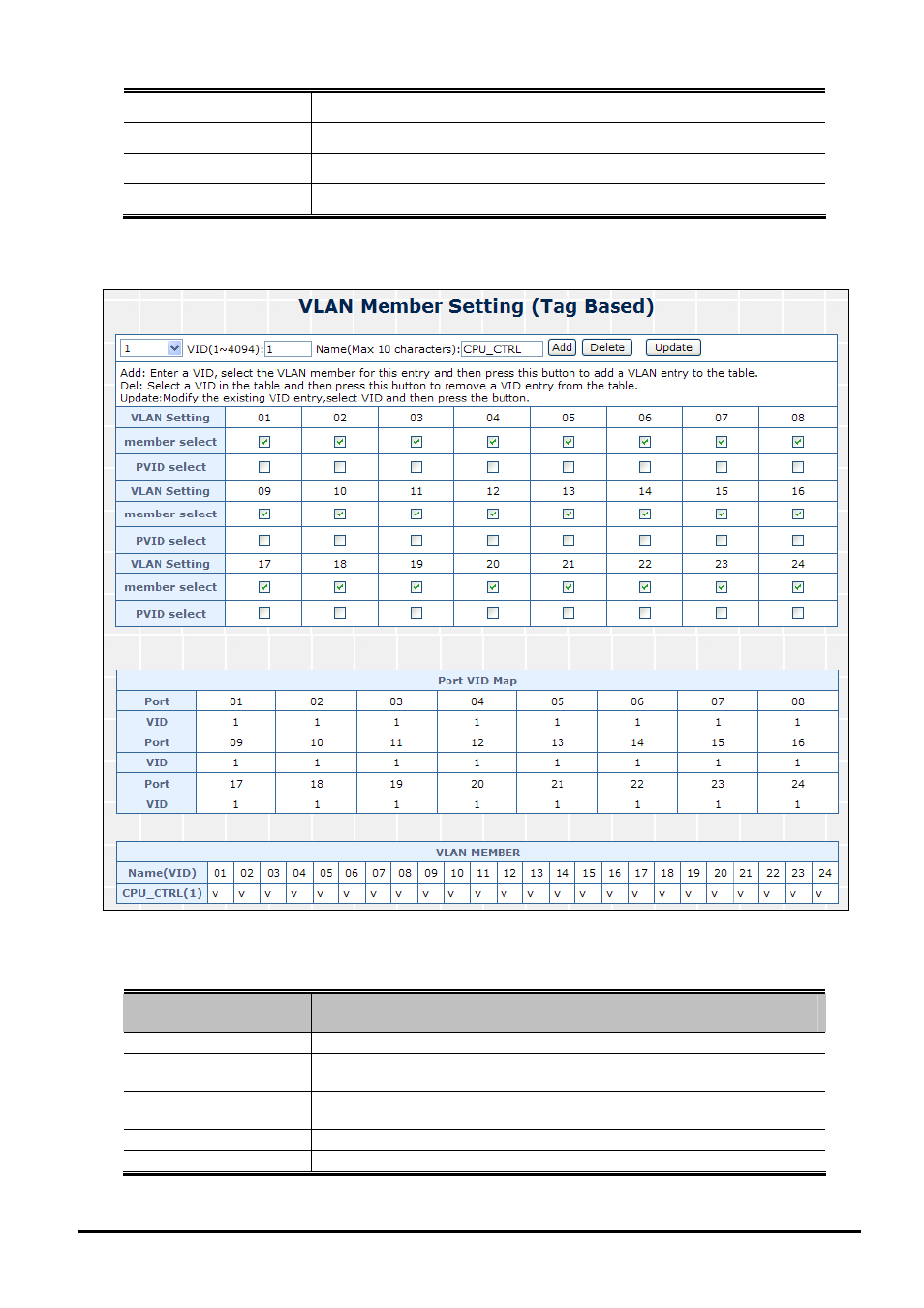
Figure 4-28
VLAN Member Setting (Tag Based) Web Page Screen
The page includes the following fields:
Object
Description
• VID (1~4094)
Display different VLAN ID from multi-Tag Base VLAN mode groups.
• Name
Assign and display different VLAN name from multi-Tag Base VLAN VLAN
groups. Up to maximum 10 characters allow.
• Add Button
Press this button for add a new port based VLAN groups. Up to maximum 24 port
based VLAN groups
.
• Delete Button
Allow to delete the group which has been created
• Update Button
Allow to update the group when change/modify the port members
Table 4-14
Descriptions of the VLAN Member Setting (Tag Based) Screen Objects
- 35 -