Inserting the card (optional), Attaching/removing the lens – Panasonic Lumix GX80 User Manual
Page 15
Preparation/Basic “Quick Start Guide”
15
(ENG) SQT1310
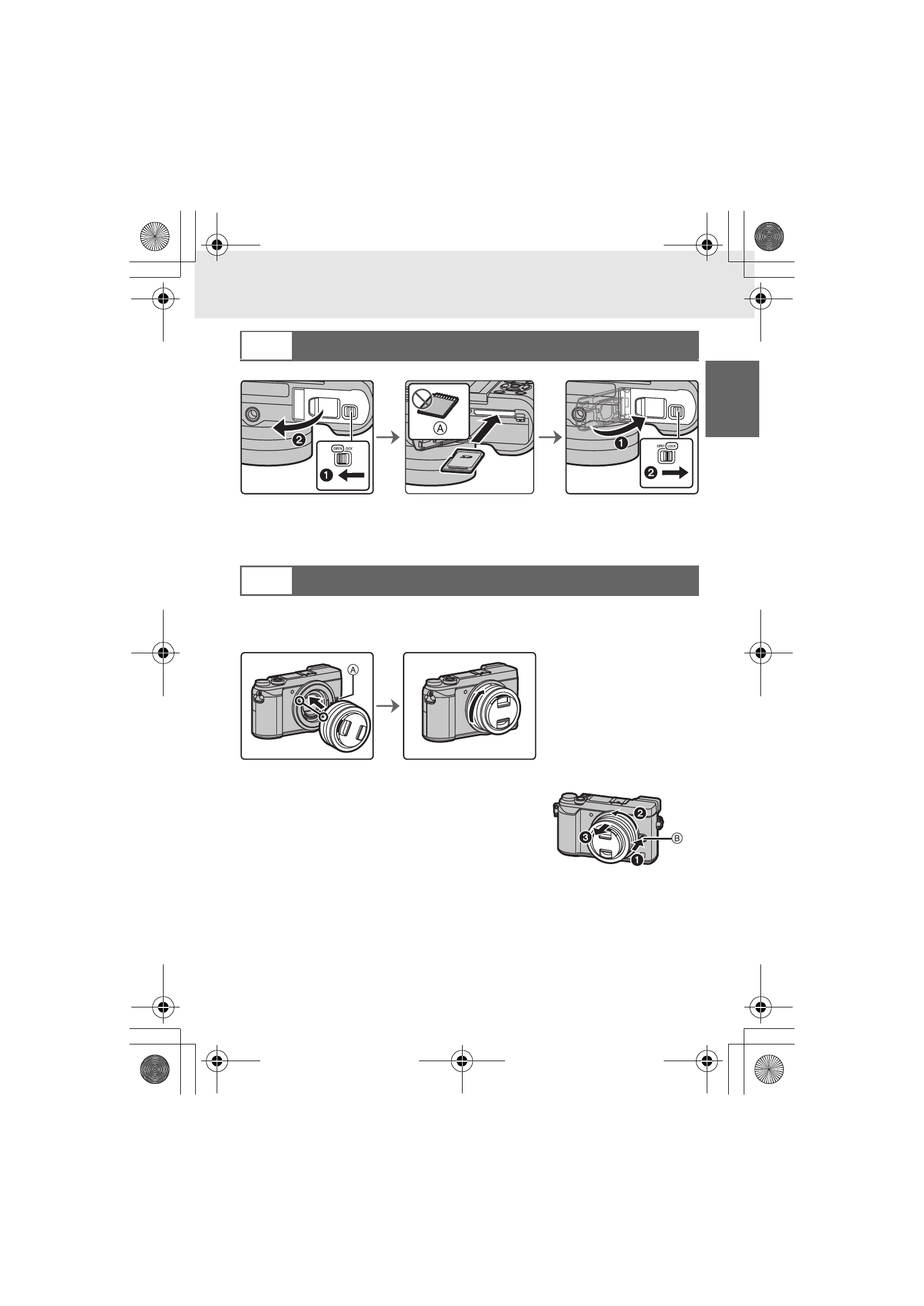
A Check the orientation of the card.
•
Push it securely all the way until you hear a “click” while being careful about the direction
in which you insert it.
To remove the card, push the card until it clicks, then pull the card out upright.
•
When attaching or detaching the interchangeable lens (H-FS12032), retract the lens
barrel.
•
Change lenses where there is not a lot of dirt or dust.
•
Do not press the lens release button A when you attach a lens.
∫ Detaching the lens
1
Attach the lens cap.
2
While pressing on the lens release button
B, rotate the lens toward the arrow until it
stops and then remove.
•
Hold the part around the base of the lens to
rotate it.
3
Inserting the Card (Optional)
4
Attaching/Removing the Lens
DMC-GX85KBody_PP-SQT1310_eng.book 15 ページ 2016年3月25日 金曜日 午後5時13分