Ip addressing configuration example, Network requirements, Configuration procedure – H3C Technologies H3C SecPath F1000-E User Manual
Page 51
26
IP addressing configuration example
Network requirements
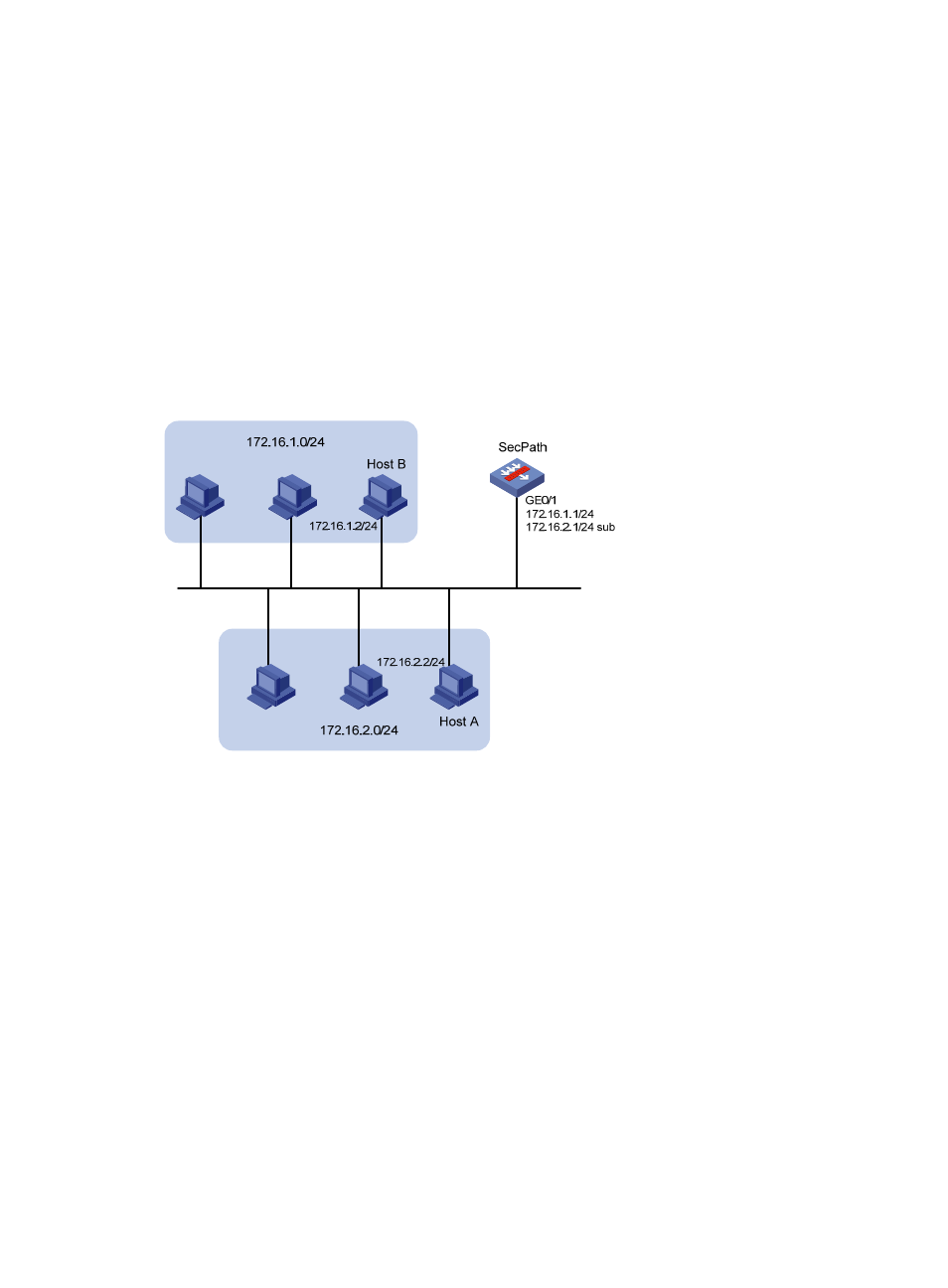
As shown in
, GigabitEthernet 0/1 on the SecPath is connected to a LAN comprising two
segments: 172.16.1.0/24 and 172.16.2.0/24.
To enable the hosts on the two network segments to communicate with the external network through the
SecPath, and to enable the hosts on the LAN to communicate with each other,
•
Assign a primary IP address and a secondary IP address to GigabitEthernet 0/1 on the router.
•
Set the primary IP address of the SecPath as the gateway address of the PCs on subnet
172.16.1.0/24, and the secondary IP address of the SecPath as the gateway address of the PCs on
subnet 172.16.2.0/24.
Figure 12 Network diagram
Configuration procedure
# Assign a primary IP address and a secondary IP address to GigabitEthernet 0/1.
<SecPath> system-view
[SecPath] interface GigabitEthernet 0/1
[SecPath-GigabitEthernet0/1] ip address 172.16.1.1 255.255.255.0
[SecPath-GigabitEthernet0/1] ip address 172.16.2.1 255.255.255.0 sub
# Set the gateway address to 172.16.1.1 on the PCs attached to subnet 172.16.1.0/24, and to 172.16.2.1
on the PCs attached to subnet 172.16.2.0/24.
# Ping a host on subnet 172.16.1.0/24 from the SecPath to check the connectivity.
<SecPath> ping 172.16.1.2
PING 172.16.1.2: 56 data bytes, press CTRL_C to break
Reply from 172.16.1.2: bytes=56 Sequence=1 ttl=255 time=25 ms
Reply from 172.16.1.2: bytes=56 Sequence=2 ttl=255 time=27 ms
Reply from 172.16.1.2: bytes=56 Sequence=3 ttl=255 time=26 ms
Reply from 172.16.1.2: bytes=56 Sequence=4 ttl=255 time=26 ms
Reply from 172.16.1.2: bytes=56 Sequence=5 ttl=255 time=26 ms
- H3C SecPath F5000-A5 Firewall H3C SecPath F1000-A-EI H3C SecPath F1000-E-SI H3C SecPath F1000-S-AI H3C SecPath F5000-S Firewall H3C SecPath F5000-C Firewall H3C SecPath F100-C-SI H3C SecPath F1000-C-SI H3C SecPath F100-A-SI H3C SecBlade FW Cards H3C SecBlade FW Enhanced Cards H3C SecPath U200-A U200-M U200-S H3C SecPath U200-CA U200-CM U200-CS H3C SecBlade LB Cards H3C SecPath L1000-A Load Balancer