4 p ath cont ours — car tesian coor dinat es – HEIDENHAIN TNC 410 User Manual
Page 90
77
HEIDENHAIN TNC 410
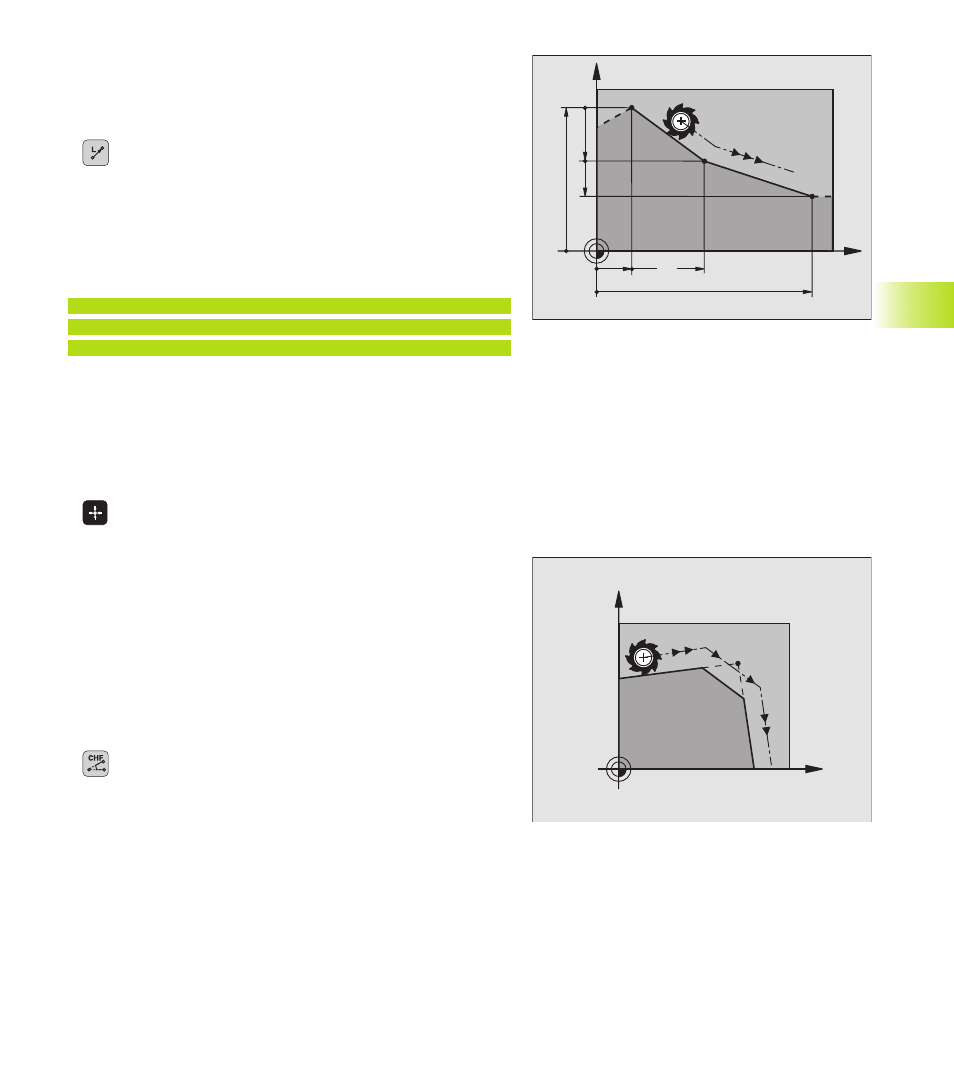
Straight line L
The TNC moves the tool in a straight line from its current position
to the straight-line end point. The starting point for the straight line
is the end point that was programmed in the preceding block.
ú
Enter the coordinates of the end point for the line.
Further entries, if necessary:
ú
Radius compensation RL/RR/R0
ú
Feed rate F
ú
Miscellaneous function M
Example NC blocks
7 L X+10 Y+40 RL F200 M3
8 L IX+20 IY-15
9 L X+60 IY-10
Actual position capture
In a positioning block you can capture the coordinates of the current
tool position:
ú
Select the Programming and Editing mode of operation.
ú
Open a new block or move the highlight to a coordinate within an
existing block.
ú
Press the actual-position-capture key: The TNC stores
the coordinates of the highlighted axis.
Inserting a chamfer CHF between two straight lines
The chamfer enables you to cut off corners at the intersection of
two straight lines.
■
The blocks before and after the CHF block must be in the same
working plane.
■
The radius compensation before and after the chamfer block must
be the same.
■
An inside chamfer must be large enough to accommodate the
current tool.
ú
Chamfer side length: Enter the length of the chamfer
Further entries, if necessary:
ú
Feed rate F (only effective in CHF block)
Please observe the notes on the next page!
X
Y
60
15
40
10
10
20
X
Y
6.4 P
ath Cont
ours — Car
tesian Coor
dinat
es