Connecting to a video device, Connection using an hdmi-dvi cable, Connection using an hdmi cable – Samsung S-Box Signage UHD Player Pro User Manual
Page 20: Using an hdmi cable or hdmi to dvi cable
20
Connecting to a Video Device
•
Do not connect the power cable before connecting all other cables.
Ensure you connect a source device first before connecting the power cable.
•
You can connect a video device to the product using a cable.
"
Press the
SOURCE
button on the remote control to change the source.
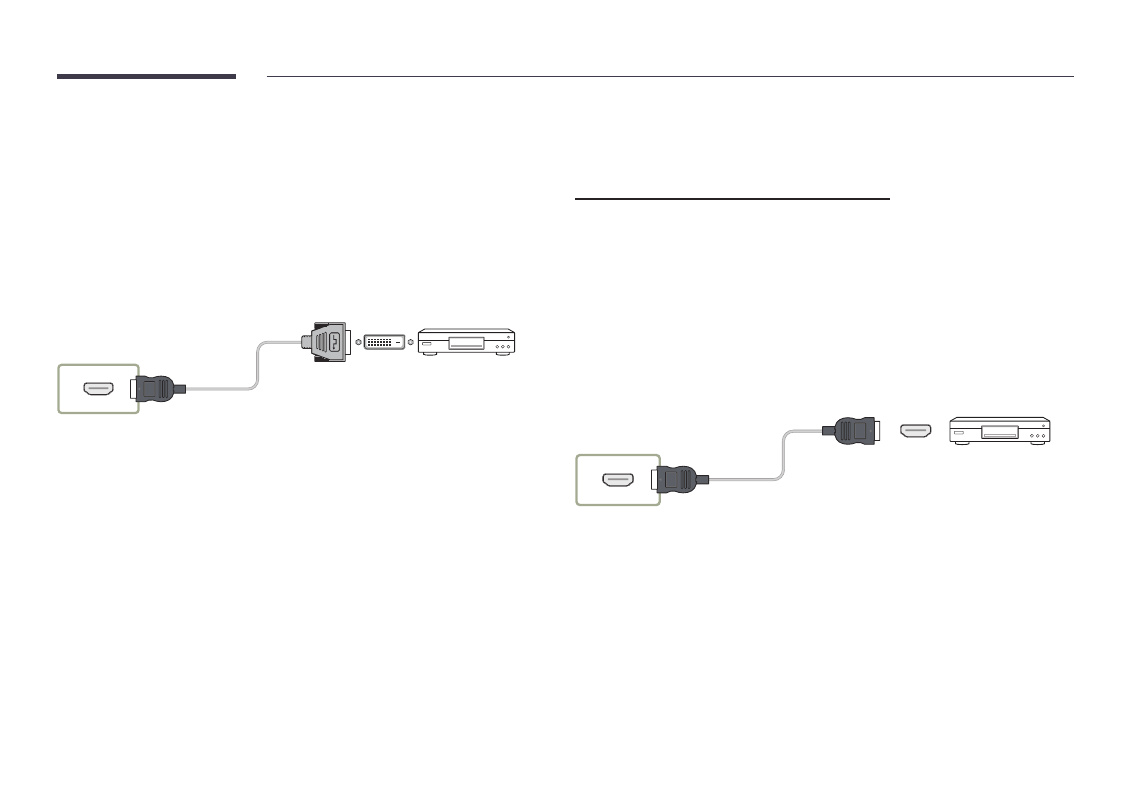
Connection Using an HDMI-DVI Cable
"
Connecting parts may differ in different products.
HDMI IN 1, HDMI IN 2
Connection Using an HDMI Cable
"
Connecting parts may differ in different products.
Using an HDMI Cable or HDMI to DVI Cable
•
For better picture and audio quality, connect to a digital device using an HDMI cable.
•
If the product is connected to an external device that is compatible with an older HDMI
version, the product may not display screen colors properly. It may also display a blank
screen.
If such a problem occurs, ask the manufacturer of the external device about the HDMI
version and, if out of date, request an upgrade.
•
Be sure to use an HDMI cable with a thickness of 14 mm or less.
•
Be sure to purchase a certified HDMI cable. Otherwise, the picture may not display or a
connection error may occur.
•
A basic high-speed HDMI cable or one with ethernet is recommended.
This product does not support the ethernet function via HDMI.
HDMI IN 1, HDMI IN 2