Connection, Connection 28 – Samsung S-Box Signage UHD Player Pro User Manual
Page 28
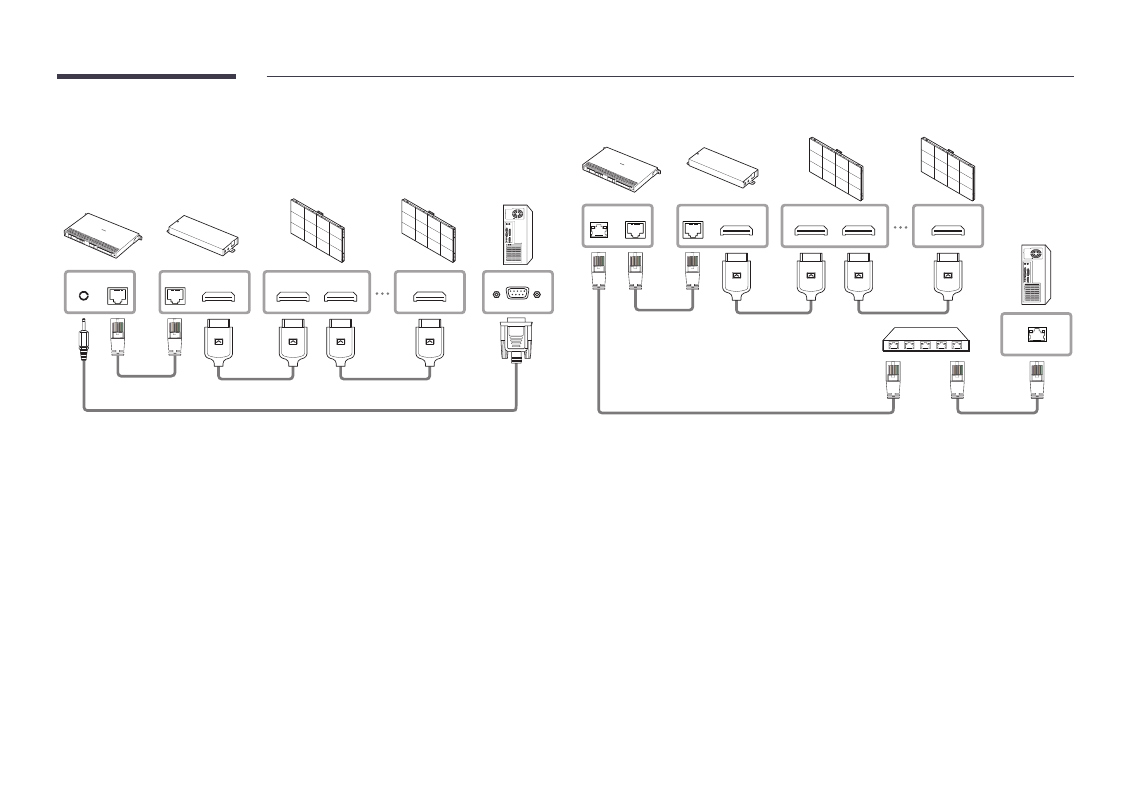
Advertising
See also other documents in the category Samsung Players:
- YP-F2 (62 pages)
- YP-MT6 (32 pages)
- YP-55 (37 pages)
- YP-60V (2 pages)
- yepp Sports AH68-01467F (38 pages)
- YP-T8 (50 pages)
- YP-K3 (58 pages)
- YP-F1 (34 pages)
- YEPP YP-C1X (28 pages)
- YP-MT6V (2 pages)
- DVD-V1000 (39 pages)
- SV-DVD1E (3 pages)
- VY-H200 (27 pages)
- YP-60V (40 pages)
- YP-35 (2 pages)
- SIR-T351 (51 pages)
- YH-820 (35 pages)
- YP-C1X (36 pages)
- YPK3JSE (59 pages)
- YP-N30S (28 pages)
- MM-X5 (13 pages)
- YP-F2Q (68 pages)
- YEPP YH-920 (39 pages)
- DVD-V8650 (92 pages)
- Yepp' AH68-01523A (117 pages)
- Yepp' AH68-01567B (28 pages)
- DVD-V2000 (32 pages)
- YEPP YP-T6X (25 pages)
- yepp' YP-780 (33 pages)
- YEPP YP-ST5 (26 pages)
- YEPP Sports YP-60V (34 pages)
- YP-NDU64B (16 pages)
- Yepp YP-NEU (48 pages)
- YP-K5JAB (57 pages)
- YH-J70J (84 pages)
- SPF-85P (29 pages)
- NEXUS 25 & 50 YP-X5X (40 pages)
- yepp' YP-53 (24 pages)
- DVD-V9500 (89 pages)
- SIR-T151 (45 pages)
- Q1B (141 pages)
- YH-925 (35 pages)
- YP-T5V (2 pages)
- YP-700 (44 pages)
- YP-90H (34 pages)