Arp pads – Novation Launchpad Mini MK3 64-Pad MIDI Grid Controller for Ableton Live User Manual
Page 25
24
25
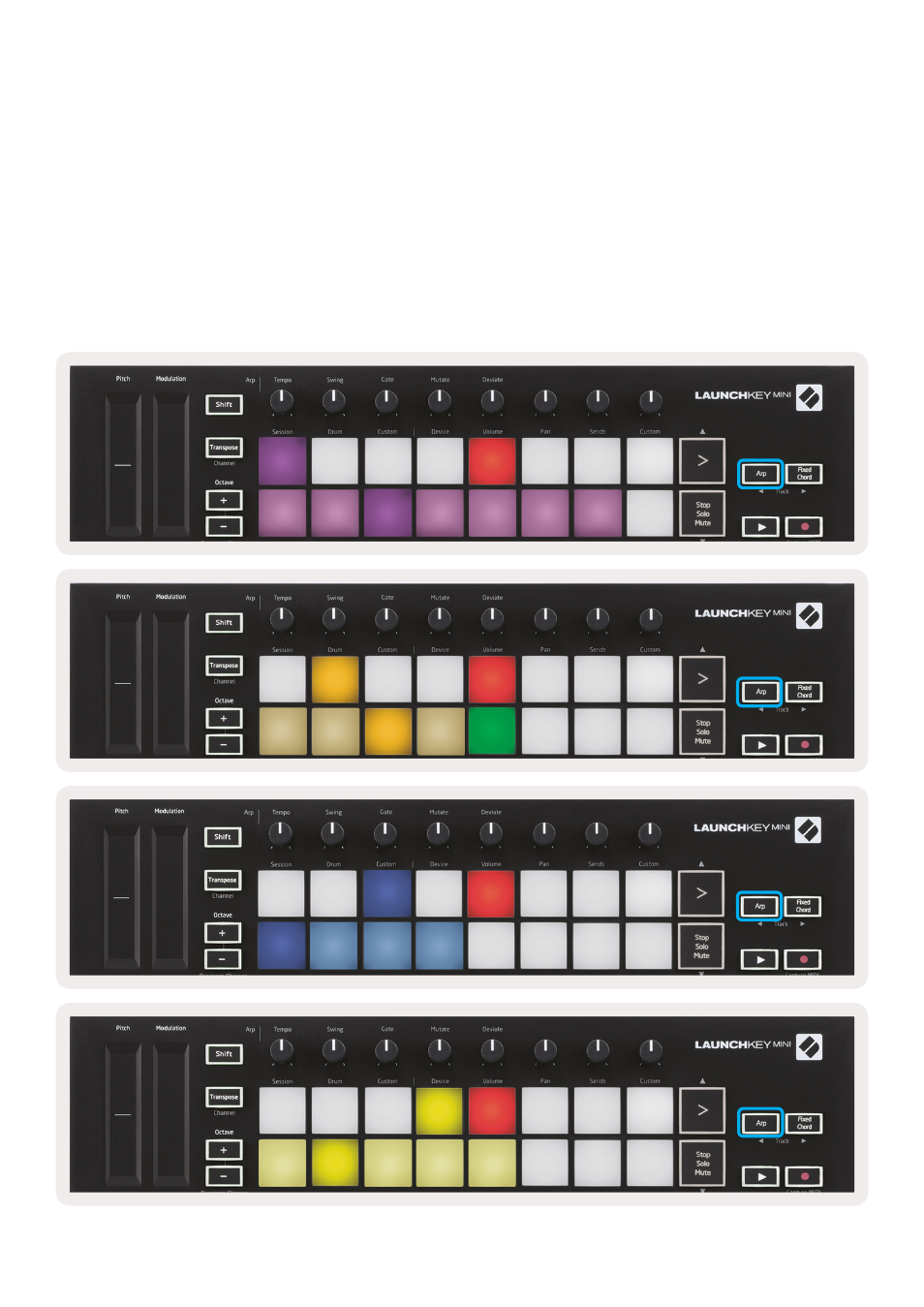
Arp Pads
The pads of the Launchkey Mini help to visually confirm the current Arp state. When the Arp button is
held the pads will light up in different colours, indicating these Arp settings: purple (Arp Modes), red
(Arp Rates), blue (Arp Octaves), yellow (Arp Rhythms), and red/light green (Latch).
The top row of pads select the Arp groups: Arp Modes, Arp Rates, Arp Octaves, Arp Rhythms, and
Latch (On/Off). The bottom row of pads select the different options within the selected group
(from the top row), as follows:
Mode
(Selected)
Mode
Mode
Mode
Up
1/4
1
O
Rate
Rate
(Selected)
Rate
Rate
Down
1/8
2
OXO
(Selected)
Octave
Octave
Octave
(Selected)
Octave
Up/Down
(Selected)
1/16
(Selected)
3
OXXO
Rhythm
Rhythm
Rhythm
Rhythm
(Selected)
Played
1/32
4
Random
Latch
(Off)
Latch
(Off)
Latch
(Off)
Latch
(Off)
Random
Triplet
(On)
Deviate
Chord
Mutate