Pr seek ch. fine, Ok c 2 1 – Sony DAR-RD100 User Manual
Page 76
76
GB
2
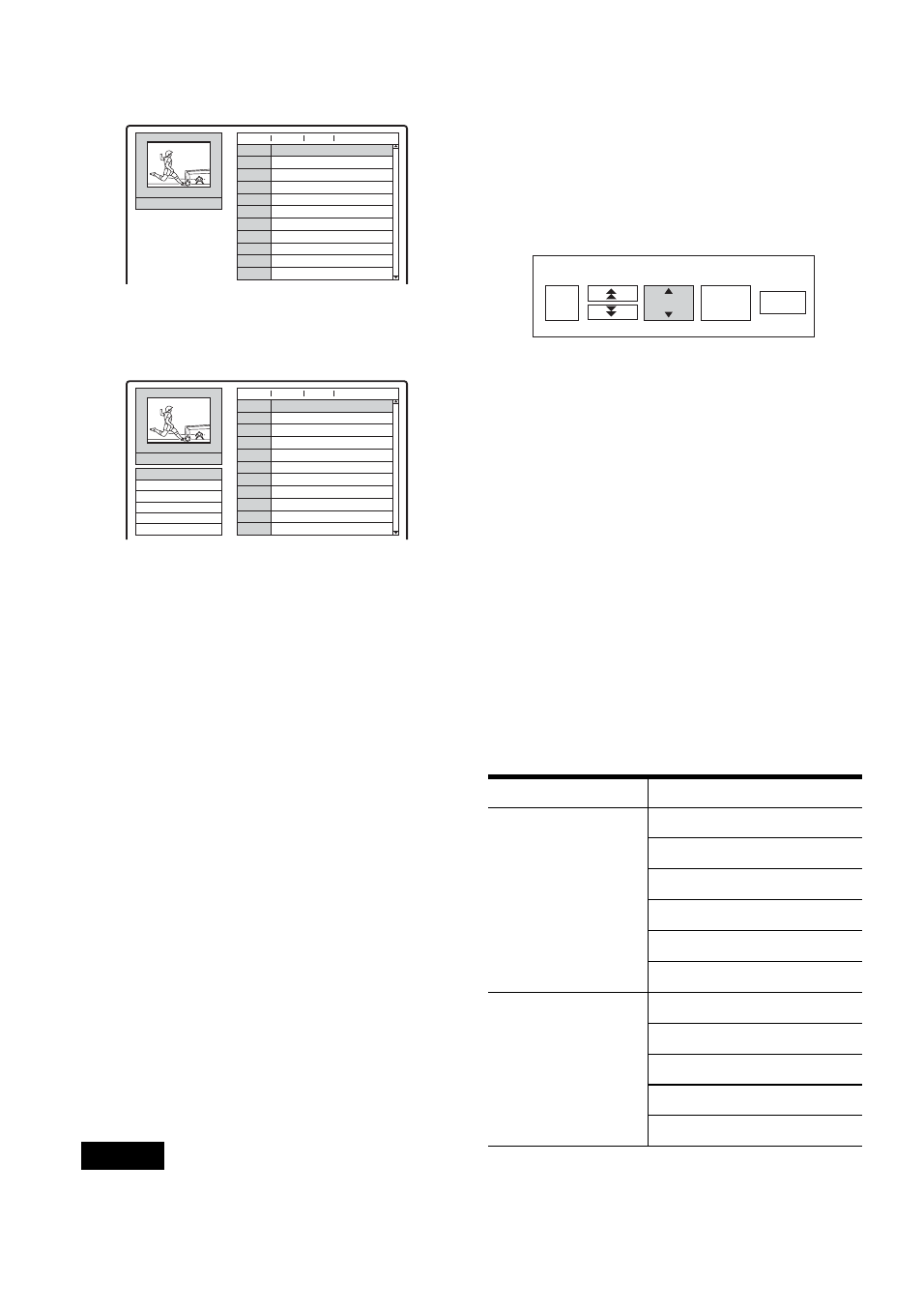
Press ENTER while [Setting] is selected.
The Channel List menu appears.
3
Press
M
/
m
to select the programme position
you want to set, and press ENTER.
4
Select an option from the sub-menu, and press
ENTER.
[Channel Settings]: Sets the channel
manually. See “To set the channels manually”
below.
[Station Name]: Changes the station name.
The display for entering characters appears.
To enter characters, see page 37.
[Move]: Sorts the programme positions on the
Channel List. Press
M
/
m
to move the selected
programme position to a new location.
[Erase]: Disables a programme position you
do not need.
[Decoder On/Off]: Sets the channels for the
decoder. You need this setting to watch or
record PAY-TV/Canal Plus programmes.
Press ENTER so [Decoder] appears on the
display. Press ENTER again to turn off the
setting.
[NICAM/Standard]: Sets the channels for the
NICAM broadcast. Normally, [NICAM] is lit
on the display. If the sound from NICAM
broadcast is not clear, press ENTER so
[NICAM] disappears.
Note
Be sure to correctly select the programme position you
want to disable. If you disable the wrong programme
position by mistake, you need to reset that channel
manually.
◆
To set the channels manually
When you select [Channel Settings] in step 4
above, the display for setting channels appears.
1
Press
<
/
,
to select the item and press
M
/
m
to change the setting.
[PR] indicates the selected programme
position.
[Seek]: Searches for a channel automatically.
Searching stops when the recorder tunes in a
channel.
[Ch.]: Changes the channel number.
[Fine]: Fine tunes the channel to obtain a
clearer picture.
[PAL/SECAM]: This appears only for
selected models. For customers in France,
switch channels from PAL to SECAM if the
reception is poor.
2
Select [OK] and press ENTER.
The setting is stored and the display returns to
the Channel List.
To preset other channels, follow from step 3
of the Channel List setting (page 75).
◆
Receivable channels
PR-01
01
PR
C 12
Ch.
C 23
C 7
C 27
C 17
C 33
C 34
C 47
C 10
0
Fine
Station
0
0
0
0
0
0
0
0
02
03
04
05
06
07
08
09
10
11
NICAM
AWB1
AWB2
DTV
CH2
LHTV
CSN
PTGLE
PSG
TV2
PR-01
01
PR
C 12
Ch.
C 23
C 7
C 27
C 17
C 33
C 34
C 47
C 10
0
Fine
Station
0
0
0
0
0
0
0
0
02
03
04
05
06
07
08
09
10
11
NICAM
Channel Settings
Station Name
Move
Erase
Decoder On/Off
NICAM/Standard
AWB1
AWB2
DTV
CH2
LHTV
CSN
PTGLE
PSG
TV2
TV system
Channel coverage
BG (West European
Countries, except
those listed below)
Colour system: PAL
E2 - E12 VHF
Italia A – H VHF
E21 – E69 UHF
S1 – S20 CATV
S21 – S41 HYPER
S01 – S05 CATV
DK (East European
Countries)
Colour system: PAL
R1 – R12 VHF
R21 – R69 UHF
S1 – S20 CATV
S21 – S41 HYPER
S01 – S05 CATV
OK
C 2
1
PR
Seek
Ch.
Fine
0