Linking campuses, Offline version), Event manager – Code Blue BLUE ALERT MNS MASS NOTIFICATION SOFTWARE User Manual
Page 55: Blue alert, Linking campuses to an event (offline version), Creating a new event, User guide
Detail Layer selection continued on next page
Linking Campuses to an Event (Offline Version)
The Offline version for linking campuses to an event may look different than the Online version
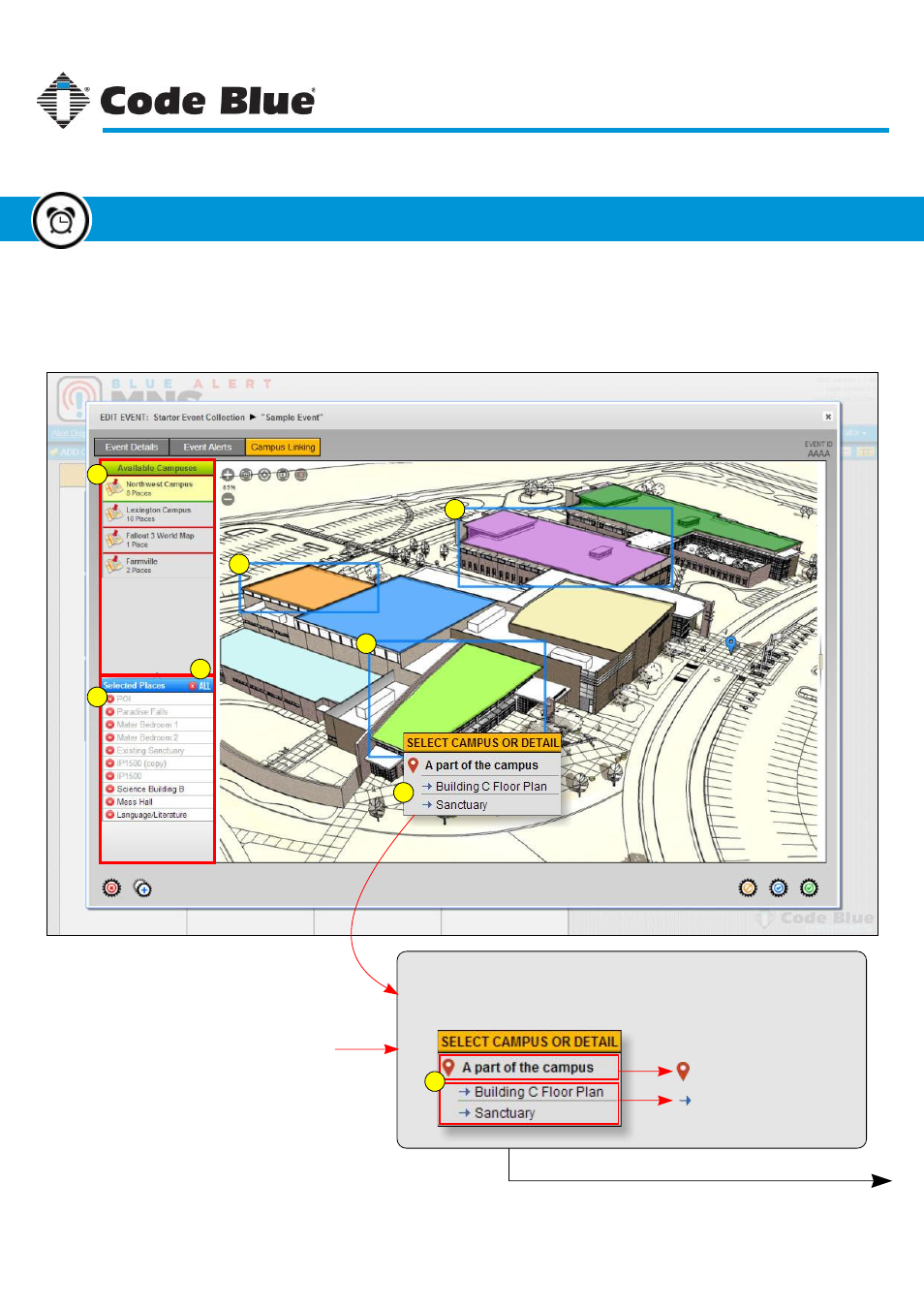
(page 54), however, it works pretty much the same way. Select the campus from the Available
Campuses list, then select the place or places to associate with the event.
1. List of available campuses
2. List of selected places for event
3. Selected place for event
4. Delete all selected places button
5. Pop-down menu for Detail Layer
1
2
3
3
3
4
5
Places with Detail Layers:
If a selected place has detail layers attached to it a pop-down
menu appears with some options.
Select the parent place
Select a detail layer
5
Code Blue
●
259 Hedcor Street
●
Holland, MI
●
4923 USA
●
800.205.7186
●
www.codeblue.com
Rev 1/2015
page 55
User Guide
Blue Alert
®
MNS
Creating a New Event
Event Manager
GU-141-C