Roland SP-404MKII Creative Sampler and Effector User Manual
Page 88
Mixing the Samples (DJ MODE)
88
When pad [10] is pressed, the CH1 sample follows the tempo of
the CH2 sample.
When pad [12] is pressed, the CH2 sample follows the tempo of
the CH1 sample.
CH1: Pad [2]
CH2: Pad [4]
BPM+
Speeds up the tempo.
CH1: Pad [6]
CH2: Pad [8]
BPM-
Slows down the tempo.
CH1: [DEL] button + Pad [2] +
Pad [6]
CH2: [DEL] button + Pad [4] +
Pad [8]
BPM
Resets the tempo to the default value.
CH1: Pad [1]
CH2: Pad [3]
BEND+
The pitch goes up while you hold down the pad. This also
speeds up the playback, like an analog turntable.
CH1: Pad [5]
CH2: Pad [7]
BEND-
The pitch goes down while you hold down the pad. This also
slows down the playback, like an analog turntable.
CH1: [REMAIN] button + Pad
[14]
CH2: [REMAIN] button + Pad
[16]
BUS FX
You can set the bus to which the CH1/CH2 sample playback is
sent (meaning which effects are used).
While holding down the [REMAIN] button, each time you press
pad [14] or pad [16] switches the effect to use as follows: “BUS-
1” -> “BUS-2” -> “DRY” -> “BUS-1”.
CH1: [ROLL] button + Pad [13]
CH2: [ROLL] button + Pad [15]
Repeats the sample playback in more detailed intervals (ROLL).
Note that when the ROLL SIZE (roll interval) is longer than the
sample length, a roll cannot played back.
[SHIFT] button + [ROLL] knob
ROLL SIZE
Sets the roll interval (1/4, 1/2, 1 or 2 measures).
Set the ROLL SIZE before playing back rolls. (You can’t change
the ROLL SIZE with this operation while a roll is playing back).
[ROLL] button + pads [1]–[4]
Changes the roll interval while the roll is playing back.
[ROLL] button + pad [1]: quarter-note (1/4 of a measure)
[ROLL] button + pad [2]: half-note (1/2 of a measure)
[ROLL] button + pad [3]: whole note (1 measure)
[ROLL] button + pad [4]: two whole notes (2 measures)
[START/END] button
Switches between the functions (CUE MIX or X-FADE) for the
[CTRL 3] knob.
[PITCH/SPEED] button
Changes the number of digits shown for the BPM.
Each time you press the [PITCH/SPEED] button, the display
switches in the following order: integers only -> to the second
decimal place -> to the first decimal place -> integers only....
When you set the BPM value using pads [2] [4] (BPM+) and pads
[6] [8] (BPM-), the number of digits shown for the BPM changes
according to the minimum unit.
[MARK] button
Switches between the EFX and MIXER screen views.
[BPM SYNC] button
Selects the channel (CH1/CH2) used to control reverse playback
([REVERSE] button).
[REVERSE] button
REVERSE
Starts reverse playback immediately from the playback position
of the current sample.
When playing back in reverse, this works the same as when the
(P.124)” system parameter is set to “303”.
CH1: [SHIFT] button +
[REVERSE] button + Pad [13]
CH2: [SHIFT] button +
[REVERSE] button + Pad [15]
MUTE
Mutes the sample that’s playing back.
Press [RESAMPLE] button +
[VALUE] knob
VOLUME
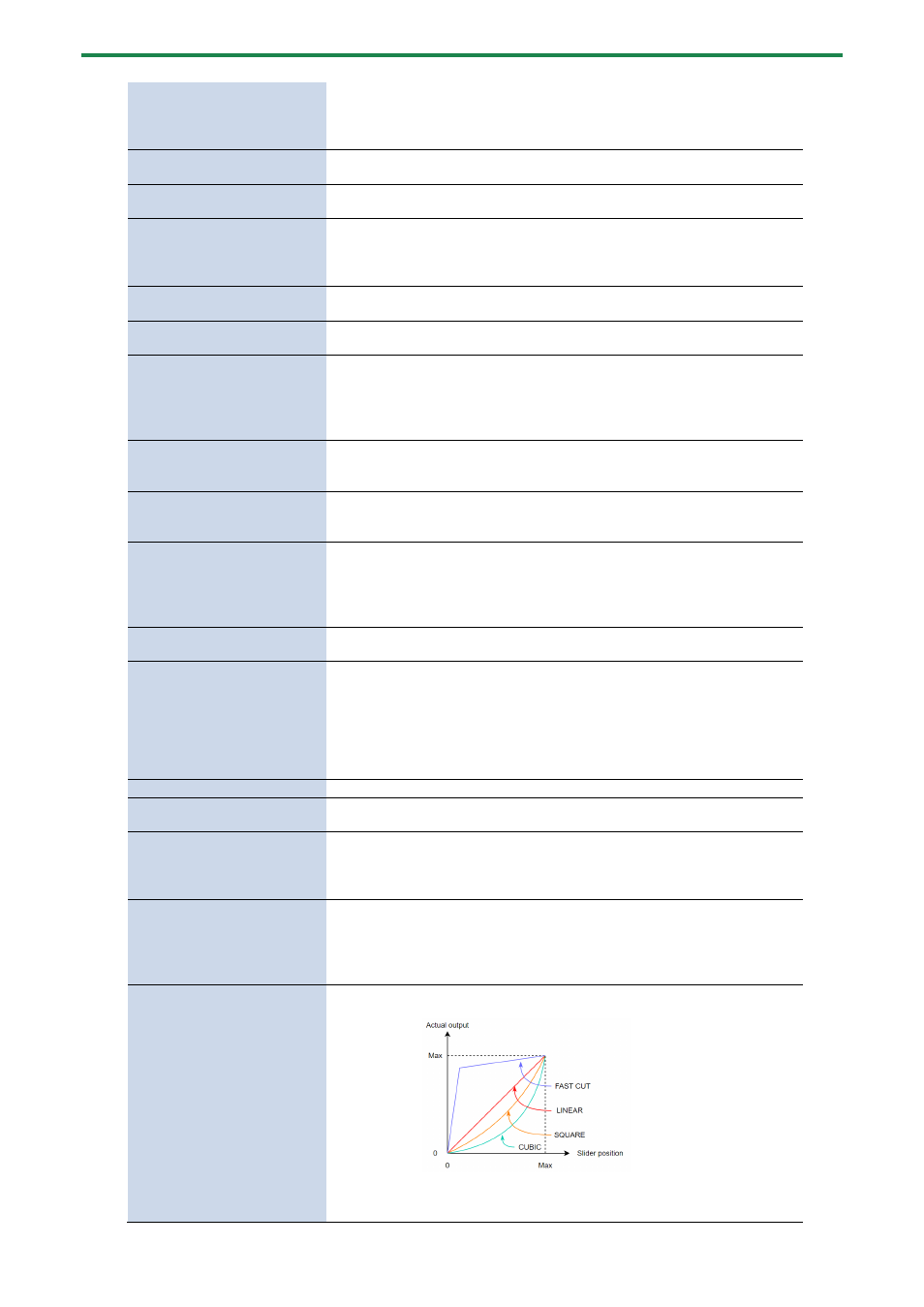
CURVE
Selects the volume curve characteristics used for each slider
(CH1 LEVEL, CH2 LEVEL, X-FADE) in DJ mode.
Each time you hold down the [RESAMPLE] button and press the
[VALUE] knob, the characteristic switches in this order: “FAST
CUT” -> “LINEAR” -> “SQUARE” -> “CUBIC” -> “FAST CUT”.