Avery Dennison Monarch 9416 XL Fixed Format User Manual
Page 17
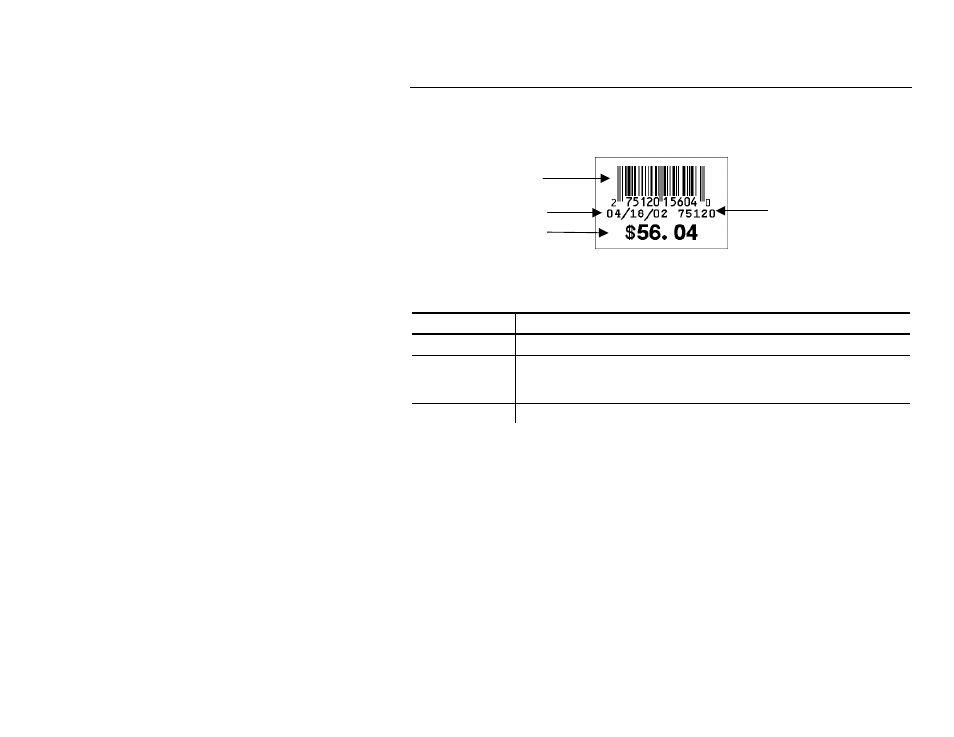
Printing Labels 3-3
F o r m a t 2 : U P C - S y s 2 D a t e D e p t & P r i c e
1. Load 1.5" x 1.1" (1511) labels.
2. Enter the data as prompted:
Prompt
What You Do
DEPT
Enter up to four numeric digits. Press Enter.
PRICE
Enter up to four numeric digits. Do Not enter a decimal point
or dollar sign. Those characters are automatically printed.
Press Enter.
PRINT QTY:
Enter up to three numeric digits. Press Enter.
NOTES:
♦
The keyboard uses the system date (MM/DD/YY) that you entered
when you first powered on the keyboard and printer.
♦
The bar code consists of data from two other fields. Note that in the
example above, bar code characters 2-5 (numbered right to left) are
the price (5604) and characters 7-11 are the department (75120). If
you enter less than the maximum number of digits in either field, the
printer zero-pads the data from the left in the bar code.
♦
Character 6 is also a check digit (in addition to character 1).
♦
Character 12 is fixed. The bar code is defined to contain specially-
defined data.
UPC-Sys+Price
Check Digit (CD)
Bar Code
Date
Price
Department