Sony Xperia XA1 User Manual
Page 91
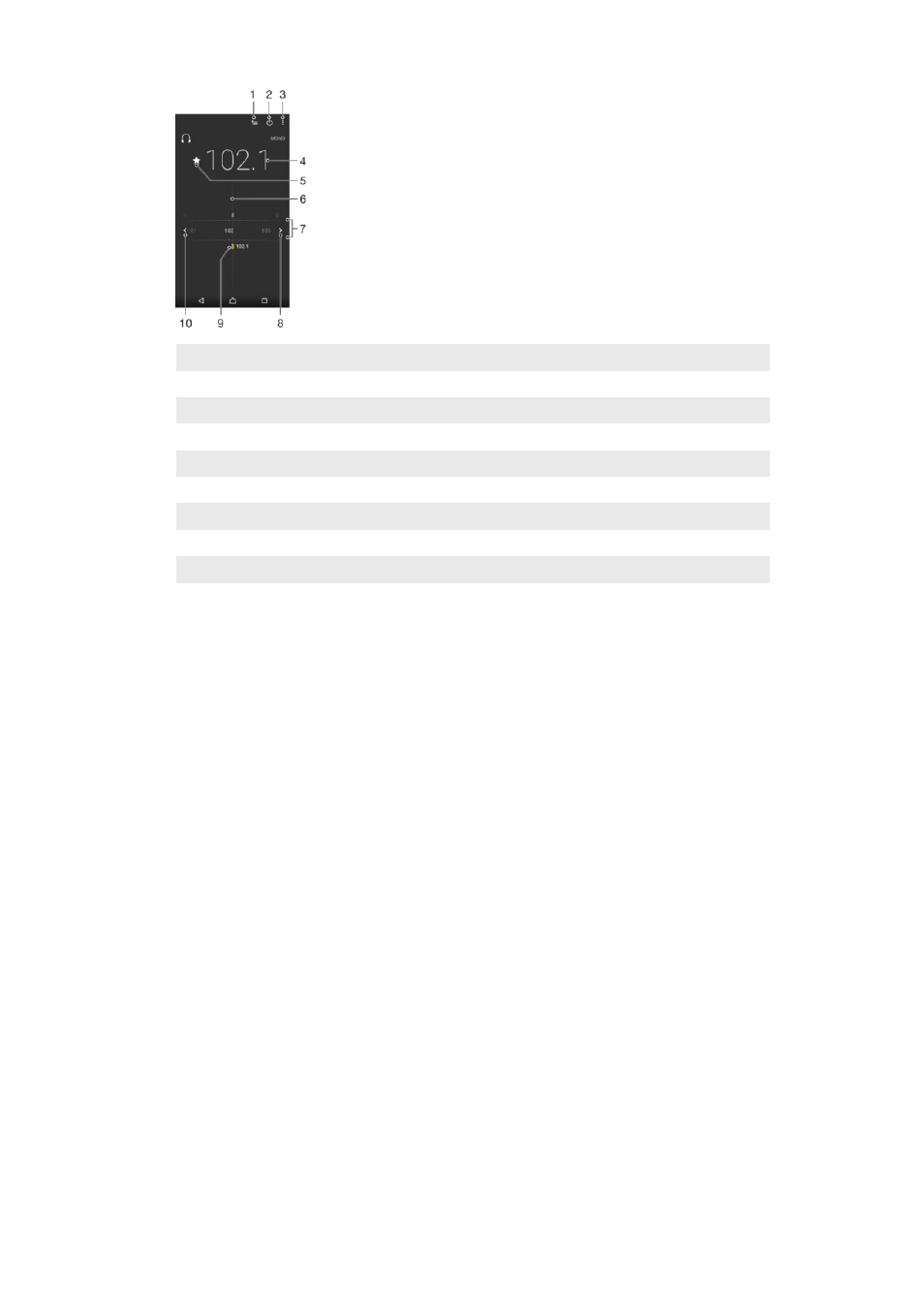
1
Favorites list
2
Radio on/off button
3
View menu options
4
Tuned frequency
5
Save or remove a channel as a favorite
6
Tuning dial
7
Frequency band – drag left or right to move between channels
8
Move up the frequency band to search for a channel
9
A saved favorite channel
10 Move down the frequency band to search for a channel
To Listen to the FM Radio
1
Connect a headset or a set of headphones to your device.
2
From your
Home screen, tap .
3
Find and tap . The available channels appear as you scroll through the
frequency band.
When you start the FM radio, available channels appear automatically. If a channel has RDS
information, it appears a few seconds after you start listening to the channel.
To Move between Radio Channels
•
Drag the frequency band left or right.
•
Alternately, tap the arrows on either side of the band to jump to the next clear
radio signal.
To start a new search for radio channels
1
When the radio is open, tap .
2
Tap
Search for channels. The radio scans the whole frequency band and marks
all available channels.
To switch the radio sound to the speaker
1
When the radio is open, press .
2
Tap
Play in speaker.
To switch the sound back to the wired headset or headphones, press and tap
Play in
headphones.
91
This is an internet version of this publication. © Print only for private use.