Welltech SIPPBX 6200 V.3.1.1 User Manual
Page 28
Welltech Technology Co., Ltd.
SIPPBX 6200S, 6200GS, 6200N Release 3.1.1
User Guide
- 28 -
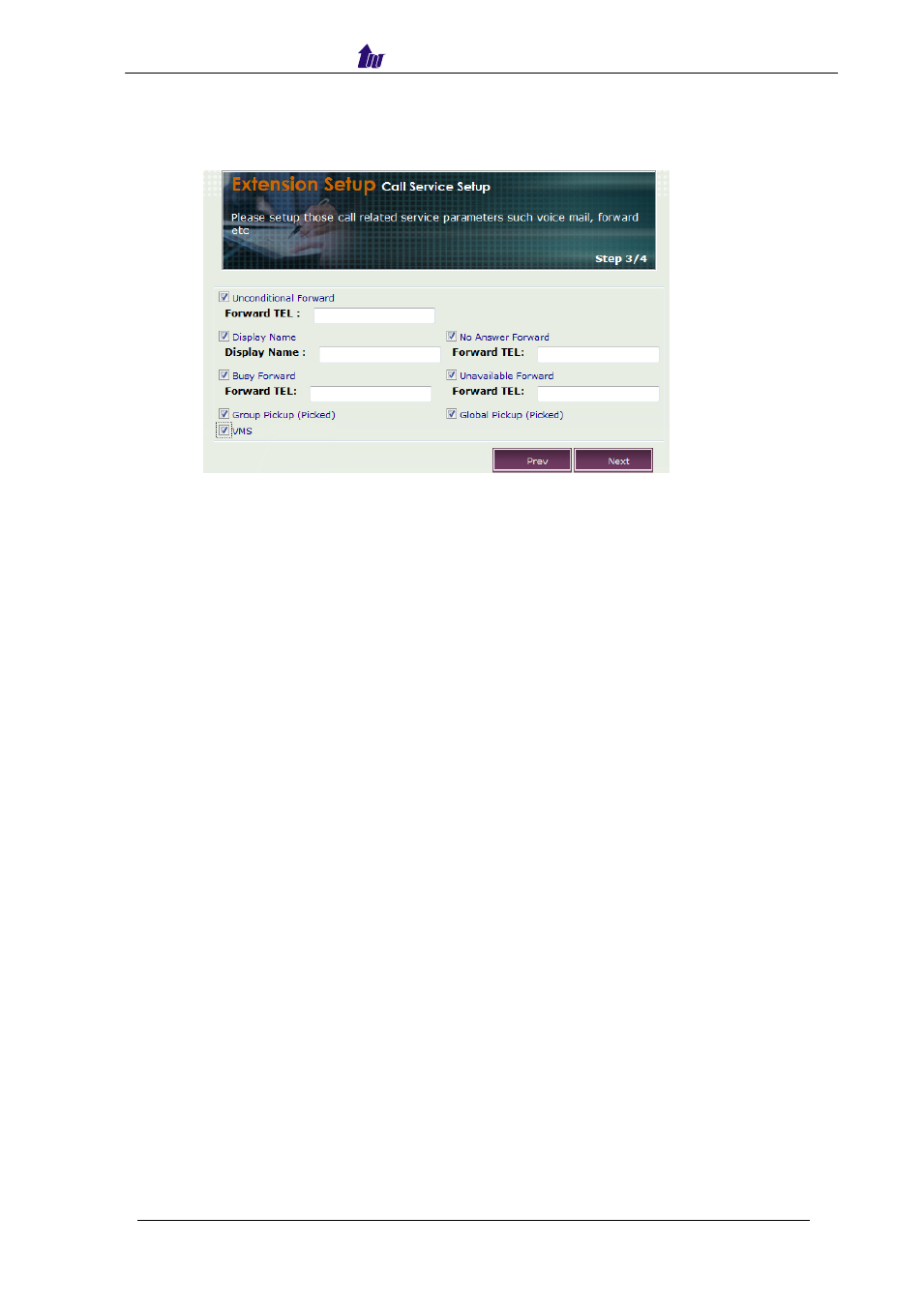
Step 3:
Setup those calls related service parameters such as voice mail, forward
and etc.
Figure 3.4-3
Parameter Description:
•
Unconditional Forward: When enabled, any calls to this subscriber will be
forwarded to this number unconditionally. You can use SIP URI or subscriber
number here.
•
Display Name: Change SIP display name to this extension.
•
No Answer Forward: Forward to this telephone number when the subscriber
has no answer.
•
Busy Forward: Forward to this telephone number when the subscriber is
busy.
•
Unavailable Forward: Forward to this telephone number when the subscriber
is unavailable (not registered).
•
Group Pickup (Picked)
: Allowed to be picked up
within the same group
.
•
Global Pickup (Picked)
: Allowed to be picked up
globally (different group)
.
•
VMS: Enable Voice Mail Service or not.