Managing user accounts for processes, Adding a new account from process management – H3C Technologies H3C Intelligent Management Center User Manual
Page 34
26
•
Configuring processes
•
Executing and managing processes
Managing user accounts for processes
You cannot create a process without assigning at least one account to it. There are four ways to create
user accounts: in IMC from User > Add User, in SOM from System Management, from the SOM Login
dialog box (user registration), and in SOM from Process Management. The first three are described in
the section:
Adding an SOM Self-Service account
, the last is described in the section below.
Adding a new account from Process Management
1.
Under Process Management in the navigation pane, right-click Default Account Registration
Process, and then click Start Process.
2.
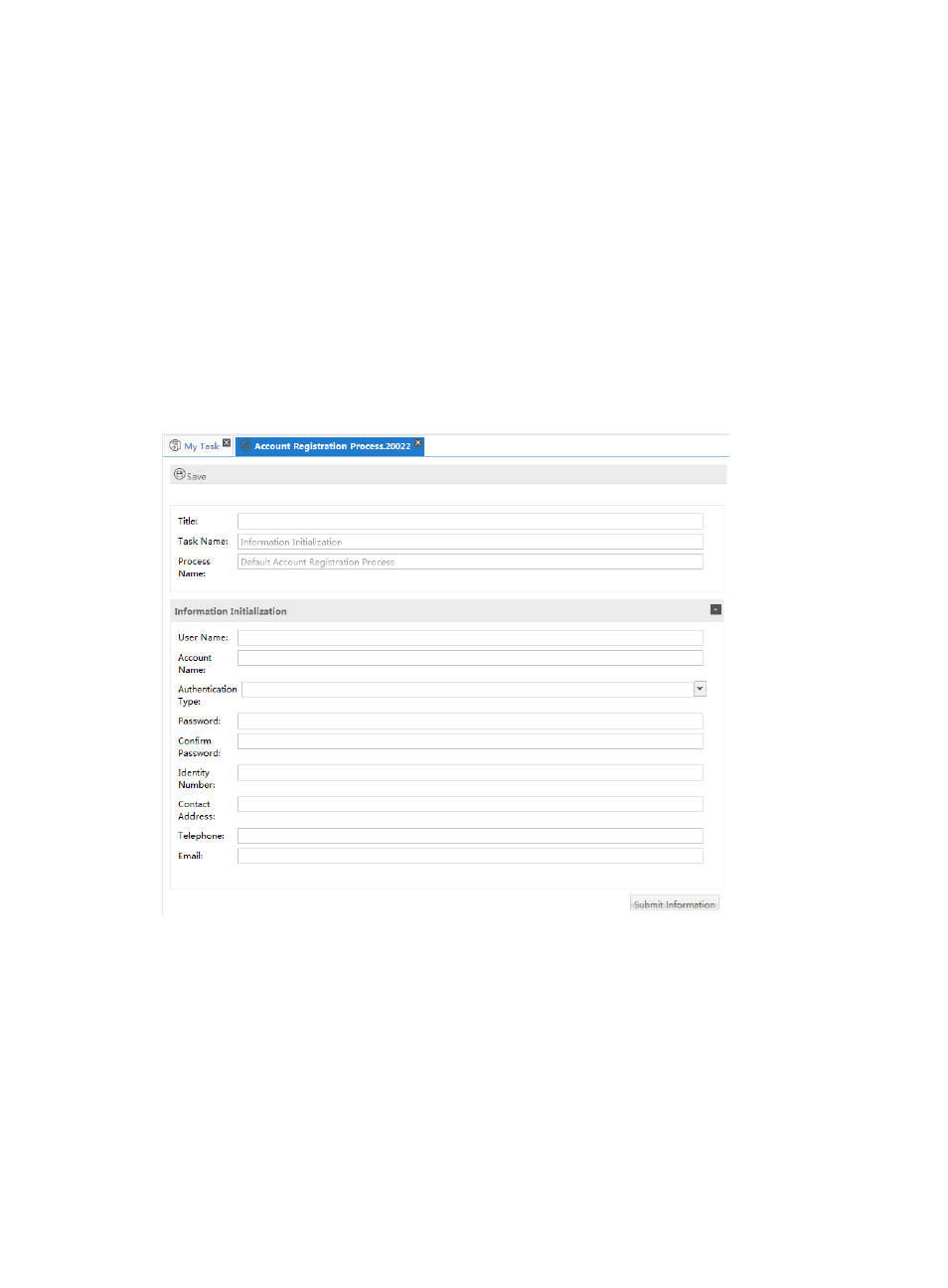
Configure the text fields, as shown in
.
Figure 11 Using the Default Account Registration Process
•
Title—Enter a title that has 32 or fewer characters.
•
User Name—Enter the user name. The same user name can be used by multiple users.
•
Account Name—Create an account name. Account names must be unique.
Users will be assigned to processes and tasks by their account name.
•
Authentication Type—Select an authentication type. Options include password, LDAP, and
RADIUS.
•
Password—Create a password. H3C recommends that the password is at least six characters
long and includes a number.
•
Confirm Password—Enter the password again.