Inserting the battery in the remote control – Nikon KeyMission 170 User Manual
Page 41
22
Using Accessories
Inserting the Battery in the Remote Control
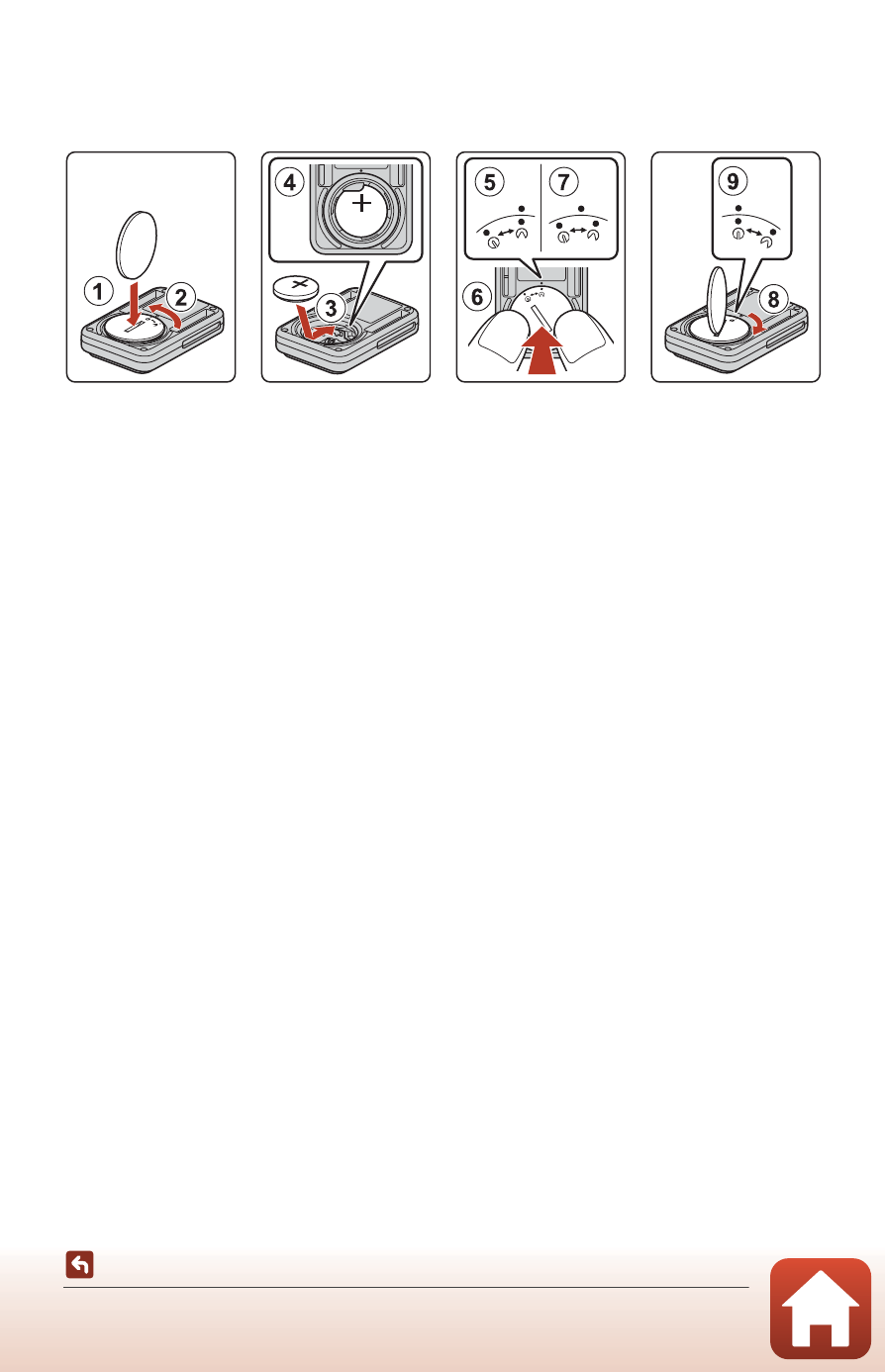
Insert a 3V CR2032 lithium battery.
• Use a coin (1) to turn the battery-chamber cover counterclockwise (2) and open
it.
• Insert the battery with the positive side face up (3). Make sure that the battery is
firmly inserted at the center of the battery chamber (4).
• Align the N mark of the battery-chamber cover with the R mark of the remote
control (5), and press the battery-chamber cover with your thumbs (6). The
battery-chamber cover rotates clockwise slightly and stops (7).
• Use a coin to turn the battery-chamber cover clockwise (8) to securely lock it.
Make sure that the
X mark of the battery-chamber cover is aligned with the R
mark of the remote control (9).
• Make sure that no foreign substance such as lint is caught in the battery-chamber
cover. Failure to observe this precaution could impair the waterproof performance
and cause water to seep inside the remote control.