Attaching a power connector and ac adapter – Nikon D780 DSLR Camera (Body Only) User Manual
Page 860
Advertising
814
Technical Notes
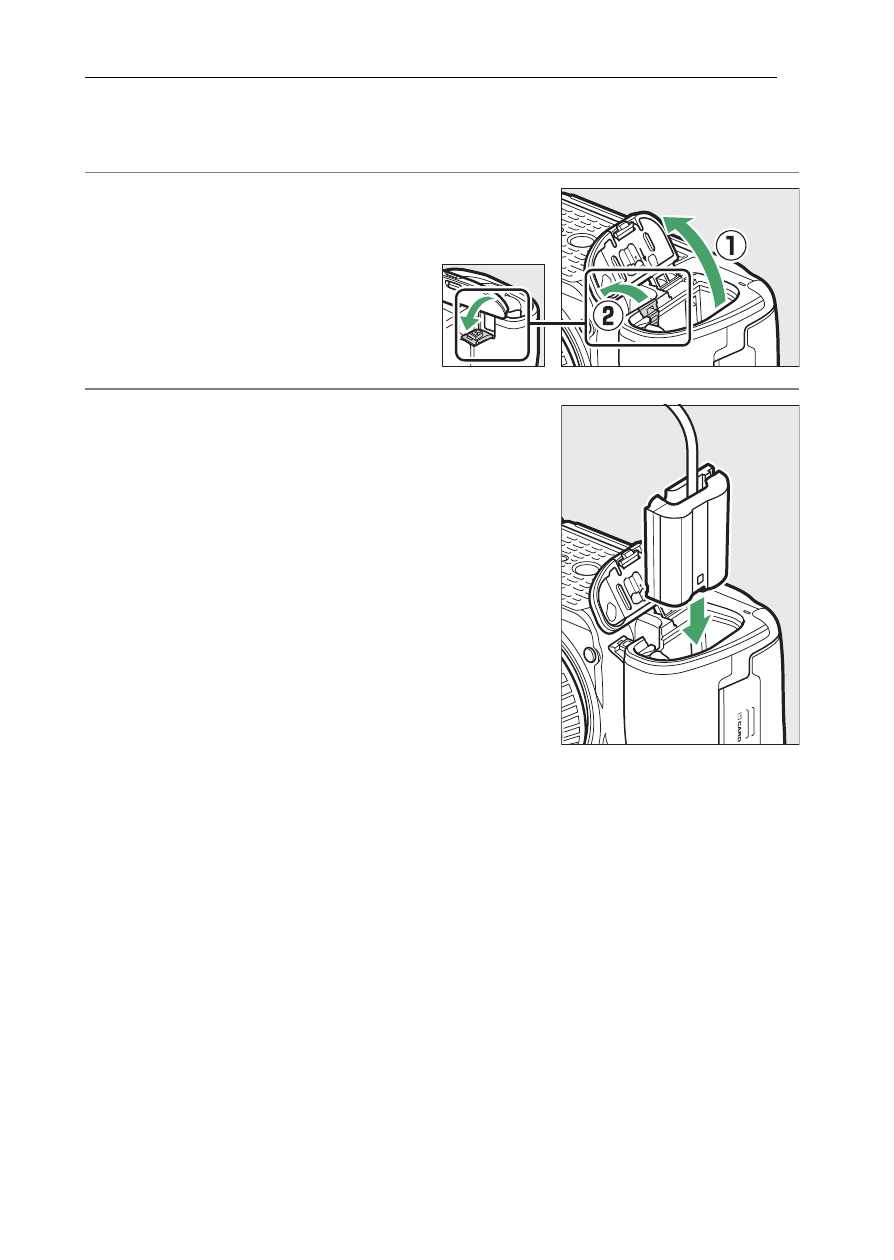
Attaching a Power Connector and AC Adapter
Turn the camera off before attaching an optional power
connector and AC adapter.
1
Open the battery-
chamber (
q
) and
power connector (
w
)
covers.
2
Insert the EP-5B power
connector.
•
Be sure to insert the connector in
the correct orientation.
•
Using the connector to keep the
orange battery latch pressed to one
side, slide the connector into the
battery chamber until the latch
locks the connector in place.
Advertising
See also other documents in the category Nikon Cameras:
- D800 (472 pages)
- D800 (38 pages)
- D800 (48 pages)
- N80 (116 pages)
- n65 (116 pages)
- D300 (452 pages)
- D80 (162 pages)
- F100 (57 pages)
- D200 (221 pages)
- D200 (48 pages)
- D40X (139 pages)
- D100 (212 pages)
- D60 (204 pages)
- D40 (139 pages)
- Coolpix S3000 (184 pages)
- Coolpix L110 (156 pages)
- F3 (71 pages)
- F3 (3 pages)
- D50 (148 pages)
- D700 (472 pages)
- COOLPIX-P100 (216 pages)
- COOLPIX-S8100 (220 pages)
- D90 (300 pages)
- D90 (2 pages)
- D3000 (68 pages)
- D3000 (216 pages)
- D5000 (256 pages)
- D3100 (224 pages)
- D300s (432 pages)
- EM (34 pages)
- FG (34 pages)
- fe (49 pages)
- fe2 (66 pages)
- f2 (70 pages)
- n2000 (54 pages)
- COOLPIX P500 (252 pages)
- Coolpix S550 (2 pages)
- Coolpix 5400 (4 pages)
- Coolpix 775 (2 pages)
- Coolpix 2500 (120 pages)
- Coolpix S4 (8 pages)
- Coolpix S4 (28 pages)
- Coolpix S560 (172 pages)
- SQ (116 pages)
- Coolpix 990 (50 pages)