Setting date and time, Data transfer to an external program – Amprobe PQ55A Power-Analyzer User Manual
Page 36
Advertising
Setting date and time
Click the (h) [Insert graph] button to transmit the current system time of the PC
to the power measuring instrument.
Data transfer to an external program
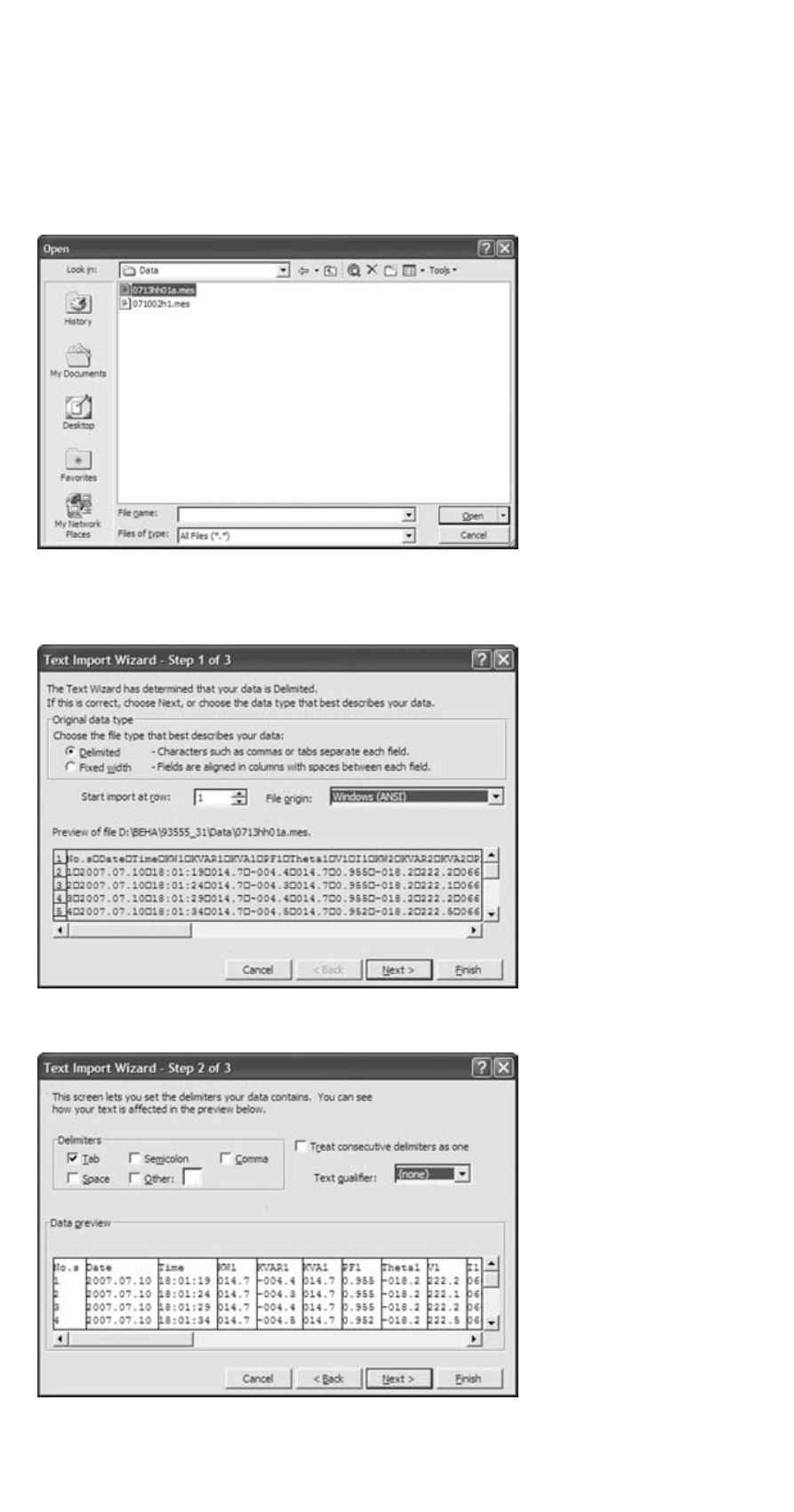
Example: Evaluation of the measured values by importing the data to MS EXCEL.
Open the “Open file” function in MS EXCEL.
☞
Select “Alle Dateien” (All files) data type
Settings in MS EXCEL text wizard
☞
Setting the data type: Do not select “fixed width”, but “delimited”.
☞
Setting the delimiter: select Tab and text qualifier: select “none”.
36
Advertising
See also other documents in the category Amprobe Measuring instruments:
- AC71B Clamp-On-Multimeter (96 pages)
- AC50A (78 pages)
- ACD-10-TRMS-Pro (16 pages)
- AC68C Clamp-Multimeter (52 pages)
- ACD-14-TRMS-FX Clamp-On-Multimeter (19 pages)
- ACD-10-TRMS-PLUS ACD-10-PLUS Clamp-Multimeters (116 pages)
- ACD-40PQ Clamp-Meters (16 pages)
- ACD-23SW Digital-Clamp-Meters (20 pages)
- ACD-41PQ Clamp-On-Power-Meters (20 pages)
- ACD-41PQ Clamp-On-Power-Meters (121 pages)
- ACD-14-TRMS-PLUS Clamp-On-Multimeters (148 pages)
- ACD-330T Clamp-On-Multimeter (42 pages)
- ACD-21SWC Digital-Clamp-Meters (84 pages)
- ACD-4 Mini-Clamp-DMM (16 pages)
- ACD-6-TRMS-PRO Clamp-On-Multimeters (15 pages)
- FLASH-80 Industrial-Mini-Flashlight (64 pages)
- FLASH-80 Industrial-Mini-Flashlight (46 pages)
- FLASH-80 Industrial-Mini-Flashlight (44 pages)
- FLASH-80 Industrial-Mini-Flashlight (98 pages)
- ACD-50NAV ACD-51NAV ACDC-52NAV ACD-53NAV ACD-54NAV Navigator-Clamps (36 pages)
- ACD-55HPQ Clamp-Meter (62 pages)
- ACDC-620T Clamp-On-Multimeter (65 pages)
- ACDC-400 Digital-Clamp-On-Multimeter (98 pages)
- ACDC-100-TRMS Clamp-On-Multimeters (97 pages)
- RS-3 Rotary-Scale-Clamp-On (4 pages)
- AD105A Clamp-Meter (34 pages)
- LH41A Clamp-On-Ammeter (53 pages)
- 30XR-A Professional-Digital-Multimeter (53 pages)
- 33XR-A Professional-Digital-Multimeter (73 pages)
- 34XR-A Professional-Digital-Multimeter (73 pages)
- 37XR-A Professional-Digital-Multimeter (86 pages)
- 5XP-A 15XP-A 35XP-A Compact-Digital-Multimeters (126 pages)
- AM-110-TRMS Digital-Multimeters (15 pages)
- AM-160-A DMM (30 pages)
- 38XR-A Professional-Digital-Multimeter (92 pages)
- AM-33 Digital-Multimeter (1 page)
- AM-34 Auto-Digital-Multimeter (1 page)
- AM-47 Multimeters (8 pages)
- AM-240 Digital-Multimeters (75 pages)
- AM-250 Digital-Multimeter (22 pages)
- AM-270 Industrial-Multimeter (28 pages)
- AM-60 Compact-Digital-Multimeter (20 pages)
- AM8C Analog-Multimeter (66 pages)
- CR50A Capacitance-Resistance-Meter (46 pages)
- AM91RS Digital-Multimeter (30 pages)