Analysis, Configuring the internet explorer settings – H3C Technologies H3C MSR 50 User Manual
Page 44
23
Analysis
•
If you use the Microsoft Internet Explorer, you can access the Web interface only when the following
functions are enabled: Run ActiveX controls and plug-ins, script ActiveX controls marked safe for
scripting and active scripting.
•
If you use the Mozilla Firefox, you can access the Web interface only when JavaScript is enabled.
Configuring the Internet Explorer settings
1.
Open the Internet Explorer, and then select Tools > Internet Options.
2.
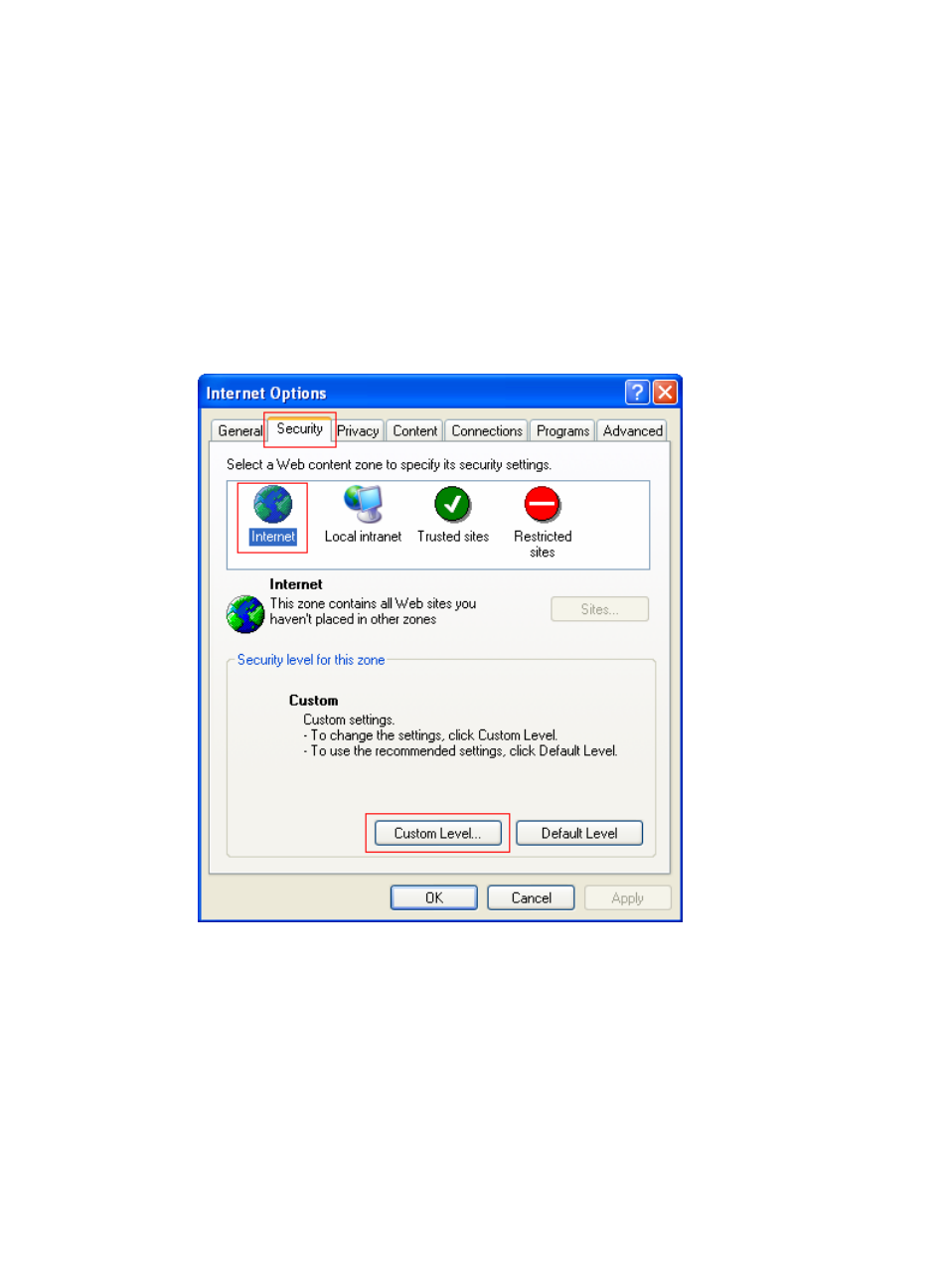
Click the Security tab, and then select a Web content zone to specify its security settings, as shown
in
Figure 11 Internet Explorer setting (I)
3.
Click Custom Level, and a dialog box Security Settings appears.
4.
As shown in
, enable these functions: Run ActiveX controls and plug-ins, script ActiveX
controls marked safe for scripting and active scripting.