Configuring a ce1/pri interface in ce1 mode – H3C Technologies H3C MSR 50 User Manual
Page 74
53
Item Description
MTU
Configure the MTU on the interface.
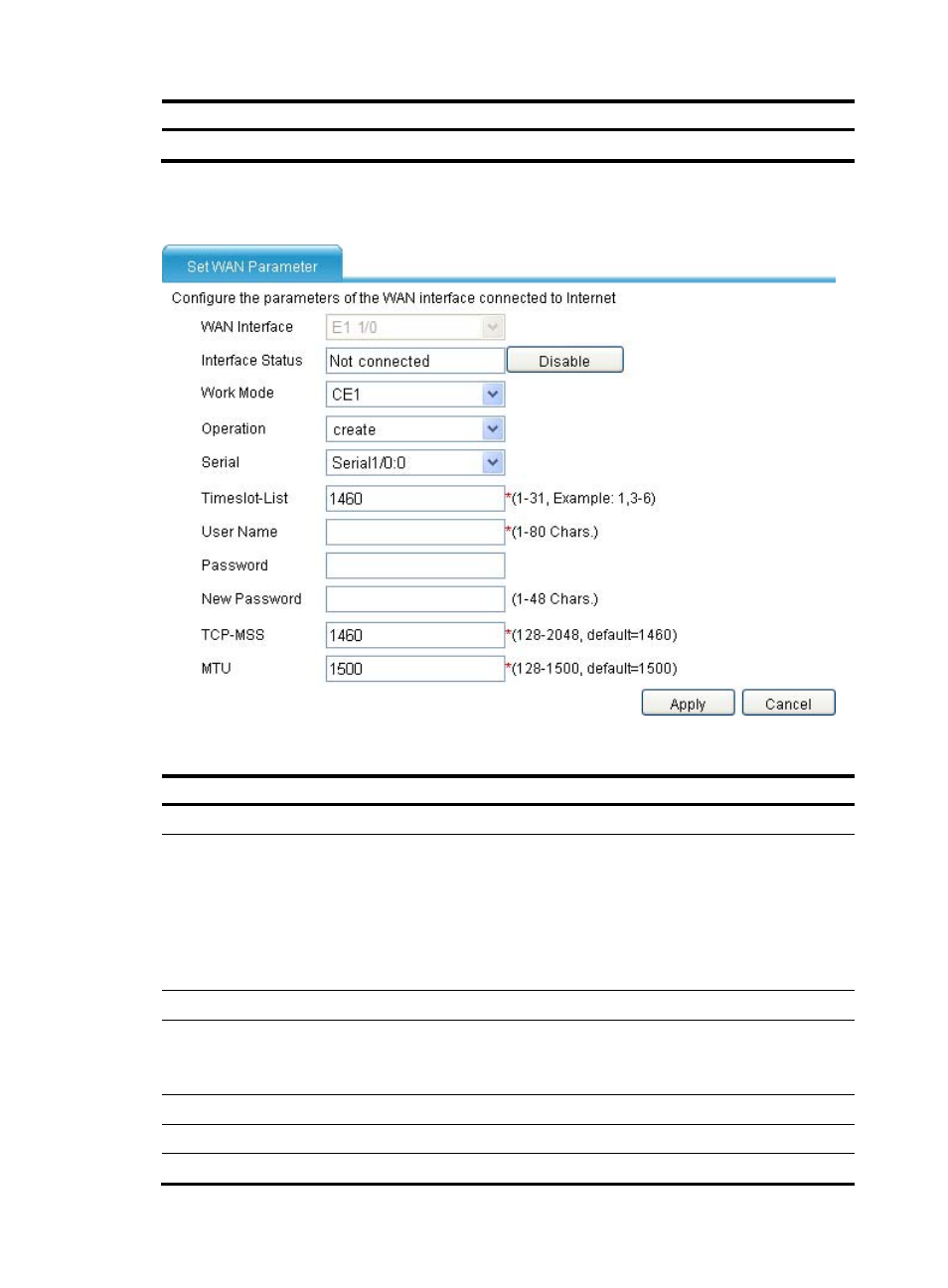
Configuring a CE1/PRI interface in CE1 mode
Figure 33 Configuring a CE1/PRI interface in CE1 mode
Table 33 Configuration items (in CE1 mode)
Item Description
WAN Interface
Displays the name of the CE1/PRI interface to be configured.
Interface Status
Display and set the interface status:
•
Connected—Indicating that the current interface is up and connected, click Disable
to shut down the interface.
•
Not connected—Indicating that the current interface is up but not connected, click
Disable to shut down the interface.
•
Administratively Down—Indicating that the current interface is shut down by a
network administrator, click Enable to bring up the interface.
Work Mode: CE1
Select CE1 as the operating mode.
Operation
Add or remove timeslots:
•
create—Adds timeslots to form a channel set.
•
delete—Removes timeslots from a channel set.
Serial
Specify the serial interface number of the channel set.
Timeslot-List
Set the timeslots to add or remove.
User Name
Configure the username for authentication.