Expression pedal settings, Damper pedal settings, Speakers settings – Dexibell CLASSICO L3 76-Organ User Manual
Page 43: Auto off settings, Local on/off settings, Manual ii/orchestra, Orchestra (manual ii), Orchestra (manual i and pedal), Piano, Piano, orchestra (manual i)
43
Expression Pedal Settings
Expression Pedal Settings
[
FUNCTION/EXIT
] button
3
An optional expression pedal can be connected to the CLASSICO L3
EXPRESSION PEDAL socket and used to set the volume of the organ
and the other sound you are using.
Here below the keyboard parts that you can control:
Piston
Setting
Explanation
MANUAL II/
ORCHESTRA
The expression pedal acts on
the MANUAL II division and its
orchestral section. (DEFAULT)
ALL
The expression pedal acts on
all divisions and orchestral
sections.
ORCHESTRA
(
MANUAL II
)
The expression pedal acts on
the orchestral sections in the
MANUAL II division.
ORCHESTRA
(
MANUAL I
and
PEDAL)
The expression pedal acts on
the orchestral sections in the
MANUAL I and PEDAL division.
Damper Pedal Settings
[
FUNCTION/EXIT
] button
4
An optional damper pedal can be connected to the CLASSICO L3
DAMPER PEDAL socket. You will be able to hold the notes of the
PEDAL, MANUAL I and II sections in the same way as on an acoustic
piano.
NOTE
You can connect a continuous pedal as damper to the [CRESCENDO]
socket. See the parameter "CRESCENDO PEDAL" (p. 45).
Piston
Setting
Explanation
PIANO
The damper pedal acts on the
PIANO sectionas a acoustic
piano. (DEFAULT)
PIANO, ORCHESTRA
(
MANUAL I
)
The damper pedal acts on the
PIANO and orchestral section
in the MANUAL I divisions.
PIANO, ORCHESTRA
(
PEDAL
)
The damper pedal acts on the
PIANO and orchestra sections
in the PEDAL division.
PIANO, ORCHESTRA
(
PEDAL and MANUAL I
)
The damper pedal acts on
the orchestral sections in the
MANUAL I and PEDAL division.
Speakers Settings
[
FUNCTION/EXIT
] button
5
Piston
Setting
Explanation
AUTO
Choose this option if you
want to use the CLASSICO L3
internal speakers. Connecting
a pair of headphones mutes
the internal speakers.
Piston
Setting
Explanation
ON
Choose this option if you
want to use the CLASSICO L3
internal speakers when con-
necting a pair of headphones,
the internal speakers continue
to produce sound.
OFF
When you use the
CLASSICO L3 for live perfor-
mances and therefore connect
it to an external amplification
system, it may be convenient
to switch off the CLASSICO L3
internal speakers.
AUTO OFF Settings
[
FUNCTION/EXIT
] button
6
This parameter allows you to cause the CLASSICO L3 to switch itself off after the
selected number of minutes has elapsed if you are not using it.
Select “OFF” if you prefer not to use this function.
Piston
Setting
OFF
60 minutes
120 minutes
240 minutes
LOCAL ON/OFF Settings
[
FUNCTION/EXIT
] button
7
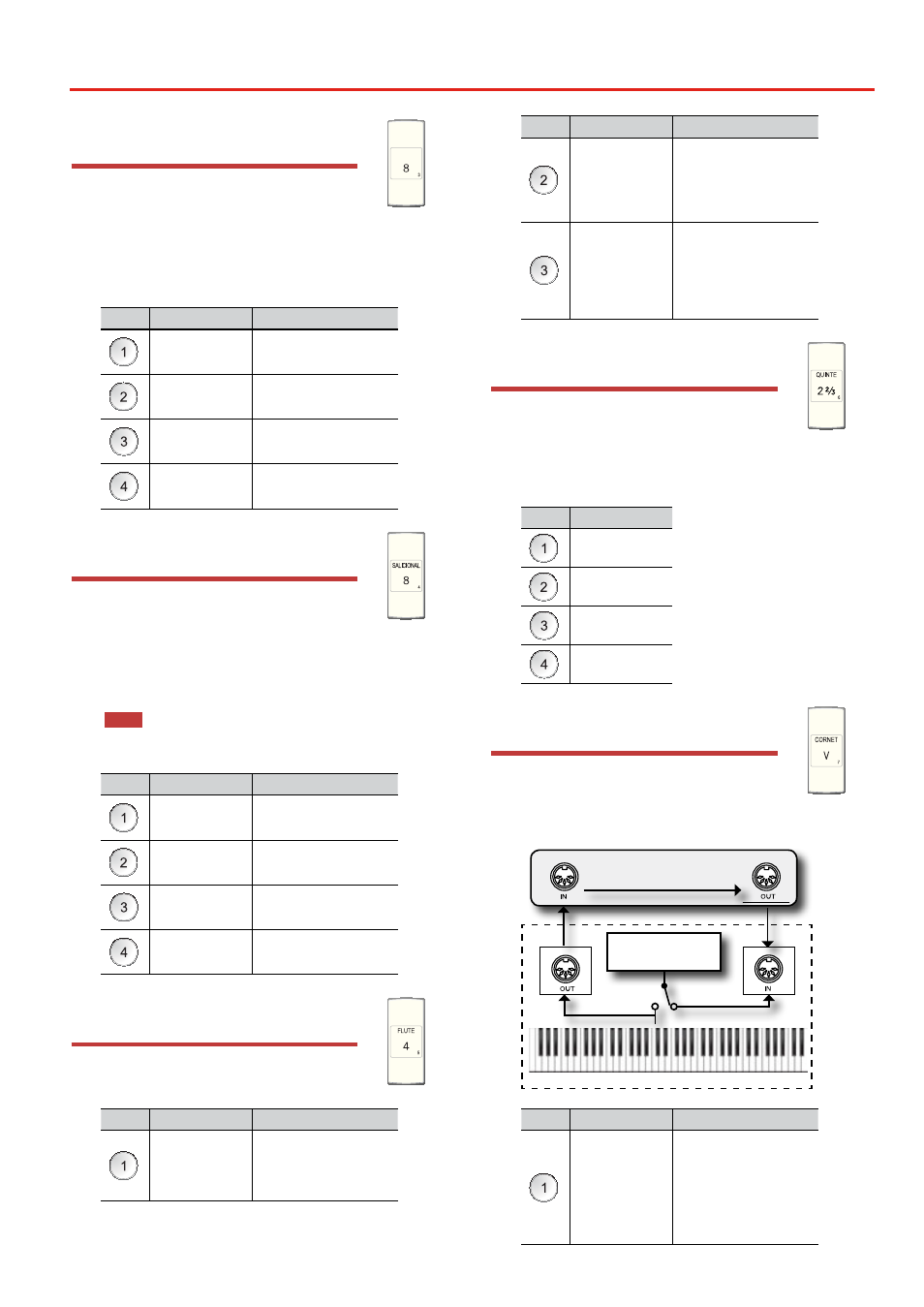
This parameter is useful when you connect an external MIDI sequencer to
the CLASSICO L3.
CLASSICO L3
Tone Generator
External
Sequencer
CLASSICO L3
LOCAL OFF
Soft Thru
Piston
Setting
Explanation
OFF
Select “OFF” to switch off
its connection with the
CLASSICO L3 internal tone
generator.
The generator receives MIDI
data from a sequencer or other
instrument you connect to the
CLASSICO L3 MIDI IN port.