3 port classification – PLANET WGSD-10020 User Manual
Page 177
User’s Manual of WGSD-10020 Series
177
4.9.3 Port Classification
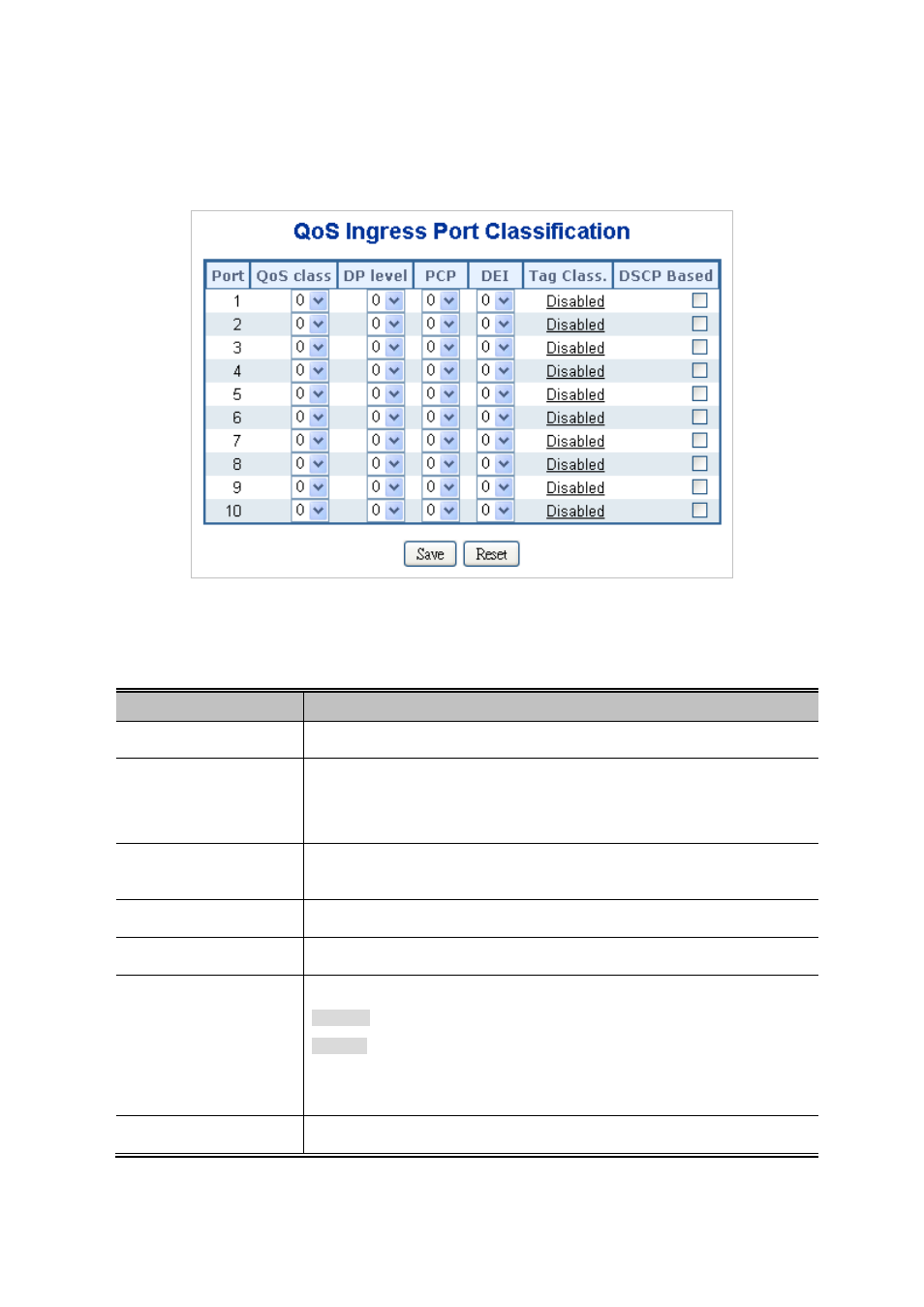
This page allows you to configure the basicIngress Classification settings for all switch ports. The Port Classification
screen in
Figure 4-9-2
appears.
Figure 4-9-2 QoS Ingress Port Classification page screenshot
The page includes the following fields:
Object
Description
•
Port
The port number for which the configuration below applies.
•
QoS Class
Controls the default QoS class, i.e., the QoS class for frames not classified in any
other way. There is a one to one mapping between QoS class, queue and priority.
A QoS class of 0 (zero) has the lowest priority.
•
DP Level
Controls the default DP level, i.e., the DP level for frames not classified in any
other way.
•
PCP
Controls the defaultfor untagged frames.
•
DEI
Controls the defaultfor untagged frames.
•
Tag Class
Shows the classification mode for tagged frames on this port.
Disabled: Use default QoS class and DP level for tagged frames.
Enabled: Use mapped versionsandfor tagged frames.
Click on the mode in order to configure the mode and/or mapping.
For more detail information, please refer to chapter 4.9.3.1.
•
DSCP Based
Click to Enable DSCP Based QoS Ingress Port Classification.