3 snmpv3 groups – PLANET WGSD-10020 User Manual
Page 85
User’s Manual of WGSD-10020 Series
85
4.3.4.3 SNMPv3 Groups
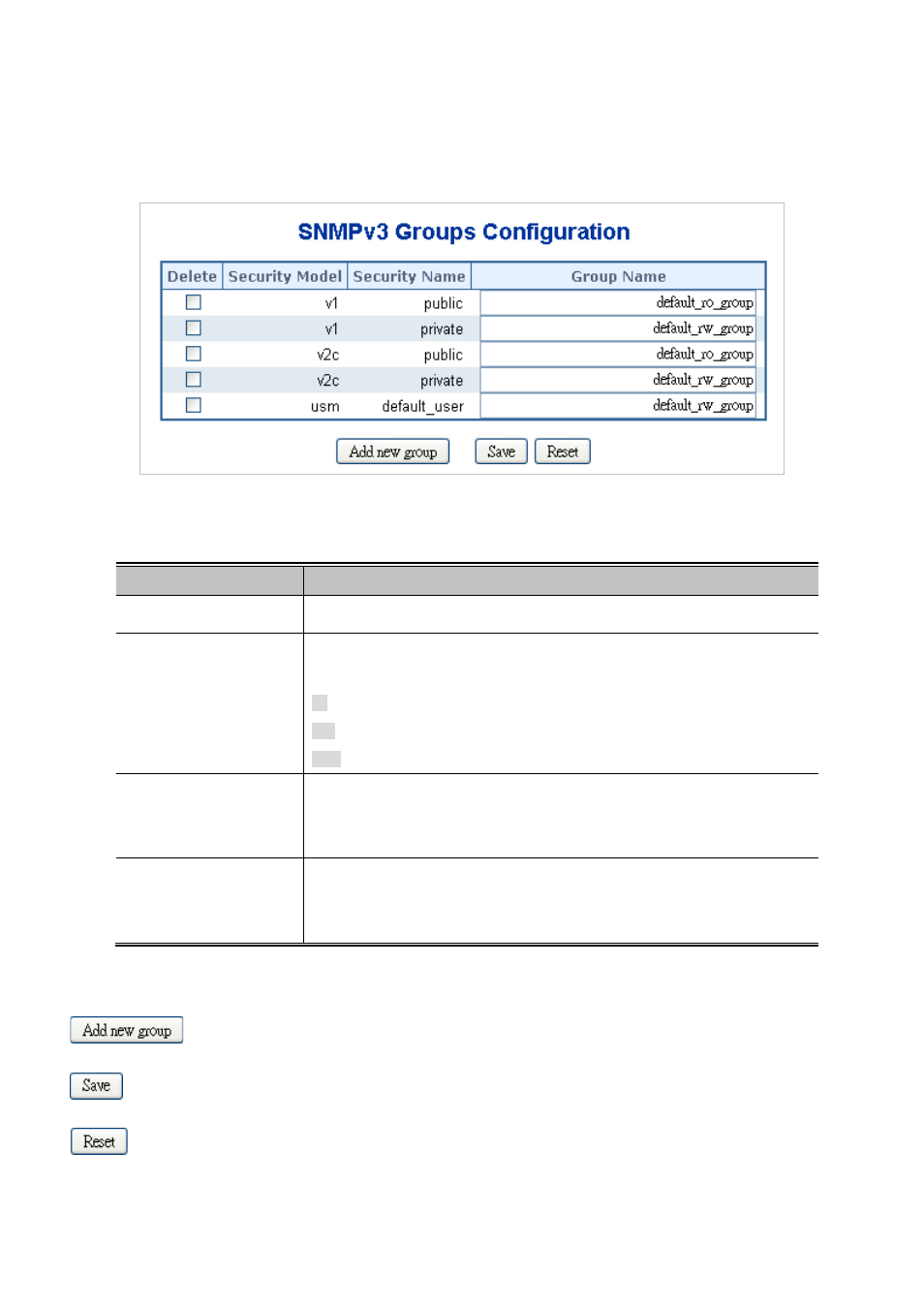
Configure SNMPv3 groups table on this page. The entry index keys are Security Model and Security Name. The SNMPv3
Groups screen in
Figure 4-3-6
appears.
Figure 4-3-6 SNMPv3 Groups Configuration page screenshot
The page includes the following fields:
Object
Description
•
Delete
Check to delete the entry. It will be deleted during the next save.
•
Security Model
Indicates the security model that this entry should belong to. Possible security
models are:
v1: Reserved for SNMPv1.
v2c: Reserved for SNMPv2c.
usm: User-based Security Model (USM).
•
Security Name
A string identifying the security name that this entry should belong to.
The allowed string length is 1 to 32, and the allowed content is the ASCII
characters from 33 to 126.
•
Group Name
A string identifying the group name that this entry should belong to.
The allowed string length is 1 to 32, and the allowed content is the ASCII
characters from 33 to 126.
Buttons
: Click to add a new group entry.
: Click to save changes.
: Click to undo any changes made locally and revert to previously saved values.