PLANET CS-2001 User Manual
Page 375
Advertising
364
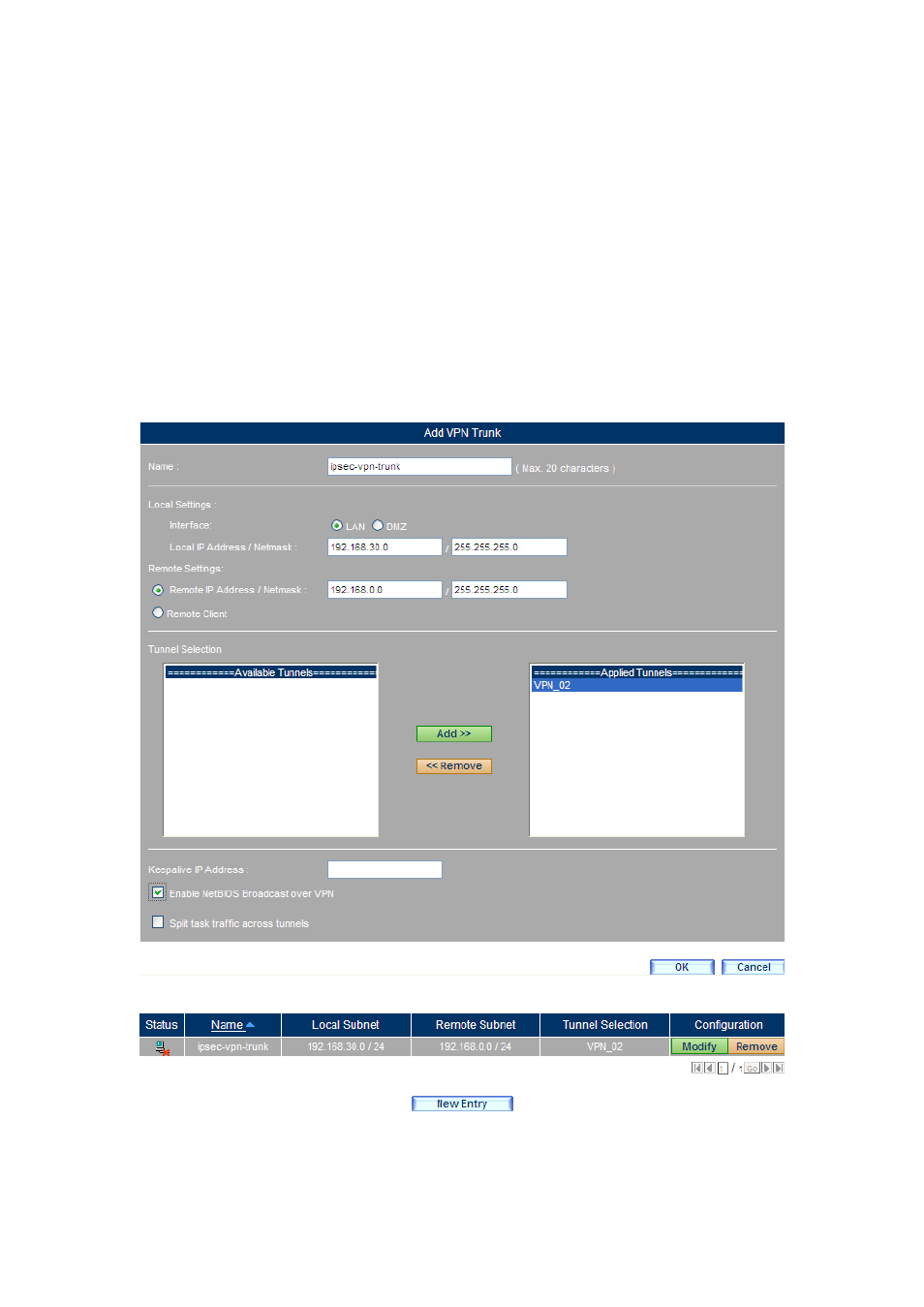
Step 9. Go to Policy Object > VPN > Trunk, click the New Entry button and then
set as below:
(Figure 11-243)
Type the name in the Name field.
Local Settings : Select LAN. Enter C Company’s subnet / mask
192.168.30.3 / 255.255.255.0 in the field.
Under the Remote Settings section, type A Company’s subnet / mask
192.168.0.0 / 255.255.255.0 in the field.
Move VPN_02 from the Available Tunnels column to the Selected
Tunnels column.
Tick Enable NetBIOS Broadcast over VPN.
Click OK.
(Figure 11-244)
Figure 11-243 Configuring the Trunk
Figure 11-244 Setting Completed
Advertising
See also other documents in the category PLANET Communication:
- ISW-1022M (167 pages)
- ADE-2400A (8 pages)
- ADE-4400 (2 pages)
- ADE-3400 (2 pages)
- ADE-3400 (61 pages)
- ADE-3400 (73 pages)
- ADW-4401 (84 pages)
- ADE-4400 (2 pages)
- ADE-3100 (51 pages)
- ADE-3410 (2 pages)
- ADW-4401 (2 pages)
- ADW-4401 (2 pages)
- ADN-4000 (118 pages)
- ADN-4000 (91 pages)
- ADN-4000 (2 pages)
- ADN-4100 (115 pages)
- ADN-4100 (2 pages)
- ADN-4100 (2 pages)
- ADN-4100 (2 pages)
- ADN-4100 (104 pages)
- ADN-4102 (2 pages)
- ADU-2110A (2 pages)
- ADU-2110A (37 pages)
- ADW-4302 (8 pages)
- ADW-4302 (6 pages)
- ADW-4100 (57 pages)
- GRT-501 (52 pages)
- GRT-501 (51 pages)
- PRT-301W (32 pages)
- VC-100M (26 pages)
- CS-2000 (573 pages)
- CS-2000 (16 pages)
- CS-2000 (13 pages)
- BM-525 (205 pages)
- CS-1000 (226 pages)
- BM-2101 (278 pages)
- CS-2001 (16 pages)
- CS-500 (12 pages)
- CS-5800 (12 pages)
- SG-4800 (182 pages)
- FRT-401NS15 (12 pages)
- FRT-401NS15 (76 pages)
- FRT-405N (2 pages)
- FRT-405N (108 pages)