PLANET CS-2001 User Manual
Page 591
Advertising
580
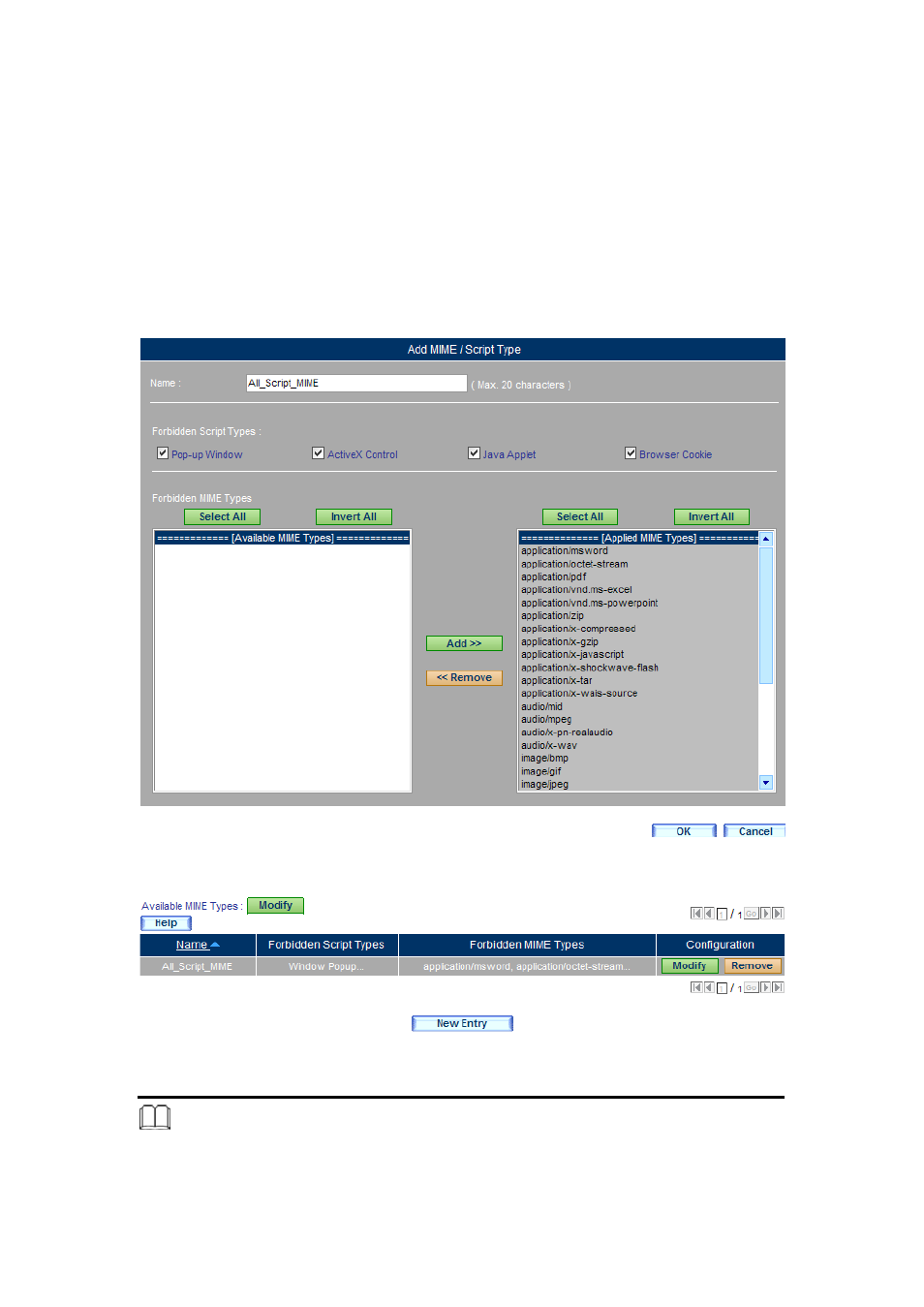
Step 3. Go to Web Filter > Configuration > MIME/Script, click New Entry and
then set as below:
(Figure 16-19)
Type the name in the Name field.
Under the Forbidden File Extensions section, tick Window Popup,
Microsoft ActiveX, Java Applet and Web Cookie.
Move the MIME type from the Available MIME Types column to the
Selected MIME Types column.
Click OK.
(Figure 16-20)
Figure 16-19 Configuring the MIME/Script
Figure 16-20 MIME/Script Setting Completed
Note:
1. Under Web Filter > Configuration > MIME/ Script, users may configure the MIME Type to
be blocked:
Advertising
See also other documents in the category PLANET Communication:
- ISW-1022M (167 pages)
- ADE-2400A (8 pages)
- ADE-4400 (2 pages)
- ADE-3400 (2 pages)
- ADE-3400 (61 pages)
- ADE-3400 (73 pages)
- ADW-4401 (84 pages)
- ADE-4400 (2 pages)
- ADE-3100 (51 pages)
- ADE-3410 (2 pages)
- ADW-4401 (2 pages)
- ADW-4401 (2 pages)
- ADN-4000 (118 pages)
- ADN-4000 (91 pages)
- ADN-4000 (2 pages)
- ADN-4100 (115 pages)
- ADN-4100 (2 pages)
- ADN-4100 (2 pages)
- ADN-4100 (2 pages)
- ADN-4100 (104 pages)
- ADN-4102 (2 pages)
- ADU-2110A (2 pages)
- ADU-2110A (37 pages)
- ADW-4302 (8 pages)
- ADW-4302 (6 pages)
- ADW-4100 (57 pages)
- GRT-501 (52 pages)
- GRT-501 (51 pages)
- PRT-301W (32 pages)
- VC-100M (26 pages)
- CS-2000 (573 pages)
- CS-2000 (16 pages)
- CS-2000 (13 pages)
- BM-525 (205 pages)
- CS-1000 (226 pages)
- BM-2101 (278 pages)
- CS-2001 (16 pages)
- CS-500 (12 pages)
- CS-5800 (12 pages)
- SG-4800 (182 pages)
- FRT-401NS15 (12 pages)
- FRT-401NS15 (76 pages)
- FRT-405N (2 pages)
- FRT-405N (108 pages)