PLANET CS-2001 User Manual
Page 589
Advertising
578
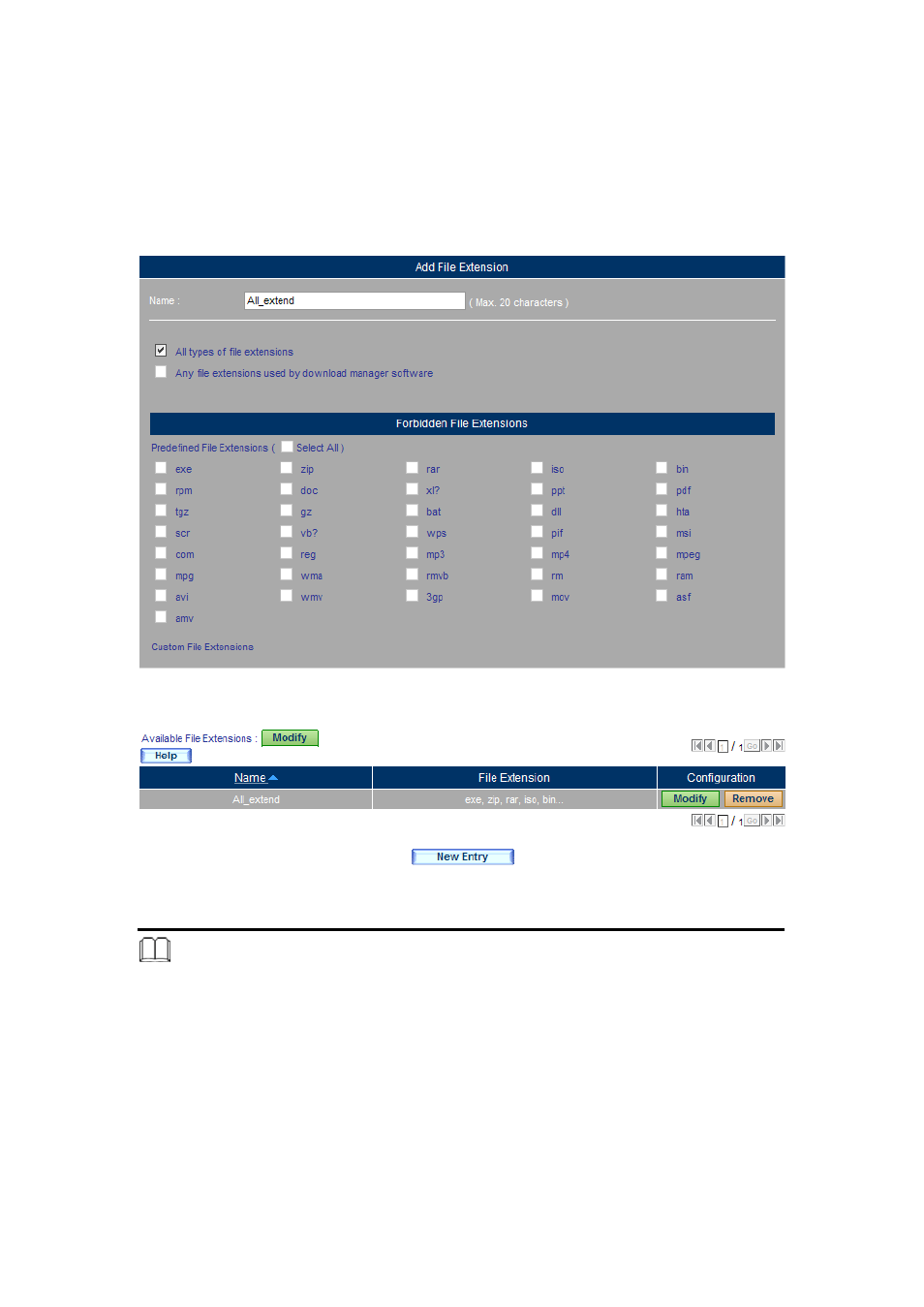
Step 2. Go to Web Filter > Configuration > File Extensions, click New Entry
and then set as below:
(Figure 16-14)
Type the name in the Name field.
Select All types of file extensions.
Click OK.
(Figure 16-15)
Figure 16-14 Blocking the Specific File Extension
Figure 16-15 Setting Completed
Note:
1. Under Web Filter > Configuration > File Extensions, the user may add the extension to be
blocked:
Click Modify and then click New Entry.
(Figure 16-16)
Type the extenstion in the field.
Click OK.
(Figure 16-17, 16-18)
Advertising
See also other documents in the category PLANET Communication:
- ISW-1022M (167 pages)
- ADE-2400A (8 pages)
- ADE-4400 (2 pages)
- ADE-3400 (2 pages)
- ADE-3400 (61 pages)
- ADE-3400 (73 pages)
- ADW-4401 (84 pages)
- ADE-4400 (2 pages)
- ADE-3100 (51 pages)
- ADE-3410 (2 pages)
- ADW-4401 (2 pages)
- ADW-4401 (2 pages)
- ADN-4000 (118 pages)
- ADN-4000 (91 pages)
- ADN-4000 (2 pages)
- ADN-4100 (115 pages)
- ADN-4100 (2 pages)
- ADN-4100 (2 pages)
- ADN-4100 (2 pages)
- ADN-4100 (104 pages)
- ADN-4102 (2 pages)
- ADU-2110A (2 pages)
- ADU-2110A (37 pages)
- ADW-4302 (8 pages)
- ADW-4302 (6 pages)
- ADW-4100 (57 pages)
- GRT-501 (52 pages)
- GRT-501 (51 pages)
- PRT-301W (32 pages)
- VC-100M (26 pages)
- CS-2000 (573 pages)
- CS-2000 (16 pages)
- CS-2000 (13 pages)
- BM-525 (205 pages)
- CS-1000 (226 pages)
- BM-2101 (278 pages)
- CS-2001 (16 pages)
- CS-500 (12 pages)
- CS-5800 (12 pages)
- SG-4800 (182 pages)
- FRT-401NS15 (12 pages)
- FRT-401NS15 (76 pages)
- FRT-405N (2 pages)
- FRT-405N (108 pages)