Checking and editing registered information – Canon PowerShot SX60 HS User Manual
Page 49
49
Before Use
Basic Guide
Advanced Guide
1
Camera Basics
2
Auto Mode /
Hybrid Auto Mode
3
Other Shooting Modes
5
Tv, Av, M, C1, and C2 Mode
6
Playback Mode
7
Wi-Fi Functions
8
Setting Menu
9
Accessories
10
Appendix
Index
4
P Mode
Checking and Editing Registered Information
1
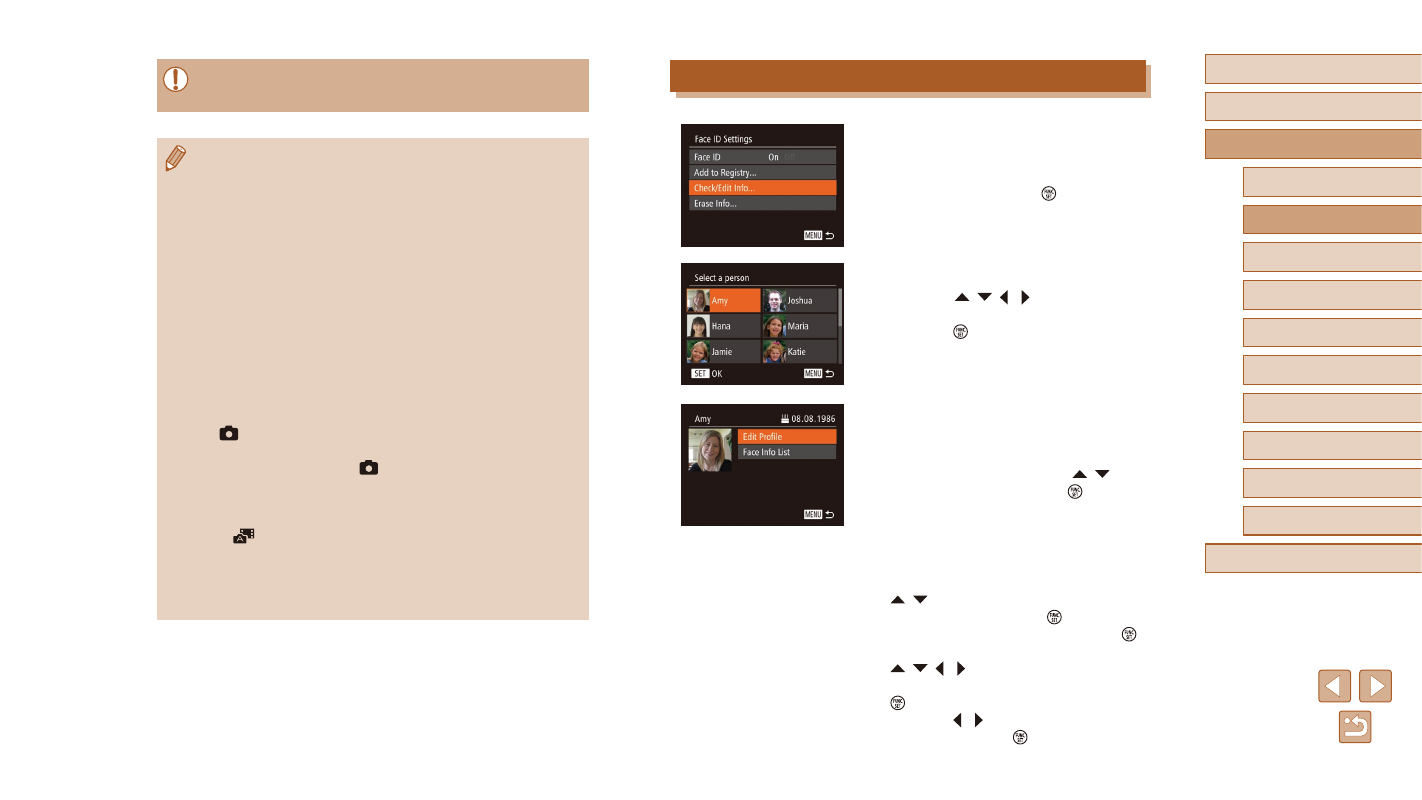
Access the [Check/Edit Info] screen.
●
Following step 2 in “Registering Face ID
Information” (= 47), choose [Check/
Edit Info] and press the [ ] button.
2
Choose a person to check or edit.
●
Press the [ ][ ][ ][ ] buttons to choose
the person to check or edit, and then
press the [ ] button.
3
Check or edit the information as
needed.
●
To check a name or birthday, choose
[Edit Profile] by pressing the [ ][ ]
buttons, and then press the [ ] button.
On the screen displayed, you can edit
names or birthdays as described in step 4
of “Registering Face ID Information”
●
To check face information, press the
[ ][ ] buttons to choose [Face Info
List], and then press the [ ] button.
To erase face information, press the [ ]
button on the screen displayed, press the
[ ][ ][ ][ ] buttons to choose the face
information to erase, and then press the
[ ] button. After [Erase?] is displayed,
press the [ ][ ] buttons to choose [OK],
and then press the [ ] button.
●
People other than those registered may be mistakenly detected
as the registered person if they share similar facial features.
●
Registered people may not be correctly detected if the captured
image or scene differs drastically from the registered face
information.
●
If a registered face is not detected, or not easily detected,
overwrite registered information with new face info. Registering
face info right before shooting will allow for easier detection of
registered faces.
●
If a person is mistakenly detected as another person and you
continue shooting, you can edit or erase the name recorded in the
image during playback (= 107).
●
Because faces of babies and children change quickly as they
grow, you should update their face info regularly (= 47).
●
When information display is set to off (= 28), names will not
display, but will be recorded in the image.
●
Names will still be recorded in images even if you clear the
[Shooting Info] check box in [Custom Display] (= 96) on the
[
] tab so that the names are not displayed.
●
If you don’t want names to be recorded in still images, choose
[Face ID Settings] on the [
] tab, choose [Face ID], and then
choose [Off].
●
You can check names recorded in images in the playback screen
(simple information display) (= 102).
●
In [
] mode, names are not displayed on the shooting screen,
but they will be recorded in still images.
●
Names recorded in continuous shooting (= 46, = 86) will
continue to be recorded in the same position as for the first shot,
even if subjects move.