Ultralite-mk5 rear panel – MOTU UltraLite-mk5 USB-C Audio/MIDI Interface User Manual
Page 10
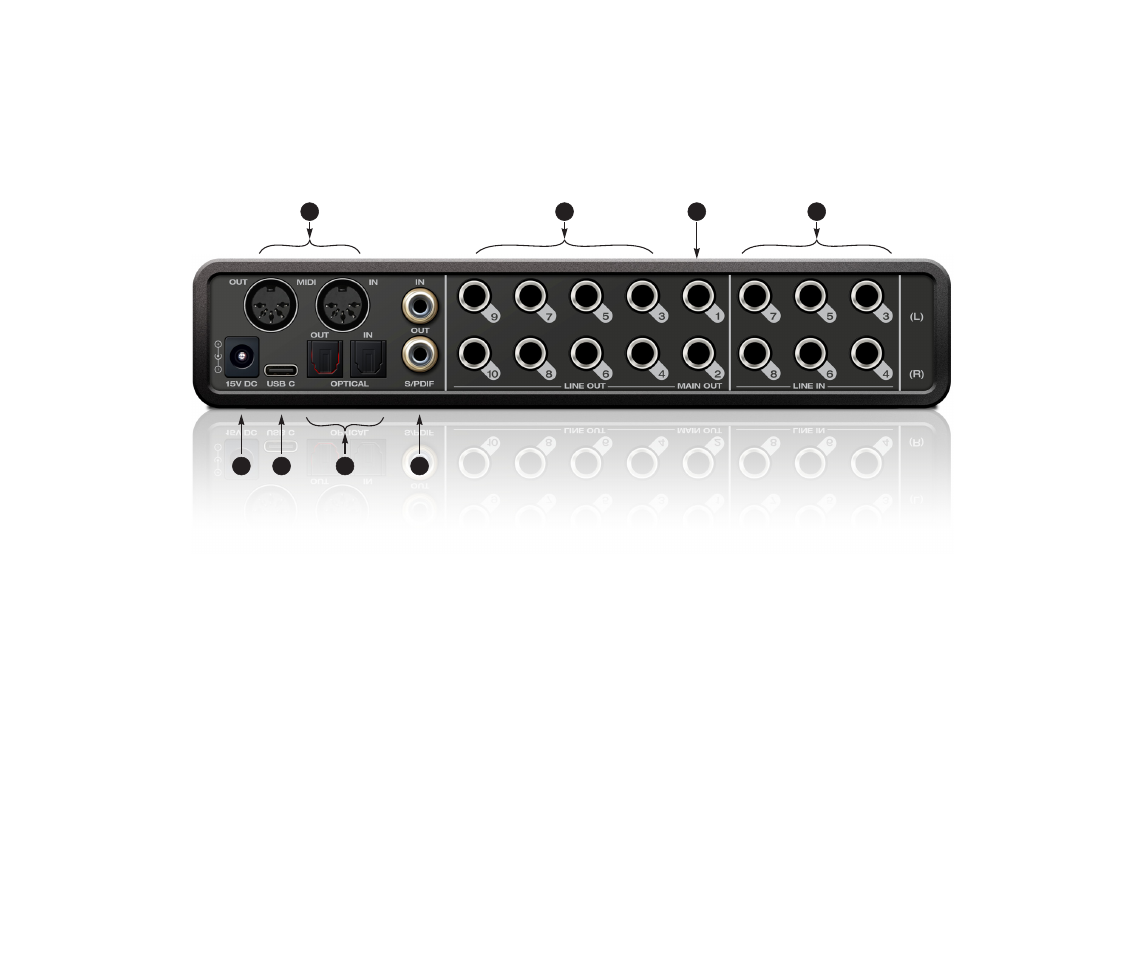
UltraLite-mk5 Rear Panel
1. The UltraLite-mk5 operates as a USB
MIDI
interface, allow-
ing MIDI software to communicate with connected MIDI
devices through the USB connection to the computer.
Connect a MIDI device here using standard MIDI cables.
Connect the UltraLite-mk5’s MIDI OUT port to the MIDI IN
port on the other device. Conversely, connect the
UltraLite-mk5’s MIDI IN port to the MIDI OUT port on the
other device. For further details, see “MIDI connections” on
2. The
analog (‘Line’) outputs
provide additional analog
output for secondary studio monitors, surround monitor-
ing, sub-mixes or any other desired destination. These
connectors are balanced (tip/ring/sleeve), but they also
accept an unbalanced plug. They are DC-coupled. Control
volume from the CueMix 5 app or your host audio software.
For further details, see “Audio connections” on page 22.
3. The
Main Out
pair provides stereo analog output for
primary (powered) studio monitors or PA speakers, or any
other desired destination. Control volume from the
CueMix 5 app or from the front panel volume control.
To hear audio playback from your host audio software on
the MAIN OUT pair, assign audio tracks (and master fader)
to these main outs. You can also use the CueMix 5 app to
route live UltraLite-mk5 inputs here as well.
4. Equipped with very high quality 24-bit 192 kHz converters,
these six
line inputs
are balanced TRS (tip/ring/sleeve)
quarter-inch connectors that can also accept an unbal-
anced plug (with the ring disconnected). Use them for
keyboards or other line level analog sources. These inputs
are equipped with the UltraLite-mk5’s Precision Digital
Gain™ feature: digital gain that boosts the input level up to
+20 dB in 1 dB increments, adjusted from the CueMix 5
app. Each input includes a
Phase Invert
switch, accessed in
the CueMix 5 app. See “Input tab” on page 34.
5. These
RCA S/PDIF
jacks provide stereo, 24-bit digital input
and output at all supported sample rates (up to 96 kHz).
When connecting a source to the input, be sure to set the
clock source correctly. See “S/PDIF” on page 24.
6. These
ADAT optical
“lightpipe” jacks provide 8 channels of
24-bit ADAT optical digital I/O at 1x sample rates (44.1 or 48
kHz) and 4 channels at 2x sample rates (88.2 or 96 kHz).
They are disabled at higher sample rates. Alternately, they
can operate as stereo TOSLink (optical S/PDIF) connectors.
7. Connect the UltraLite-mk5 to the computer here using the
included USB-C-to-C or USB-C-to-A cable. If you are
connecting to an iOS device, see “iOS setup (USB-C)” on
8. This
DC power
jack accepts any standard 15V DC, 1A
tip-positive power supply.
4
8
1
2
3
7
6
5