Output tab, Ee “output tab” on – MOTU UltraLite-mk5 USB-C Audio/MIDI Interface User Manual
Page 35
C U E M I X 5
35
OUTPUT TAB
3
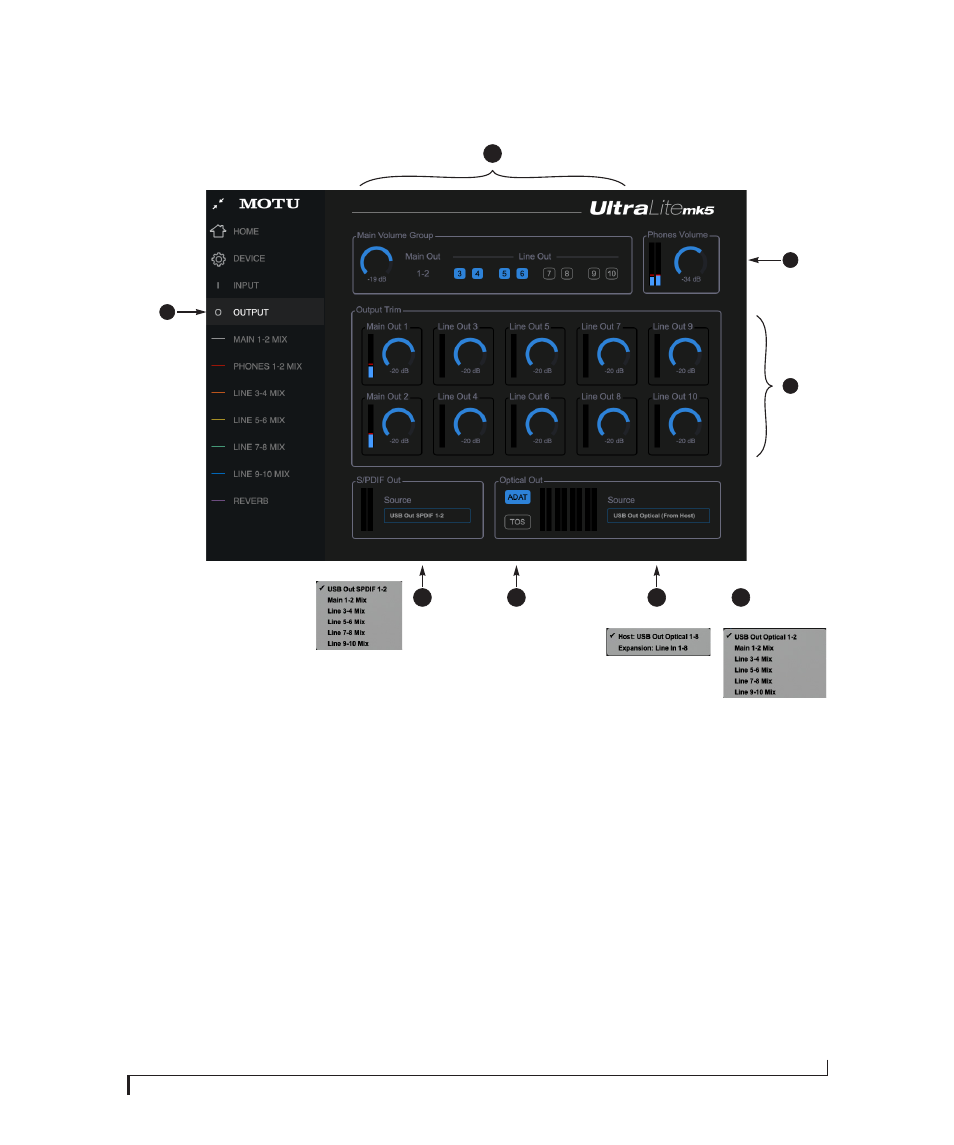
1. This is the
Output
tab, which
provides settings for the
UltraLite-mk5’s analog and digital
outputs.
2. The
Main Volume Group
deter-
mines which outputs are controlled
by the
Main Out
volume knob on the
UltraLite-mk5’s front panel (item #8
on page 9, plus the Main Volume
controls in the Home tab (item #8 on
page 32) and here in the Output tab.
For example, if your studio has a pair
of main monitors, plus a sub-woofer
connected to Line Out 3, you could
click the Line Out 3 button to add it
to the main volume controls. If you
have 5.1 or 7.1 surround monitoring,
you can add the surround channels
to the monitor group to be able to
control the volume of all surround
outputs simultaneously with the
Main Volume knob. Please note: the
Main Out 1-2
pair is always part of
the Main Volume Group.
3. Meters and volume control for the
Headphone
out. This is the same as
the PHONES volume control on the
front panel.
4. All analog outs can be
trimmed
(in
the DAC) from zero to -100 dB. This
can be useful for speaker calibration
or other situations where you need a
fixed amount of level adjustment for
a particular output (or output pair).
5. The
Source
menu lets you choose the
source for the Optical Output. By
default, the source is set to USB
channels from your host audio
software, as shown above in the
menus. However, if you would like to
use the UltraLite-mk5 as an ADAT
optical expander, choose ADAT as
the format and choose
Expansion:
Line In 1-8
in the Source menu.
Doing so patches the line inputs
directly to their corresponding
optical output channel (1 to 1, 2 to 2,
etc.)
6. When the Optical Out format is
TOSLink (TOS), the
Source
menu lets
you send any UltraLite-mk5 monitor
mix to the optical output.
7. Configure the o
ptical out format
for
either 8-channel ADAT or stereo
TOSLink. At 88.2 or 96 kHz, the ADAT
setting supports 4-channel SMUX
format. Note that you can choose a
different format for the IN and OUT.
See “Optical I/O” on page 47.
8. By default the
Source
for the RCA
S/PDIF output is set to USB channels
from your host audio software, as
shown in the menu. Alternately, you
can send any UltraLite-mk5 monitor
mix to the RCA S/PDIF output.
1
2
7
5
8
4
TOSLink sources:
ADAT sources:
6