Ultralite-mk5 front panel – MOTU UltraLite-mk5 USB-C Audio/MIDI Interface User Manual
Page 9
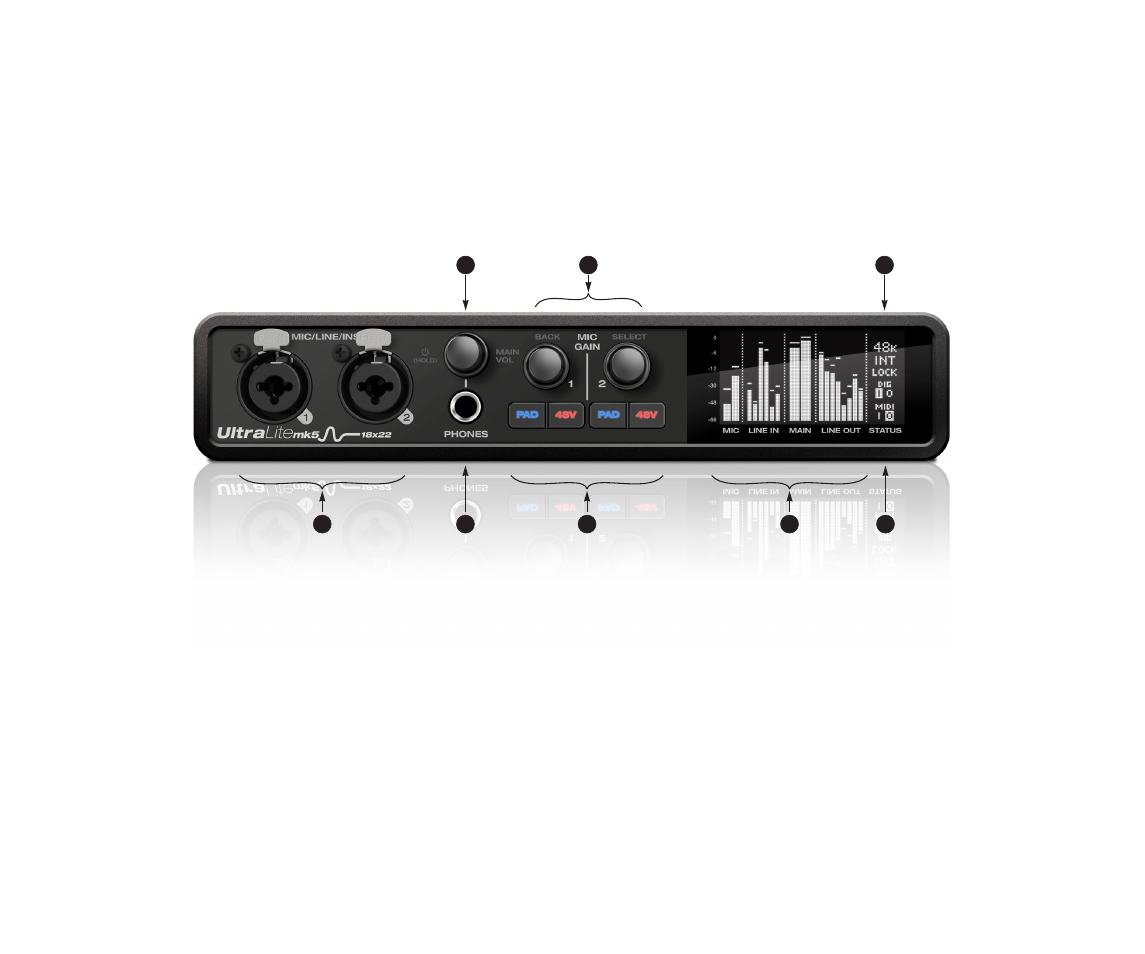
UltraLite-mk5 Front Panel
1. These
Mic/Line/Inst
inputs are XLR/TRS combo jacks
that accept either a mic cable or a quarter-inch cable,
balanced or unbalanced, from a guitar or line input. Use
the controls to the right (3) to adjust individual preamp
gain, instrument input gain, 48V phantom power, and
an optional -20 dB pad for each mic input. Each input
includes a
Phase Invert
switch, accessed in the CueMix 5
app. See “Input tab” on page 34.
2. The
Phones
jack accepts a quarter-inch headphone
plug. Use the knob above for volume control. The
display provides feedback as you turn the knob.
3. Individual
preamp gain
, switchable
48V phantom
power
, and optional
-20 dB pad
switches for each
combo input. The Precision Digital Gain™ knob provides
+74 dB of preamp gain or instrument input gain. Both
gain settings are retained independently. Turn the knob
to see the gain adjustments in the screen.
4. This portion of the screen displays
level meters
for all
analog inputs and outputs. It can also show device
settings, using the knobs to the left.
5. This portion of the screen shows
digital I/O activity
(optical and S/PDIF) and MIDI activity (in and out).
6. This portion of the screen displays the current
sample
rate
and
clock source
, such as
INT
(Internal clock mode).
7. Push
Select
to enter the menu. Turn
Select
to scroll
through menu options. Push again to descend into the
sub-menus, if applicable. To choose the current setting,
push
Select
a third time. Push
Back
to return to the
previous menu level, and do so repeatedly to exit the
menu altogether.
8.
Power
and
Volume
control for phones and main outs.
Push this knob to toggle between
Phones
volume and
Main Out
volume. The screen provides visual feedback.
This setting, along with all front panel settings, can also
be adjusted from the CueMix 5 app. The CueMix 5 app
also allows you to add additional Line Outs to the Main
Volume group, so you can control them all with this
knob. See item #2 (
Main Volume Group
Push this knob to power on the unit; push and hold for
three seconds to power it off.
7
8
2
3
5
6
1
4