Input channel strip – MOTU UltraLite-mk5 USB-C Audio/MIDI Interface User Manual
Page 38
C U E M I X 5
38
INPUT CHANNEL STRIP
2
1
4
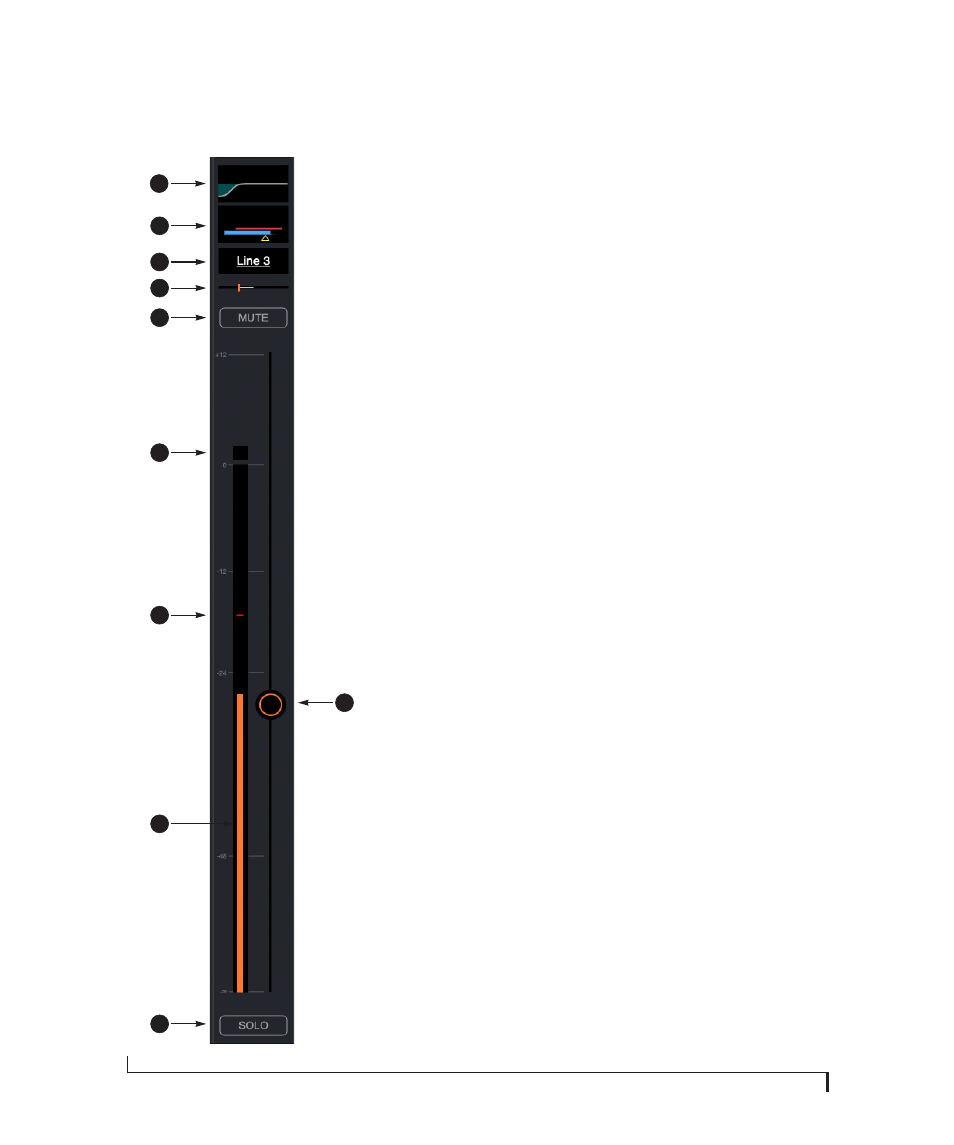
1. Click this EQ thumbnail to access the parametric EQ
and other channel settings. EQ is only available on
analog inputs and mix bus master faders. See “Four-
band parametric EQ” on page 40.
2. Click this thumbnail to access the
Gate
,
Compressor
and other channel settings. Compression is only
available on analog inputs. See “Compressor” on
page 41. The Gate is only available on mic/line/inst
inputs. See “Gate” on page 41.
3. Click the channel name to access the channel
settings, where you can rename the channel and
make other channel settings.
4. Panning for mono inputs (such as a mic input). Stereo
inputs (such as S/PDIF) do not have a pan control.
5. Channel mute.
6. Clip indicator.
7. The peak/hold indicator shows where the signal has
recently peaked.
8. Use the channel fader to control the input level.
Double-click to return to -
∞
.
9. By default, the level meter displays the signal level
after the fader (post-fader), but they can be changed
to pre-fader, if desired. See “Mix input meters” on
10. Channel solo. When you solo a channel, it mutes all
other inputs on the bus (as is customary in a tradi-
tional “solo-in-place” model on a mixing console. In
other words, there is no separate solo bus.)
5
7
10
3
9
8
6